An ongoing challenge, to be sure.
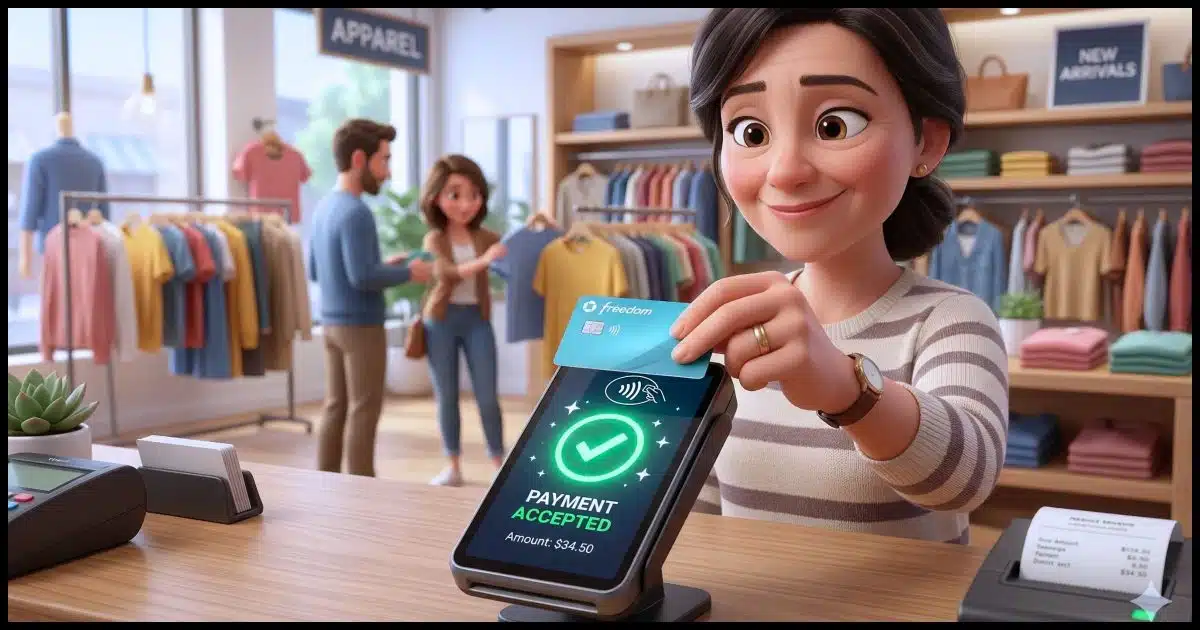
While I’ve fortunately (knock on wood) never been a victim of actual identity theft, I’ve definitely had a credit card compromised a time or two over the years. It’s frustrating, a little scary, and once it was extra inconvenient, as I was travelling when it happened!
Some aspects of transaction technology have changed in recent years, making credit card use safer than ever… if you take advantage of them.

Protecting your card
To avoid having your credit card info stolen in-store or online, use tap-to-pay or phone payment apps for in-person purchases, because they never share your real card number. Shop online with virtual card numbers. Set up transaction alerts to catch fraud fast. When in doubt, use a credit card, not a debit card.
Credit or Debit?
Throughout this article, I’ll refer to credit cards, but many of the same considerations apply equally to debit cards. Debit and credit cards look similar, can usually be used interchangeably, and use the same payment networks, but the differences are important to understand.
Credit cards usually include some level of protection provided by the credit card companies. If your card is stolen, for example, you’re generally not responsible for purchases made thereafter as long as you report the theft quickly. Similarly, if you have a dispute with someone you’ve paid via credit card, you can often challenge the charge with the credit card company; their leverage can often expedite a solution.1 Credit cards can also accumulate your debt, which you then pay monthly or over time.
Debit cards are best thought of as a direct line to your bank account. While some banks offer some level of credit card-like protection, most do not. Once money is transferred by using a debit card, it’s gone. Debit card transactions are similar to immediate withdrawals from your bank account.
Help keep it going by becoming a Patron.
In-person transactions
If you’re paying at the grocery store, the coffee shop, or anywhere you’re physically present, you can take action to keep your information more secure.
- Use tap-to-pay (contactless) whenever possible. This is where you literally tap or wave your contactless-enabled credit card over a contactless reader. It generates a one-time code instead of transmitting your actual card number. Even if someone could intercept the number, it’s useless.
- Use Apple Pay or Google Pay on your smartphone. These work the same way as contactless payments and are even more secure than the physical card. I use Google Pay whenever possible. It also allows me to use several different cards, even though I might not be carrying the physical card with me at the time, because they’re all stored in my phone. To use the app, you generally have to authenticate at payment time via password, PIN, or biometrics. It’s quite quick and convenient, though.
-

(Image: Gemini) Cover the keypad when entering your PIN. Not only are there people nearby who could “shoulder surf” and see what you’re entering, but with today’s mobile phone cameras, they could be quite a ways away and still be able to record something that captures your PIN.
- Avoid sketchy card readers if you can. Gas pump skimmers are the most common. Pay inside when possible, or, even better, use tap-to-pay at the pump if it has that capability (more and more do).

Related
Shop Online Safely: My Choice for the Best Free Virtual Credit Card
Virtual credit cards are a great tool to help protect yourself when shopping online. After using a service for well over a year, I have a recommendation.#128848
Online transactions
When paying online, there are other steps you can take to protect yourself.
- Use virtual card numbers. Many banks and credit card companies offer these. They’re temporary, unique card numbers tied to your real account. Even if stolen, they can’t be reused. I’ve written about Privacy.com in the past. Privacy.com numbers are locked to the first merchant you use them with. While it’s technically a debit card, Privacy.com numbers can also include spending limits and can be closed or invalidated in an instant.
- Don’t save your card number on shopping websites if you can avoid it. I get that this is convenient, and I’ll admit to doing it, but only with sites I know and trust. The more places your number is stored, the more chances it can be stolen.
- Use PayPal or similar services as a middleman. Many people don’t realize that for many sites that offer payment via PayPal, you may not need a PayPal account. PayPal simply acts as the credit card processor; the merchant never sees your real card number. (PayPal may encourage you to create a PayPal account, but it’s usually not required.) Similar services include Stripe, Square, Link, and others.
- Only shop on sites with https:// (the padlock icon in your browser). This is the default these days, so if you do see only HTTP, your browser may warn you. HTTPS is important because it prevents your information — including credit card information — from being captured by someone listening in on the digital conversation. Lack of HTTPS can also be a sign of a malicious site attempting to fool you into entering your credit card information.
- Watch for phishing emails pretending to be stores or banks. Phishing attempts take various forms, but some include asking you to “verify” your card (which is never needed).
General safety habits
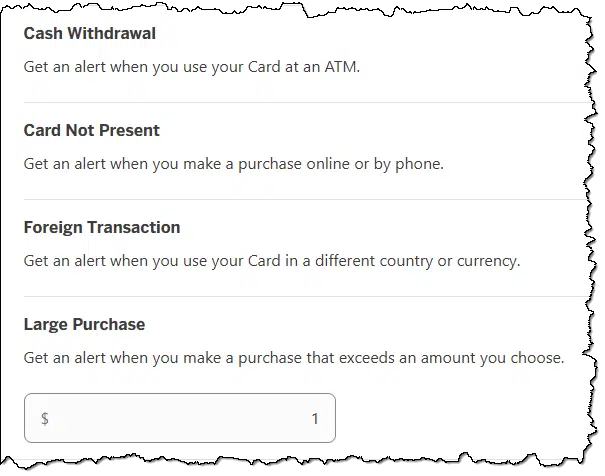
- Set up transaction alerts with your bank or credit card company so you get a text or email for every charge. You’ll catch fraud fast. In some cases, you may need to set a minimum transaction amount for which to get alerts. Set this as low as is allowed so you get alerts for as many transactions as possible.
- Use a credit card instead of a debit card for purchases. As I mentioned above, credit cards have stronger fraud protection, whereas a stolen debit card hits your actual bank account directly.
- Monitor your account online and look for unexpected transactions. Set up online account access and check it from time to time. Honestly, it’s not enough to check the paper statement you might get in the mail once a month; by then, it may be too late. If you find something irregular, contact your credit card company immediately.
- Check your credit reports at AnnualCreditReport.com2. You can get free reports from all three bureaus (Equifax, Experian, TransUnion). Beware of other sites offering free credit reports; they’re often scams.
- Consider a credit freeze if you’re worried about someone opening new accounts in your name. It’s free and doesn’t affect your existing cards.
Do this
My strongest suggestion is to start using tap-to-pay in person. Not only is it convenient, but it doesn’t share your credit card number with anyone.
My second suggestion is to use virtual card numbers for any online purchases you’re not 100% certain about.
Third one? That’s easy: subscribe to Confident Computing! Less frustration and more confidence, solutions, answers, and tips in your inbox every week.
Podcast audio

Footnotes & References
1: But please attempt to resolve the problem with the merchant directly first. Credit card “charge backs”, as they’re called, cost the merchant. I’ve had several people cancel their patronage by disputing the transaction on their card where a simple email to me would have worked equally well without me having to pay a penalty.
2: In the U.S., at least. Check your local options in other countries.

Great info Leo. There are so many entities trying to separate us from our money.
Will Paypal (with no Paypal account) and similar services Stripe, Square, Link, and others, be able to create a customer profile of my info if I pay a merchant using their system?
Yes.
If you aren’t granted a card credit, open a separate account and connect your debit card to that account and use that account for card transactions only. Make sure your salary and other deposits is made on another account. Keep the balance on the card account as low as possible. Transfer from other account only when you need to.
“Debit cards are best thought of as a direct line to your bank account. While some banks offer some level of credit card-like protection, most do not. Once money is transferred by using a debit card, it’s gone. ”
I only use my debit card at my (or another) bank’s ATM. A credit card gives me theft protection which I’ve used a couple of times when my credit card number was stolen in a gas station in (skimmers aren’t your only point of vulnerability). As a bonus, using a credit card also gives me 1-3% cash back.
After my number was stolen, I scratched off the security code from my cards, and I keep them in an encrypted file and in my password manager.
Using an EV insulates one from gas-station skimmers. Mostly true also for PHEVs whose owners (like me) log a high percentage of mileage from electric driving.
And you believe that using a cell phone to scan QR code is safe? Or the car parked next to you reading your RFID broadcast? Or the Plug and Charge method where you have to enter your payment info into your car’s computer, which is then broadcast who knows where. Bottom line, you can’t count on anything being “safe” or hack-proof. It’s like a casino, but in this case you get lucky most of the time – so far.
Leo mentioned about Transaction alerts. An additional good idea is to set a “low limit” alert like $16. You’ll be notified of any charges BELOW the amount set. Some thieves try to charge something small to see if the card still works before they go on a shopping spree.
Set the transaction alert to $0 or $0.01 if possible. then you’ll see every transaction.
My bank only allowed me to set alerts for $100 and over online. I phoned the bank and the banker was able to change the alert to anything over $1.00. If you can’t set a low enough alert limit online, try visiting or phoning your bank.
I once got a $1 CC charge from a company I had never dealt with. I got an alert on my phone and called my bank. They immediately canceled my CC and issued another one. They said the next transaction from this company would be much larger. The $1 transaction was just validating the account. Any transaction can be cause for concern, regardless of how small the amount is.
I’ve had a series of such charges happen over night, from random locations around the planet. My credit card company called me to ask if it was me, which i appreciated.
I’ve had my credit frozen since 2019 after my wife passed away as part of my efforts to manage the changes her loss had on my monthly cost of living. I have my son, who uses my debit card to pay for our grocery and gas purchases, use the tap-to-pay method for the reasons described here. Since my bank provides protections similar to what’s usually offered by credit card providers, and my debit card does not incur any membership fees that I’ve encountered with credit cards, I continue to use my debit card for most transactions, in particular for many recurring bills such as my utilities, my internet service provider, and a few others I won’t detail here. I make the majority of my on-line purchases at a single, well-known site with which I’ve done business for decades without issue, and when there’s a transaction on my account with them, I receive an email alerting me to it, at which time, if I don’t recognize it, I go to their website using my password manager to navigate there to check my Orders list to see what it is, and if I didn’t make it, I cancel it and report the issue to the site and my bank for further guidance to prevent any recurrence.
I’ve encountered two unauthorized transactions on my debit card in all the many decades I’ve been a client with my bank, and both have been successfully blocked for me, and in both cases, I requested a new card number to prevent continued efforts. Even though it’s inconvenient during the time between when I report the transaction and the time when I receive my new debit card, it’s much less inconvenient than would be the consequences of doing nothing.
I hope the steps I’ve taken to protect my card will help others,
Ernie
If your bank gives the same protection for a debit card that they give for a credit card, your method sounds good. Unfortunately, that wouldn’t work for everybody, as not all banks offer debit card protection and the debit card protection generally isn’t as good as the protection offered for credit cards which has federally mandated fraud protection. I use a credit card for all my shopping because of the fraud protection, and the 2 or 3% cash back is a cheer on the cake. And I have my bank automatically pay off the card balance every month. The only time I’ve ever carried over a balance was when I got a card with an introductory 0% APR to do some major home repairs. I’ve never paid interest on a credit card.
My approach as well: unless the merchant charges an additional fee to use a credit card (used to be illegal, now common), I:
My biz expenses work the same way, except via an American Express card where I use the accumulated points for travel.
I’m a Prime member, maybe I’ll see if I qualify for an Amazon CC. It may pay off with free stuff as I use the card. Not bad!
Ernie
Two things. I have a credit card with a deliberate limit of £1,000 so that my would be the extent of my loss if something went bad. I use it online for moderate amounts.
I have another credit card with a high limit to be used offline.
Some browsers, Google is one, no longer display https or the padlock which gives the impression that the site has no security. Instead a different icon is displayed and when hovered over it says view site information. When clicked, a pop up tells you that the site is secure and you can also view a copy of the secure certificate which includes the certificate number and expiry date.
This creates unnecessary confusion about security in my view.
Whether the browser displays a padlock or not, you can tell if it’s an SSL encrypted page by checking whether the URL you arrive at has https://. Unfortunately, it doesn’t guarantee the site is safe or legitimate as hackers can get SSL certificates. If it has the S, it’s encrypted. If it’s just http://, then it’s not encrypted. Browsers removed the padlock because users were over‑trusting it.
This is excellent advice, Leo – we thank you. I would only add the following: When your credit card is replaced after fraud, merchants who stored your old credit card (AND flagged that account for repeat use with the network (such as Mastercard, Visa and the others) keep charging the old card number but the charges are posted to the new credit card number. It’s convenient for the user that there’s no need to advise the merchants about the new number BUT if your old credit card number was stored by a bad actor who flagged the network, you can easily continue to get fraudulent charges on the replacement card. To prevent this from happening, specifically tell your credit card company to “suppress” the old credit card number. This is not the same as closing the account. You’ll prevent those and other bad actors from continuing to use the old number BUT you’ll need to notify valid merchants about the new card number. Clearly, if you report fraudulent charges the credit card company should prevent further charges from that merchant and they probably do but by demanding “suppress” on the old card number you are taking the “belt and suspenders” approach to your security. The credit card company may not ask if you want this service, you must be proactive and demand it.
Addendum: Flagging is also called auto-updating by the network. Your credit card issuer (a bank for example) instructs the network to do this.
It’s not that dire. Only vetted, PCI‑compliant merchants enrolled in Visa/Mastercard’s updater programs can receive new card numbers. A fraudster with a stolen card number cannot use this system and will never get your updated card. Suppressing the old number only stops legitimate recurring merchants, not criminals.
Point taken – thank you. However, after personally encountering many mystery subscriptions and charges for goods not received from presumably legitimate merchants that were posted to replacement card accounts, suppression is erring on the side of caution and worth the effort for me.
Leo said: Use a credit card instead of a debit card
I strongly disagree. Regardless of how much money is in the bank account, a debit card carries its own “balance”. I mostly pay online using PayPal but in cases where PayPal is not available, such as Amazon in Australia, I use a debit card with a very limited balance. The balance on my debit card sits at an absolute minimum until I want to purchase and I then transfer over just enough funds to cover that purchase.
In both cases, credit and debit cards, it’s the balance that is at risk. If my credit card is ever compromised, the entire credit balance (which is quite high) is at risk. On the other hand, if my debit card is compromised, I might potentially lose a couple of dollars.
Only some debit cards carry their own limits.
I can create a virtual debit card with one bank & the card acts as a separate account and must be funded.
I have the debit cards that as Leo described are linked directly to a checking account and are only subject to card transaction limits.
That won’t work if you have overdraft protection, which I believe most people have. The transaction will draw the funds from your credit card or other overdraft mechanism. If you don’t have overdraft protection, you may face fees and penalties for insufficient funds.
I’ve been using credit cards for most of my adult life. I’ve had a few fraud attempts on my credit cards and even a couple of forged checks. They were all resolved within a day or two by my bank.
I don’t know how the forgers got my bank number because the only place I’ve used a check in decades is the DMV. I assume the guessed the number because the name on the forged check was different. That money was refunded before we hung up the phone.
I have removed contactless from both my debit and credit cards – the reason being is that I believe losing, or someone stealing, your card is more of a risk (I hope I am not proved wrong) as I only use reputable retailers. Most of the time I use cash, or Google Pay for contactless payments.
In Britain not only petrol stations but big household and DIY stores were considered a risk. Apparently some people who had Saturday jobs and would make a note of credit card numbers etc. to book tickets for rock concerts etc.
There are two big department stores in the West End of London with good food shops; the cash machines are right next to where the security guards stand which makes me feel more secure (I make sure no one is watching me of course).
For online shopping and subscriptions Privacy cards are great! My wife has made several “one time” purchases online that were somehow turned into monthly subscriptions. Cancelling these is a mission!!! With a Privacy cards you simply stop the card without affecting any other services.
You say to not leave credit card details on online sites. Recently, you advised using the ‘remember me’ option when shopping online. Is this not a direct contradiction?
Without knowing exactly what item of mine you’re referring to, two comments:
-Leo
I save my credit card information on sites I use a lot and trust such as Amazon and a couple others. I trust a few sites that I believe will make restitution if their sites are compromised, and if that fails, my bank will refund the full amount.
Once, Amazon sent me the same item twice by accident and billed me for both. I wrote them requesting a refund and offered to return the items. The refunded the money and told me not to return the items. It was a pack of 6 European to US plug adapters. I assum th cost of shipping it back would have been more than the cost of the items.
I scratch off the CVV security code from all my cards and keep them encrypted in my password manager’s vault and in an encrypted file on OneDrive. That prevents people from copying my credit card information and using it for online purchases.
I wonder why the banks don’t send those out in a separate letter like they do with passwords and PINs. There’s no need for it on the card.
Its presence on the card and your ability to provide it when needed is supposed to “prove” you have the physical card in hand. Saving it elsewhere (as we all now do — mine are in my password manager) kinda defeats that purpose. Sending it separately would now seem to make more sense, I agree.
Yes. Your name plus the CVV plus the expiration date together serve as the online transaction password. Take away the CVV and the other information becomes useless for online transactions.
Privacy.com sounds like a good idea, but is not available in Australia and I assume in other non US countries.