My controversial position: don’t waste your time.

There’s no argument that Windows comes with a bucketload of pre-installed software, much of which we never use, typically referred to as bloatware. Because it’s never used, many people look for a quick way to get rid of it all — debloating — leaving only a presumably leaner, meaner operating system behind.
There are several approaches, ranging from bloatware-cleaning tools to manual individual uninstalls.
Then there’s my approach: for the most part, I do nothing.

Removing bloatware
Your new PC is loaded with software you didn’t ask for. My controversial take: just leave it alone. Most bloatware doesn’t run unless you open it. Uninstall something if it causes you a problem. Otherwise, it’s not worth your time.
It’s rarely worth the effort
My approach is to do nothing at all unless something causes me a problem.
Most bloatware is completely benign. It might take up a little disk space, and perhaps there’s an icon in a menu somewhere, but for the most part, most bloatware doesn’t run unless you ask it to. Aside from that small amount of disk space, unless you run it, it doesn’t take up any system resources.
In other words, it’s not hurting anyone. Your system will run just as well with or without it.
So why bother? It’s time spent for little to no return.
Help keep it going by becoming a Patron.
What is worth the effort
I do remove bloatware that causes problems, interferes with what I’m doing, or runs all the time even though I never use it.
Microsoft Teams is a good example. I don’t use it, won’t use it, never expect to need to use it, yet it starts by default. I could just turn off the auto-start, but in a case like this, if I’m going to take any action at all, it’ll be to uninstall the software.
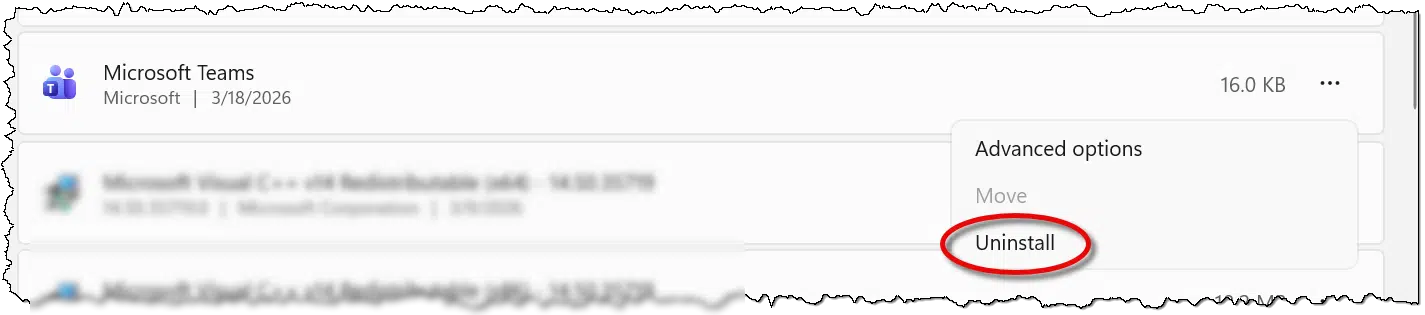
If it turns out I’m wrong, I can reinstall Teams from the Microsoft Store.
But that’s all the debloating I do: uninstall things that adversely impact me.
Cosmetic debloating
While not technically debloating, since we’re not uninstalling anything, I do take a few seconds to clean up the Start menu of icons I don’t need to see.
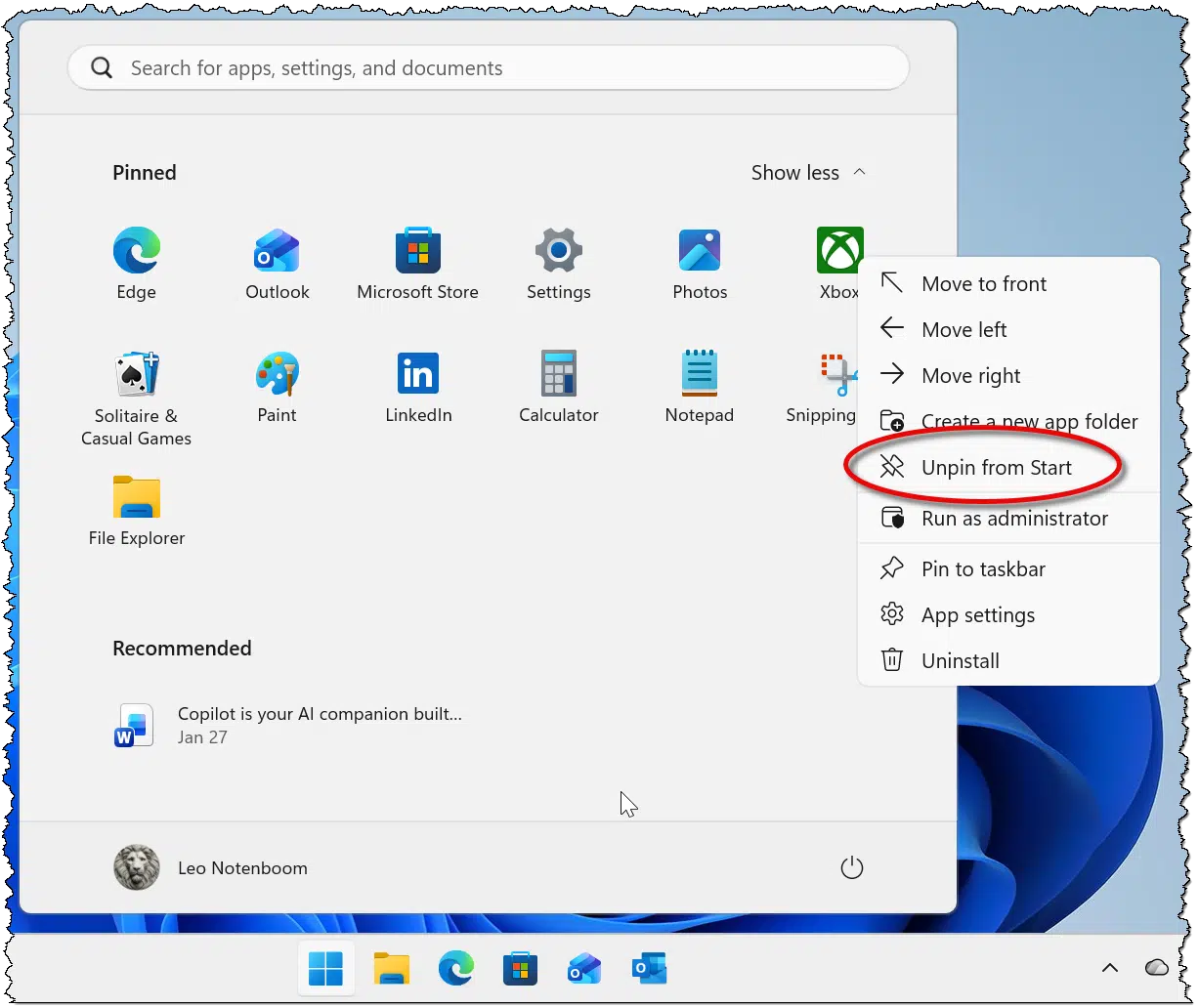
If the context menu offers an “Uninstall”, as my Xbox example shows above, I might elect to hit that instead, but it’s not a priority. If the icon is gone, I’ve cleaned things up enough.
Debloating tools
There are many (many!) debloating tools out there. They promise to remove all the apps you don’t need while leaving behind what you’ll use.
I’ve run several, and my take is that they can be very intimidating for the average user. Many present walls of options that assume you know what you do and don’t want, which is exactly the opposite of what most folks are looking for. They want a “do it for me” solution that just solves the problem.
Here’s the problem behind the problem: one person’s bloat is another person’s favorite feature. It’s impossible to devise a one-size-fits-all solution. The result is that these tools, while very powerful, have to assume you know what choices you want. Many offer defaults good enough for most folks, but I would not be surprised if those defaults either removed something you care about or left behind something you feel is unnecessary.
And, again, in my opinion, it’s all at an extremely low return on the investment of time and energy.
That being said, presented without comment are five of the more popular debloating tools.
There are almost certainly others, as it’s a very popular category.
Two additional notes:
- Back up first. Before using any of these tools, always create a system image backup. They’re making changes at the system level, and if something goes wrong, you could be left with a mess to clean up. Restoring to an image backup taken immediately prior is the best undo ever.
- They may do more than debloat. This could be seen as a positive… or not. I’ve focused here on debloating, but some tools include options to remove telemetry and AI and make other system tweaks as well. This can add to the complexity and risk of the operation.
Bloatware should not exist
Lest people accuse me of shilling for Microsoft1: just because I opt to leave it alone doesn’t mean I think it should be there in the first place. Although technically benign in most cases, the existence of bloatware is annoying. It’s another case of Microsoft (and, to be fair, computer manufacturers) ramming software down our throats whether we want it or not.
They have a wonderful delivery mechanism in the Microsoft Store. If Microsoft has software they believe to be useful, make it available there. Then focus on making these tools so good, so useful, and so valuable that people will choose to install them.
Pre-loading tools we don’t need just makes Microsoft look desperate.
Do this
As much as you can, leave well enough alone. If something causes you a problem, by all means deal with it. But proactive debloating doesn’t seem worth the effort and risk to me.
Subscribe to Confident Computing! Less frustration and more confidence, solutions, answers, and tips in your inbox every week.
Podcast audio

Footnotes & References
1: Which accusation will happen regardless. Sigh.

There are two things I do with a new computer. The first is to make a system image backup using Macrium Reflect Rescue Media and booting from it instead of booting into Windows. The second step is to perform a clean install of Windows again using a copy of the appropriate Windows version on a usb drive.
I can then set up the computer without all of the manufacturer’s free trials and other unwanted software and only have to deal with whatever Microsoft installs as part of Windows. If I do find I need something, I can always install it myself. Timewise, I’ve found it doesn’t take much longer than starting up the computer after unboxing since I still have to go through the same Windows setup process either way.
Using a backup program’s rescue disk to create a factory settings backup is overkill for most, but it’s pretty cool.
Leo’s even explained how in an article:
Backing Up a New Computer
I remove Teams and any Windows software which pertains to gaming. I don’t look for them but whenever one of them or a suggestion to update one of them comes up, I find it annoying and I uninstall them.
I uninstall Microsoft Teams, Xbox app + Gaming services, News, Windows Media Player (I use VLC instead), and Solitaire Collection. And I disable Windows Photo Viewer by changing the default viewer for all photo types to Irfanview.
I’ve found that if you buy a computer from the manufacturer’s business-oriented line rather than the consumer models, you get a lot less junk software.
Even so, you may get a “free” copy of Norton or MacAfee or similar antivirus program. IMO, these are always good candidates for uninstallation. Windows’ own AV-ware seems adequate and won’t natter at you to pay for renewals or upgrades.
Leo – I use Microsoft Teams (previously Skype) to meet with people in the USA and other countries to practice various languages. Meetings typically last for an hour or more. Since you, and some others, seem to have strong feelings against Microsoft Teams, I am curious about why that is and what you use or suggest as an alternative.
Thanks for all the great information your Ask Leo site provides. Even this semi-senile senior citizen can follow your clear posts and videos.
Teams is fine, I suppose, though I do hear a lot of negativity from people who use it — or, rather, people who are forced to use it.
My biggest objection is that not only is it pre-installed whether I want it or not (it would be a fine thing to make available in the Microsoft Store as an alternative), it’s running by default whether I use it or not. The latter is unacceptible.
As always, my preference is that they make a product so good we’ll choose to install and run it, rather than forcing it into our lives whether we want it or not.
“Most bloatware doesn’t run unless you open it”.
If you don’t pay attention to bloatware then you don’t really know what’s there and what it does. Today’s bloatware isn’t your grandfather’s software from the 1980’s. It’s running in the background and wants to stay there. Most have multiple and redundant startup hooks, in the registry, the Scheduler, via svhost, in Services. They all want to constantly update themselves in the background and put their crap all over the place. Often, if you open an app it’ll connect to the internet and reset the settings that you so meticulously changed. Uninstalling isn’t as easy as going to Control Panel – you have to have elevated access, use Powershell, and jump through many hoops for the different types of applications, packages or “capabilities”. It’s all an obnoxious pain.
“Most bloatware is completely benign”. No they are not. They are benign only if you are unaware. Any software that does “things” on my machine without my knowledge or permission is not benign. You know what was benign? Windows 7 Minesweeper.
Sadly, the reality is that most people can’t do much about bloatware because it’s overwhelming and ever-changing. It takes a great deal of effort to research and suppress bloatware, hence tools such as Winhance. All these tools change registry entries.
Is the debloating effort worth it? Yes it is. My Windows 10 & 11 systems are as streamlined and fast as Windows 7.
So, I don’t complain about Copilot, AI, OneDrive, MS accounts, ads, update disruptions, bricked computers, driver changes breaking hardware, notifications, UI changes the next morning, forced obsolescence …. Basically many of the topics covered by Leo’s articles.
What you’re describing is true for PUPs and for third‑party add‑ons that sneak in through installers. Those often use scheduled tasks, services, auto‑updaters, and redundant hooks to stay resident.
Bloatware AKA Preinstalled OEM software is a different category. Most of it really is inert unless launched, and on a clean Microsoft‑supplied Windows image (not an OEM build), the built‑in apps are generally benign in the sense that they don’t consume meaningful resources or run persistent background services. There are exceptions, but they’re not in the same league as the aggressive PUP ecosystem.
Most of the annoying OEM bloatware that ships with new machines—trials, vendor utilities, “help centers,” preinstalled games—usually stays gone once you uninstall it. Manufacturers don’t push it back down after the fact, and Windows Update doesn’t reinstall it.
Windows components like OneDrive, Copilot, or Outlook (new) are a different category. Major updates sometimes reinstall or re‑enable them. That’s frustrating, but it’s not the same behavior as third‑party bloatware trying to persist through registry hooks or scheduled tasks.
The article was talking about the OEM variety, which is generally benign once removed. The system‑component side of things is a separate discussion with its own set of annoyances.
Your categorizations are accurate, but that’s like categorizing spam.
My definition is anything that I didn’t ask for, anything that nags, intrudes, resurrects iteself, morphs, self updates, or takes up resources.
As for OEM, have you bought a Dell computer recently? Or even worse, an HP.
@Leo,
I agree with the majority of what you say in this item in principal, but even though I always perform a clean install of Windows on any new computer I purchase or assemble from hardware components, I still go through the list of installed apps in settings to remove whatever I know I’ll never use. That includes One Drive, Microsoft Teams, News, and several other apps for which Windows continually nags me to enable or configure, although I keep the X-Box Game Bar for the screen capture it includes, at least until I find an open source alternative that’s as easy for me to use, and for which I can assign the WinKey+G keyboard shortcut to launch it.
After I finish my usual app removals, I install and run Winhance to see if there’s anything I missed or that’s new/that I don’t know about yet. The thing I like most about Winhance is that it explains in very clear, concise, and easy to understand terms what each item in the list of de-bloat candidates it generates does, and any consequences of removing that item, as well as the fact that it doesn’t automatically select anything in the generated list. In other words, I get the power over what’s installed on my computer, not Microsoft, and not Winhance.
Further, even though somewhat off topic, I used Rufus to create my USB installation media, configured so it starts me with a local account, complete with my preferred user name of ernie and my preferred home folder C:\users\ernie, rather than that five character ablution I get from Microsoft by default, in my case C:\users\e-wil, even though following installation and removing One Drive and it’s folder, I still sign in with my Microsoft account to facilitate Windows Hello and a few other features it enables. But again I have the power because it is my choice to use it for sign-in, etc.
Ernie
Just bought an Asus Vivobook laptop last month from the Asus website directly. They beat retailer prices by $150 for the same laptop and the purchasing experience couldn’t have been any simpler. Got it up and running last week after it got delivered. This is the first new laptop I have ever purchased that didn’t have bloatware. McAfee, MS Office and Edge were the only things it came with. No preloaded apps either, except for MyAsus. It’s refreshing to have a blank desktop and none of that junk popping up or programs you can’t uninstall, which my HP was notorious for. Just thought I would through that out there as it was quite unexpected and appreciated !
I liked your “outlook” in this article. I still have Games in my Win10 list and have never opened or used it, although I’ve downloaded and played several online games. How do I know if my next girlfriend may be a fan of Solitaire, Spider, or who knows what? Or only understands Outlook ( I never used that either), or maybe uses One Drive, or (gawdelpus) doesn’t understand she doesn’t have to sign onto her Microsoft account to use her device at all?
I did uninstall Cortana and Copilot, not to save space but because they’re just creepy.
My question is, do bloatware and third-party firmware from the vendor present just that much greater a security risk from hackers? It’d seem sensible to nuke ’em all just for safety’s sake.
In some ways, bloatware might pose a greater security risk, but since it would be installed on a large number of machines, any malware would be caught in a few days.
Vulnerabilities are another story. The more you have installed, the more potential holes. One kind of bloatware that might be subject to hackers are system utilities that can access the deepest parts of the kernel. They are benign in themselves, but if hackers discover a vulnerability, it might take months to be discovered and repaired.
On the other hand, Windows itself has many potential vulnerabilities, and this would be just one more vulnerability.
If your girlfriend wants to play those game, you can download and reinstall them, even cooler versions are available. An since when is Solitaire bloatware? It’s an essential mental health app 😉
Raises an interesting question for which I don’t know the answer: if a vulnerability is discovered in some piece of what we would consider bloatware, and that vulnerability is being exploited, if the bloatware is “fixed”, does Windows Update update the bloatware? I’ll be the answer varies depending on the source of the bloatware, but I would HOPE that Windows Update would update anything/everything that was part of the initial Windows install.
FWIW: I don’t consider bloatware vulnerabilities a huge security risk, but it’s an interesting thought exercise.
I guess it depends on the type of bloatware. Windows bloatware are components of Windows which they are responsible for.
OEM (software supplied by computer manufacturer) has nothing to do with Windows. If they have a built-in updater, which many programs have now, they’ll update, otherwise not.
That’s where UniGetUI comes in handy! It uses Winget and a few other CLI app up-daters, all centralized under a single GUI app to update most all your Apps that are not covered by Windows update. I keep it running in the background, and when an update for anything I have installed becomes available, UniGetUI pops up a notification so I can get the update ASAP!
Ernie
This just popped up in my newsfeed.
https://www.howtogeek.com/latest-rufus-update-debloats-and-installs-windows-11-silently/
I don’t know how well it works.