It’s a friendly helper.

Some might argue there are definitely demons at play in various aspects of the internet (certain aspects of social media come to mind), but this isn’t about that.
A daemon (spelled with that “a”) is different than a demon, even though they’re typically pronounced the same way (though “day-mon” is also common for daemon).
And daemons are a fundamental part of how modern operating systems, and indeed the internet, work today.

Mailer-daemon
Mailer-daemon isn’t a demon; it’s a helpful background program that keeps email running. When something goes wrong with a message you sent, mailer-daemon sends you a note explaining the problem. You’ll see it most often on bounce messages. Pay attention to what mailer-daemon tells you.
137 daemons in a box
“Daemon” is another name for “background service”. The term is evidently a nod to Maxwell’s Demon, part of an 1867 thought experiment relating to the second law of thermodynamics. The demon was a “being who can play a game of skill with [..] molecules”.
In today’s parlance, a daemon is software performing behind-the-scenes tasks.
In Windows, we call them services, and there are many. As I type this on my desktop PC, there are approximately 137 processes running now.
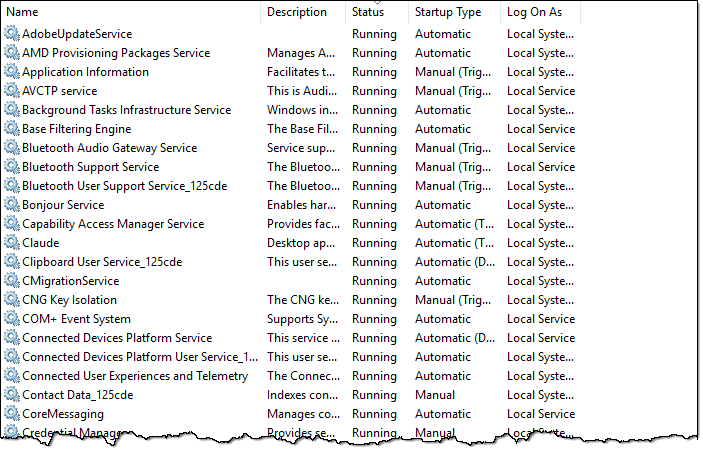
In comparison, the Linux server from which you’re likely reading this lists 27 services.
Regardless of operating system, they could just as easily be called daemons. In Linux, you’ll see both terms used — service and daemon. The tide is slowly changing to service, but older processes may still be referred to as daemon.
And email is most definitely an old process — older even than the internet itself.
Help keep it going by becoming a Patron.
Mailer-daemon
The concept of an always-running program to process email dates back to the days of the internet’s predecessor, ARPANET.
Software running on a network-connected machine awaits incoming email messages to be processed and passed on to their destinations. It typically has no real user interface, other than a configuration file telling it what to do and a log file listing what it did. It just runs in the background performing its task.
It’s a service. Or daemon. A mailer-daemon is any software running in the background that processes email.
Mail from mailer-daemon
One of the things that mailer-daemons handle is error- and status-reporting. Examples include another mail server that’s not working, misdirected email messages, refusal to accept a particular message, notification that a particular message has been delivered, and so on.
Many, if not most, of those cases involve sending an email message to the original sender informing them of the problem or sharing status information.
Depending on the specific mail software being used, that message can come “from” many different names. One of the most common is “mailer-daemon” — specifically, an email address like “mailer-daemon@somerandomservice.com”, where “somerandomservice.com” is replaced with the actual email service involved.
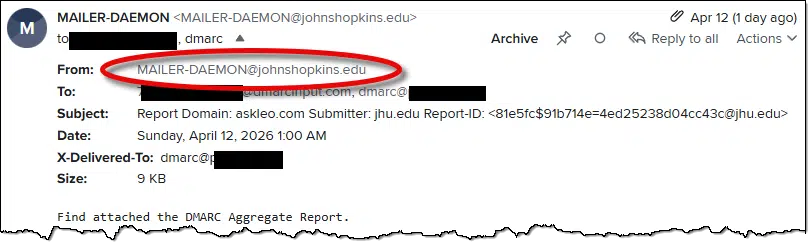
In practice, you’ll probably see mailer-daemon most often for email bounce messages. Be sure to read the message for the details of what’s being reported.
Do this
Mailer-daemon itself is nothing to be concerned about. It’s a fundamental part of how email works. Pay attention to the messages it sends you.
Subscribe to Confident Computing! Less frustration and more confidence, solutions, answers, and tips in your inbox every week.


I’ve also heard it pronounced day-mon like the pronunciation of maester in Game of Thrones. 😉
That’s how I’ve been pronouncing it.
Where is the rest of the article–how to resolve the errors? For example, sending photos and attachments from my iPhone to my email accounts returns this error.
This article isn’t about errors, it’s explaining what “Mailer Daemon” is. The message you get FROM mailer-daemon should have information about what’s wrong, and with that information you can try to fix the problem. Since you didn’t include that information here there’s no way for me to help.
In most cases, the solution is to correct the email address and send it again. In the case of photos, it’s possible that the photos cause the emails to exceed the maximum. Instead of sending the photos, you can use a Dropbox or OneDrive link.
You can read the bounce message to see what the reason was for the bounce.
I’ve always identified these types of message as ‘Bounce messages’. That’s because in my experience, that’s the only type of mailer-daemon message I’ve ever received. When I get such a message, the first thing I do is look at the address I was attempting to send to. I usually find a misspelled address, so it’s easy to fix. On the other hand, from time to time, I receive bounce notifications for messages I sent through some app, in which case I try to find another way to get the thing I’m trying to do, done.
Ernie
When I receive a bounce message, either a message failed to send or that it’s been trying for hours to send, I resend it. Unless I mistyped the address, resending works. I rarely type email addresses because I use an address book or I send a reply.
There are also Mailer Daemon messages telling you that they are still trying to send the email. When that happens, I resend the mail with a note that I’m resending it so the recipient will understand why they are getting the same email twice. Whenever I resend the mail, it usually gets delivered instantaneously.
That was a very interesting short article on a matter I’ve wondered about for decades, but simply ignored.
Not so some very religious aquaintances who need to use the internet in their daily work and publications, who have found the occasional appearance of the term disturbing.
I intend to forward this article to several of them, and encourage them to subscribe.
By the way, if I recall my Latin and Greek Derivatives class in college, the correct pronunciation of the Latin plural “ae” in English is the long “i”, as in life or kite. In classical Greek it’s a little hazier; since no one really knows anymore just how they pronounced their vowels; best guess is a short “e” as in egg or keg.
In the original Greek daimon or daemon was an unseen intermediary that performs tasks between higher powers and the human world.
That seems fitting.
Mark Jacobs YES, that’s perfect! Thought of another couple of English words that may rhyme with Greek “daemon”: “lemon”, and “feminine” …and if that last doesn’t flummox linguists twenty-five centuries from now (if there are any) we’re not living up to our ancestor’s sense of whimsy.