Lots of educated guesses.

Location identification is… complicated.
It’s a mix of various inputs from various places. While I’m not 100% knowledgeable on all the possibilities that can factor into location, here’s a sense of how things work (more or less).
To begin with, it depends on how you’re “looking at” your location, or perhaps who is looking at it.

Location, location, location
Your devices guess your location via clues like your IP address, nearby Wi-Fi, cell towers, and sometimes GPS. It’s often close, but not perfect. Mix-ups happen, especially with VPNs or bad data. If sites think you’re in the wrong country, check with your internet provider or try a VPN.
Websites
Websites almost always rely solely on your IP address to guess where you are.
Related

What Can People Tell from My IP Address?
Curious what someone can really learn from your IP address? The answer is “not much.” This quick read explains what your IP does and doesn’t reveal, why location lookups are often wrong, and when only your internet provider—or law enforcement—can dig deeper.#2293
This is information provided by your ISP when you connect to the internet. Use a tool like whatismyipaddress.com1 to get an approximate location.
An IP address cannot be used to identify your exact location; it can be off by many miles. Most websites don’t care as long as the location is close-ish. Depending on the location service being used, mine is commonly off by 10 to 20 miles.
Being misidentified as being in a completely different country implies a few other possibilities.
- You’re using a VPN. You’ll know if this is the case. A VPN is a common approach to intentionally appear to be in a different country.
- Your ISP has a large network and is routing you through various places for reasons unknown. If whatismyipaddress.com shows you coming from a different country, you’d have to ask your ISP why.
- The IP location database is incomplete or wrong. I don’t have a great solution for this.
But 90% of geolocation, as it’s called, by remote sites uses your IP address.
Help keep it going by becoming a Patron.
Your PC
The location identified by your PC can be determined or influenced by:
- Your IP address, as above.
- Any GPS hardware in your computer. This results in more accurate results, not wild mistakes.
- Nearby Wi-Fi networks. More on that in a second.
- Nearby cellular networks and cell towers for mobile devices.
- Any location you’ve told the software on your machine.2
Any or all of these, and perhaps other techniques, might be used.
Wi-Fi and location
Wi-Fi is interesting. There are databases of Wi-Fi access-point locations. These include not just public Wi-Fi (such as at your local coffee shop), but home and business locations as well.
Through various means, each Wi-Fi access point is associated with a location. That could be as simple as someone connecting a mobile device that has location functionality, such as GPS, to the access point. When someone else connects to the same access point later, their location can be identified as at or near that access point.
Most of the time, this is fairly reliable, unless the access points move.
As an extreme example, I have friends who live on a cruise ship making its way around the world. The ship, of course, has Wi-Fi. Periodically, the Wi-Fi’s location is updated to the current location of the ship. “Periodically,” though, can mean an update every few weeks. Even as the ship moves to its next port, the Wi-Fi location continues to show the last updated location. It’s not uncommon for Google to think my friends are in one location while the actual location of the ship they’re on is hundreds of miles away. Clearly, Google is relying primarily on Wi-Fi-based location.
Related
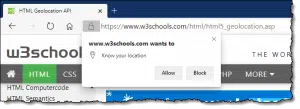
Granting Location Permission: Why You Should and When You Shouldn’t
Granting location permission gives apps and web sites a more accurate idea of exactly where you are. The question is: do they need or do they abuse it?#127903
Complications & magic
There are several ways things can get more complicated.
Your various devices may talk to one another. Your PC’s “location” could be influenced by your mobile device if they happen to share an account of some sort — say a Google or Microsoft account. Tablets and laptops that move around regularly are similar sources of confusion, as they “see” different locations for a while and connect to random Wi-Fi hotspots and cellular towers in their travels. They could also share information when they notice they’re “near” your stationary desktop, perhaps by sharing a Wi-Fi connection or being in Bluetooth range.
Sometimes software just does things wrong. My Alexa home devices use the location of my phone as if it were the location of my home. When I traveled to Europe some years ago, the lights controlled by the Alexa in my home were turning off and on according to European time, not the actual time at home.3
My computer has a spot-on concept of where I am. I suspect it’s because I told both Google and Microsoft my home address as a part of setting up accounts and/or using my computer. Google does a reasonable job of showing my phone’s location as I’m out and about because of its use of GPS.
But, honestly, sometimes it seems like location services are just so much magic.
When it’s wrong
About the only thing I can recommend when services claim you’re in the wrong country is to fire up a VPN and choose a connection that is in the country you want.
As I mentioned earlier, VPNs are often used to access content restricted from your actual location. For example, I use it occasionally to watch live TV from The Netherlands, even though I’m in the United States. But using it as another way to access content from your own country is perfectly valid as well. A VPN connected to the US would show as a different IP address to remote sites, but at least it would be in the same country.
Sadly, that works only at the country level. Most VPNs won’t expose a more granular location4.
Do this
If you’re connected to the internet normally, meaning through your ISP’s provided connection, and multiple websites consistently identify you as being in the wrong country, I would contact your ISP for assistance. You can try using VPNs, or perhaps a different internet connection (perhaps provided by your mobile device, which should coincidentally have a more accurate location), in the interim.
Subscribe to Confident Computing! Less frustration and more confidence, solutions, answers, and tips in your inbox every week.
Podcast audio

Footnotes & References
1: This specific site is meant as an example, not an endorsement. There are several such services. Always be careful, as they’re often plastered with misleading ads.
2: Perhaps you mark your home address on a map. It’s complicated by privacy policies and terms of service you may or may not have agreed to.
3: Apparently, this is a well-known, long-time bug that remains unfixed for reasons unknown.
4: Most will not, though I notice that when connecting to ProtonVPN, connection points are labelled with city locations that could be helpful.
Microsoft’s Windows location service and privacy webpage details some of the techniques used, collected, and shared.

I turn off Location Services on my phone to preserve battery life. I find geolocation on my phone relatively accurate or at least as accurate as the nearest cell tower which is within a couple of kilometers.
With Location Services on, it pinpoints my location to my exact latitude and longitude within a couple of meters. (This doesn’t always work in cities like Chicago under the L or overpasses. 😉 ) I sometimes use this to tell a friend where to find me if I’m in a hard to describe location.
Use What3Words instead …. way, way more exact than telling folks where you are than location services.
I had a problem recently where an in-line store relies on Maps to deliver items, I kept trying to move the arrow from where it said I lived to where I actually lived, and it would not do so. It could get closer but no actuality, so I had no option but to leave the site without purchasing.
I use T-mobile mobile internet. It functions fine, but I’m in Shreveport and it keeps saying I’m in Dallas, 160 miles away. This is annoying when I try to search for anything “local.” Is there any way to fix this?
On your phone, you can turn on GPS and search on your maps app, although with GPS on, your phone should get your location right in a browser search.
Or if you mean T-Mobile home Internet, then include the city in the search.
I’ve never had any issues with the accuracy of my location on any of my computers or with any phone I’ve ever owned, and I suspect that to be true for most people. Of course, I’ve told my computers my home address, and my desktop system uses that for my location, but my laptops frequently get my location off by a few houses on my street, one way or the other, but that doesn’t really have any ill effects because any sites I do business with let me enter my home address manually.
Ernie