A case of misguided security.

I encounter this from time to time, and it’s frustrating.
It’s a design decision made by that website in the name of improving security. The problem? It makes security worse.
If I were a more grumpy person, I’d say someone should be fired over it, because they really don’t understand security and shouldn’t be in charge of it.

Password-pasting problems
You copy your password from your password manager, try to paste it, and… nothing. It’s incredibly frustrating and completely backwards from a security standpoint. Before you give up, try a few alternative paste tricks. If it keeps happening, a browser extension might be able to fix it.
Can’t paste
To fill in your credentials, password managers like 1Password or others rely on the ability to paste into password fields. In addition, they sometimes can’t determine that there is a password field, and you have to do the copy/paste yourself. And of course, if you keep your passwords elsewhere, such as a spreadsheet you maintain yourself, the ability to copy/paste is essential.
And on some websites, for some reason, nothing works. You can copy all you want, but you can’t paste into the password field. The web developer has blocked the paste function from working in that field.
The one I find doubly frustrating is the form that requires you to enter the password twice, and paste works in only one of the two password fields. Why? 
Help keep it going by becoming a Patron.
Misguided security
So why on earth would a website do this? The claims vary.
They say it prevents brute-force attacks. Not only are there better ways to prevent brute-force attacks (rate limiting), but the reality is that brute-force attempts probably bypass the sign-in form entirely.
They say hackers paste, not real users. False. Real people paste, as our questioner — and dozens of password management tools — prove.
They say the clipboard is a security risk. Technically true. But if malware on your computer is monitoring your clipboard, you’ve got bigger issues. For example, that same malware could be logging the keystrokes you’ve been forced to use to enter your password.
They say it prevents typos on confirmation fields. Again, technically true: it prevents you from pasting the same typo twice. But this is a minor issue, because the source you copied from is likely correct to begin with, since you saved it when you created the password. There is no typo, except now possibly in the second field where you’re forced to type.
It’s a stupid way to enforce password length limits. If a field takes only 20 characters for a password and you paste in a 50-character password, your password may be silently truncated. Typing forces you to realize there’s a limit. The problem, of course, is that 99 times out of 100, you’re pasting in the working password that you saved when you created it, not some random over-length string.
Security theatre. It’s a way to make a site seem more secure when it’s not. This is sometimes (often?) promoted by inexperienced developers or those responding to middle/upper management who don’t know any better.
How this makes security worse
Say you regularly visit a site that doesn’t allow you to paste a password. How do you deal with it? Aside from grumping that someone should be fired as you type in your password, that is.
Easy: you choose a password that’s easy to type.
Rather than a nice, long, random password (like “VnPYJbALeuEJ4xJ2xuWh”), you chose a short(er), more memorable one. In other words, you choose a less secure password.
Preventing you from pasting into the password field has just made it more likely that your password will be cracked and your account compromised.1
Ugh.
Now let’s look at how we can work with this dilemma.
All the flavors of paste
Before you give up, it’s worth trying the many ways you can paste into a password field.
Right-clicking to paste is likely the most common thing to try, and perhaps among the first techniques to be disabled.
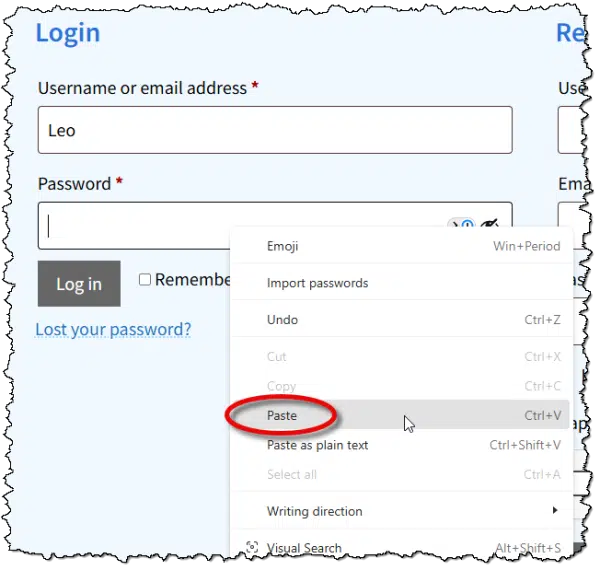
The other approach is to click in the field and type a paste keystroke. There are several.
- CTRL+V
- CTRL+SHIFT+V (technically CTRL+V without formatting, but sometimes form designers overlook it)
- SHIFT+Insert
 + V (technically opens the Clipboard history, but can sometimes bypass paste restrictions)
 + V (technically opens the Clipboard history, but can sometimes bypass paste restrictions)
Which of those might work depends on the technique used by the web developer to block pasting. Sadly, the most common techniques block all of them, but it’s worth a shot2.
If none of those work, it’s time to either give up or look for help.
Browser extensions
I haven’t used either of these extensions, but they do appear popular.
- Don’t F*** With Paste – Yes, that’s its real name. It tells the browser to accept all paste events. It’s in the Chrome Web Store, and I’m told there’s a version available for Firefox. It allows per-site configuration so as not to interfere with other sites.
- Enable Copy Paste E.C.P. – Includes an “aggressive mode” when the standard approach it uses doesn’t work.
These extensions should enable paste for the majority of websites, though not all.
I haven’t installed either because I don’t encounter the problem often enough to add yet another extension. Your situation may be different, of course.
You should be able to paste
A properly designed website allows you to paste your password.
NIST (the U.S. National Institute of Standards and Technology), in its identity guidelines, explicitly states that sites should allow users to paste passwords.
Verifiers SHOULD permit claimants to use “paste” functionality when entering a memorized secret. This facilitates the use of password managers, which are widely used and in many cases increase the likelihood that users will choose stronger memorized secrets.
Password managers allow you to make better choices.
The paste function allows password managers to work.
Seems like simple math to me.
Update (April 18, 2026)
Someone mentioned a solution using AutoHotkey, which is a tool I both use and recommend. (Though it can be a tad geeky.)
So, this morning, when I ran into a form that didn’t allow me to paste in my credit card number, I decided to give it a try. Here’s what I added to my AutoHotkey script:
; send clipboard by typing

^f4:: {

Send A_Clipboard

}
CTRL+F4 is, for me, a new Paste that actually types the text into the current field.
Worked perfectly for me.
Do this
If you’re faced with this rarely — which I certainly hope is the case — after trying the alternative approaches and keystrokes to paste, I’d just suck it up and type the password.
On the other hand, if this is something you run into frequently, a) I’m sorry, and b) consider one of the browser extensions. I’m on the fence about complaining to the site owner, but if you do, perhaps include the NIST quote above and the Troy Hunt article listed in the references below.
Subscribe to Confident Computing! Less frustration and more confidence, solutions, answers, and tips in your inbox every week.
Podcast audio

Footnotes & References
1: I’m not saying it WILL be compromised; just that a shorter, memorable password makes it more likely.
2: Especially since we’ve already determined that the web developer isn’t necessarily the sharpest.
References
The “Cobra Effect” that is disabling paste on password fields – Troy Hunt

I’ve run into a slight variation of this on one website. I use a password manager and this particular website periodically requires that passwords get changed. When I use the password manager to generate a new password, the website won’t allow the new password to be pasted into the password field. I have to write down the new password that has been generated and then type it into the password fields twice to change it.
The kicker is that when I go to the website and log in, the user name and password fields can be filled using the password manager. Out of over a hundred log in cards in the password manager, this is the only site that behaves this way so I just shake my head and move on.
Just finished reading “The Cobra Effect”. Mr. Hunt mentioned this issue, as well as others. I recommend that others click on the link. Always did find Aussie humor entertaining, especially when making valid arguments.
If all else fails, and you’re forced to manually enter the password, there’s the CorrectHorseBatteryStaple method of combining unrelated words which can be both strong and memorable.
How Can Four Random Words Possibly Be More Secure Than 16 Random Characters?
Size Matters
Sometimes if right-clicking doesn’t work, CTRL+V will or vice-versa. For example. in the Copilot app, right-clicking and pasting works the first time, but for subsequent prompts, only CTRL+V works. I’ll chalk that up as a bug. So, using the other method might work in some cases.
Would copy / paste work from Excel?
Would Leo or Mark find making your own Password Generator a safe and secure option?
This is an interesting article in PCMag by Neil J. Rubenking
I Ditched Password Generators and Made a Better One in Excel. Here’s How
https://www.pcmag.com/how-to/i-ditched-password-generators-and-made-a-better-one-in-excel-heres-how
“Pseudo‑random” doesn’t mean predictable. Modern password managers use cryptographically secure pseudo‑random number generators (CSPRNGs), not the weak PRNGs used in early programming languages. A CSPRNG is designed so that knowing the algorithm does not help an attacker, predicting future outputs is computationally infeasible. It would be similar to determining an encryption’s private key from its public key. I trust ma password vaults for that.
As for manually pasting, you can do that from your password manager. It sometimes works but not always.
Sometimes, on a computer, you can right-click the password box that doesn’t let you paste and select “Inspect element”. Then if you can find the “Event Listeners” tab, there is sometimes a listener attached to the “paste” event and you can simply delete it to allow pasting.
“Inspect” can be very powerful, but also very confusing for most folks. That’s why I didn’t suggest it.
I found that after the google password mgr. has filled in the password area with the string of “dots” to populate the rectangle, all I have to do is move my mouse cursor to the right end of that string and left click the mouse. It has never failed. The pasted character string is sent and we are good to go. This works where using the enter key has not.
Quicken used to be notorious for this. Haven’t had to try it in a while, so perhaps they’ve fixed it.
Not so smart to torture you users. I like the idea of a script. ChatGPT can help you create a custom PowerShell script for specific websites. That would feel rather satisfying– to resist the oppressors. I often create passwords from childhood street addresses if I have to type it. Somehow those are still stuck in memory, may as well put them to use. MFA and passkeys suggest the Internet is moving on from secure passwords anyway. Thanks for the fun article.
Your childhood street addresses are publicly available, so I wouldn’t recommend using them.
I am glad you wrote about this as it is something that has bothered me for years, and I had thought of mentioning it to you. I remember one convenience store where this was particularly problematic. I haven’t had this happen recently, but I will watch more.
I have found that occasionally, if I paste the password, then delete the last couple of characters and type them, the site will accept it.
And why do so many sites make you type your email address twice? No other piece of information has to be entered twice. Just the email address!!
Because so many people type their email address in WRONG. It’s a serious problem. And UNLIKE any other bit of information, if you type in the wrong email address the company or whomever can’t contact you at all.
I’ve seriously considered adding this to my ask-a-question form because I get so many questions where people have typoed their email address and thus I cannot respond. I won’t, but I completely understand why sites do it.
When it asks for the second email entry, I copy and paste the first password. This isn’t as counter productive as it sounds, because it forces me to look at the password. I’ve found and corrected my email address a few times when I saw I made a typo.
Many websites go a step further and send a confirmation number or link to confirm it’s really aour email. This protects against email address typos and prevents you from signing other people up. A PITA, but necessary.
Keepass and KeepassXC have “auto-type” that can be used when you can’t copy/paste.
It requires some setup since it is quite configurable and will insert more that just the password if you want.
I find setting the global auto-type to {Password} is the most useful when you can’t copy/paste a password.
You can also configure auto-type for each entry separately if needed.
Many people prefer password managers that keep their vault in their servers so you can use it on any computer. This can be accomplished using KeePass portable in an encrypted cloud sync folder like OneDrive’s Personal vault or any cloud service using Cryptomator.
I use ProtonPass, but I’m considering switching to KeePass to save a few bucks.
Under “Do This”, Leo should also suggest:
– write a complaint to the website that uses this archaic form of pseudo-security that annoys users.
Unless people complain, it won’t get fixed.
Writing the company is fine, but it’s doubtful many if any companies pay attention to those emails.
I’ve used this free program, ‘ClickPaste’, with some success:
https://github.com/Collective-Software/ClickPaste
After you have something copied to the clipboard, you start the program, if it’s not already running, and select the target for the paste. It then types the contents of the clipboard.
I have a kind of related issue – when the developer has prevented a user from copying text. I suppose it’s not a security issue but it’s irritating. Microsoft is a good example – when I get a Microsoft error message, I want to copy it and search it in google by pasting it into the search box. But I can’t copy it – so I have to retype it. Is there a rationale for preventing copying of text?
You can’t copy the text in those cases beecause the message is in a graphics format. If you have the Snipping Tool activated, you should be able to copy it and use the “Text extractor” feature to copy the text.

Simultaneously press WindowsLogoKey+Shift+S (or the PrintScreen key if enabled)
Click the Text extractor icon in the Snipping Tool Toolbar
Select the region you want to copy the text from.
Click “Copy all text”
You should be able to paste that text
The following article only applies only to Windows 11
https://askleo.com/how-to-copy-text-from-images/
For Windows 10 (and also 11):
https://askleo.com/how-to-extract-text-with-text-extractor/
I know we’re talking about passwords, but on the subject of copy and paste, I’ve recently been unable to paste in a WhatsApp conversation on desktop. After right-click Copy, the right-click Paste option no longer appear in the menu, so I resort to Ctrl+V just as you mentioned in this article for website passwords. Maybe this is all part of a bigger issue developing in the computing world.
I’ve noticed that with a few websites and apps. Some allow pasting with CTRL+V but not by Right-clicking, and vice versa. Each data entry field has to be coded to accept paste. So, it’s likely just a bug or a design flaw.
I used to able to use copy & paste to make transfers in my Citibank account. But they recently stopped allowing it. It really does make a difference when you use the function often.