Three things you’re hopefully already doing.


In other words, how do you avoid ransomware?
Let’s look at ransomware — software that holds your data hostage until you pay up — and how best to protect yourself.
Spoiler alert: you already know the answer.

Avoiding ransomware
- Ransomware encrypts your computer’s data and holds it hostage.
- To avoid ransomware, use the same techniques that prevent any malware: run anti-malware tools, stay up to date, and use common sense.
- Backups can save you should you ever get ransomware.
- Ransomware-specific protections exist and may help, but may add to a false sense of security.
- Never pay the ransom.
What is ransomware?
Though it gets lots of press, ransomware is nothing new.
Ransomware is malware that encrypts files on your machine and presents a message offering to decrypt and recover your files if you pay a ransom. Recent versions attacking businesses also threaten to release copies of sensitive data captured at the same time.
Most current variants use good encryption, so once you’ve fallen victim, the outlook can be pretty bleak.
Note the word I used: malware.
Please understand this: ransomware is just malware. There’s nothing special about ransomware and how it gets on your machine. It uses the same techniques as any other malware. It is most often distributed in email attachments or as downloads of some form.
Ransomware is very destructive malware, but it’s just malware.
That should give you a huge clue on how to avoid it.
Help keep it going by becoming a Patron.
How to avoid ransomware
You avoid ransomware the same way you avoid all malware.
- Run up-to-date anti-malware tools. I recommend Windows Defender, but there are many, many others. Make sure they are running and up to date.
- Keep your system and software up to date. Yes, this means letting Windows, as well as any applications with self-updating capabilities, update automatically.
- Use common sense. Don’t download random things from the internet, and don’t open attachments you aren’t completely certain are valid.
In short, do all the things you should already be doing to keep yourself safe on the internet.
More importantly, back up
If your machine does contract ransomware, having a recent backup1 can save you almost immediately.
If you get ransomware on Tuesday, restoring to a backup taken on Monday makes it almost a non-event. Aside from any work performed since the Monday backup, you’d have your machine running again in no time, without paying any ransom.
A good backup can save you from almost anything. This is another case where even something as scary as ransomware doesn’t need to get in your way.
Ransomware-specific protection
Windows has added explicit ransomware protection to Windows Defender in the form of Controlled folder access.
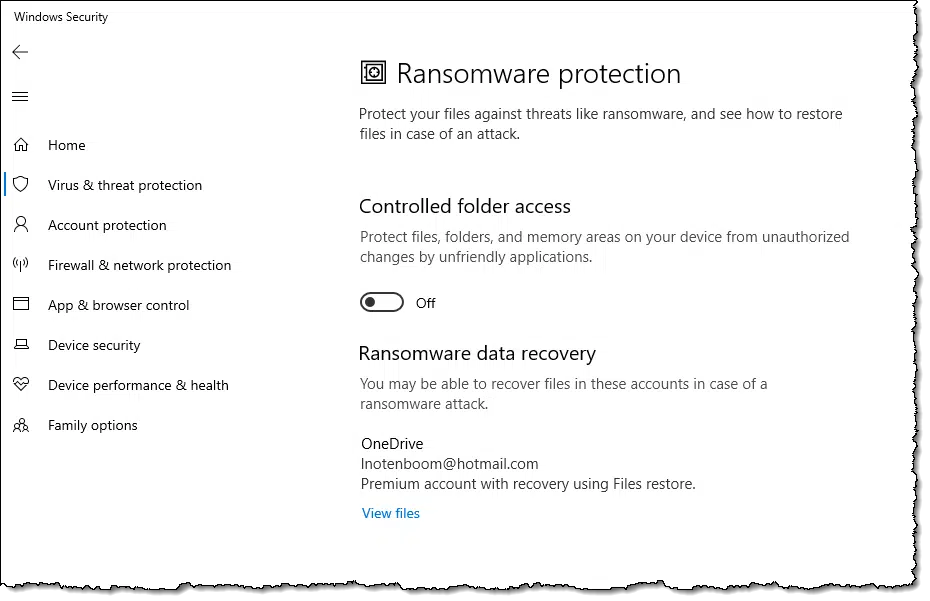
Some applications may have problems if this feature is enabled.
If enabling Controlled folder access helps you feel safer and doesn’t interfere with something else you need, by all means, feel free to enable it. It’ll protect you from a lot, including some non-ransomware forms of malware. For the record, I don’t.2
My concern with these approaches is that they focus on preventing the malware’s malicious behavior only after the malware has already infected your machine. In other words, if they helped, it’s because malware made it to your machine.
That’s the problem to focus on. That’s what I believe is most important to prioritize: preventing malware in the first place. I don’t want any tool or technique to give you a false sense of security and lead to letting your guard down.
Should I pay the ransom?
Never pay the ransom.
Paying just encourages scammers to keep doing this. Sadly, enough people do pay that ransomware is a lucrative endeavor. Don’t be one of those people.
Stay safe, back up, and never negotiate with hostage takers — even when it’s your data they take.
Do this
Avoid over-focusing on ransomware. Instead, take the steps you need to protect yourself from all malware.
Subscribe to Confident Computing! Less frustration and more confidence, solutions, answers, and tips in your inbox every week.
Podcast audio

Footnotes & References
1: Several people have expressed concern that a backup drive, if connected, may also be encrypted and held ransom. It can happen, but to me, it’s much more important that a drive remain connected so regular backups happen automatically. More here: Will Malware Infect the Backups on My Connected Backup Drives as Well?
2: I did try Controlled folder access some time ago, and discovered that it interfered with some of the tools I use.

I use Malwarebytes Premier at the moment and I use Macrium Reflect for my backups. I run a backup of ALL of my data at 9am every morning, this is sent to an external SSD and then I run another backup of this data at 10am daily to another external SSD, giving me two backups of my personal data. I also run a backup on the first day of the month of my C: drive which holds the O/S and my programmes and, this is sent to a third external SSD.
Whilst I am reasonable on a pc and find Ask Leo invaluable, as an 80 year old wrinkley am I doing things right?
P.S. I am also a big fan of LastPass and use the paid-for version.
You’re doing great — very similar to what I do.
If you want to take it next level, this article has an additional idea to consider: Should I Disconnect My Backup Drive When I’m Not Backing Up?. NOTE: I’m not saying you need to change a thing, but some folks like to take one additional step. (FWIW: I don’t.)
Guilty as charged I’m afraid. Time for a re-think. Thank you.
Wouldn’t running an add-in like No-Script be an extra layer of protection? In case you go to a rogue site, No-Script would block rogue scripts from executing.
I use Controlled Folder Access. I’ve found it to be a “one and done” option, in other words it only needs to be dealt with when installing a program and using it the first time.
I look at it as having a defense in depth. I do everything else as Leo recommends and I haven’t had to deal with malware on my computers. My only experience with malware has been recovering someone else’s computer.
< Never pay the ransom.
Good grief, folks! If you’re thinking of paying the ransom, you’d be better off buying a new computer!
Yes, I know — and Leo is cringing — but if you’re going to pay your way out, then better to give your hard-earned money to Best Buy, than to some #-$%@#& ransomware author!!!
The problem is that buying a new computer doesn’t restore/recover your data, and that’s what causes people to consider it if they have no prevention or recovery methods in place beforehand.
Buying a new computer wouldn’t help. Ransomware doesn’t harm your computer. It just encrypts your personal files. So, you can reinstall a clean version of Windows if you are infected. Even though your computer is infected, back up before reinstalling, as a fix may eventually be discovered for the ransomware you have.
https://askleo.com/new-computer-to-fix-malware/
Is Windows Defender rally a help against Ransomeware? I got a notice a had received an infected email, ran Windows Defender and had my files encryped a few days later. It didn’t seem to help.
It can definitely help, but no antimalware is perfect. Safe practices are the best protection againsr malware.
https://askleo.com/how-to-avoid-ransomware/
https://askleo.com/internet-safety/
https://askleo.com/how-to-avoid-ransomware/
Leo, you added a footnote: “I did try Controlled folder access some time ago, and discovered that it interfered with some of the tools I use.”
I have Controlled Folder Access turned on here, mostly because I do the belt and suspenders thing when it comes to system security. After enabling the feature, a new option appeared under Ransomware Protection, along with the Controlled Folder Access setting, named “Allow an app through Controlled Folder Access” I’m commenting about it because I suspect that it’s a recent addition (I don’t remember it’s presence when I enabled the feature a while back).
Also, FWIW, I store my backups in a container on my Proxmox powered server (Home Lab). The device used to be my desktop computer, but I haven’t been using it much recently (My Lenovo Legion 5 laptop’s been my most constant companion instead), so I re-purposed it (It sports 32GB RAM and 3TB internal storage) by setting up a few services, including two VMs for experimentation/testing new-to-me software.
Ernie