Scammers and hackers get sneakier all the time.
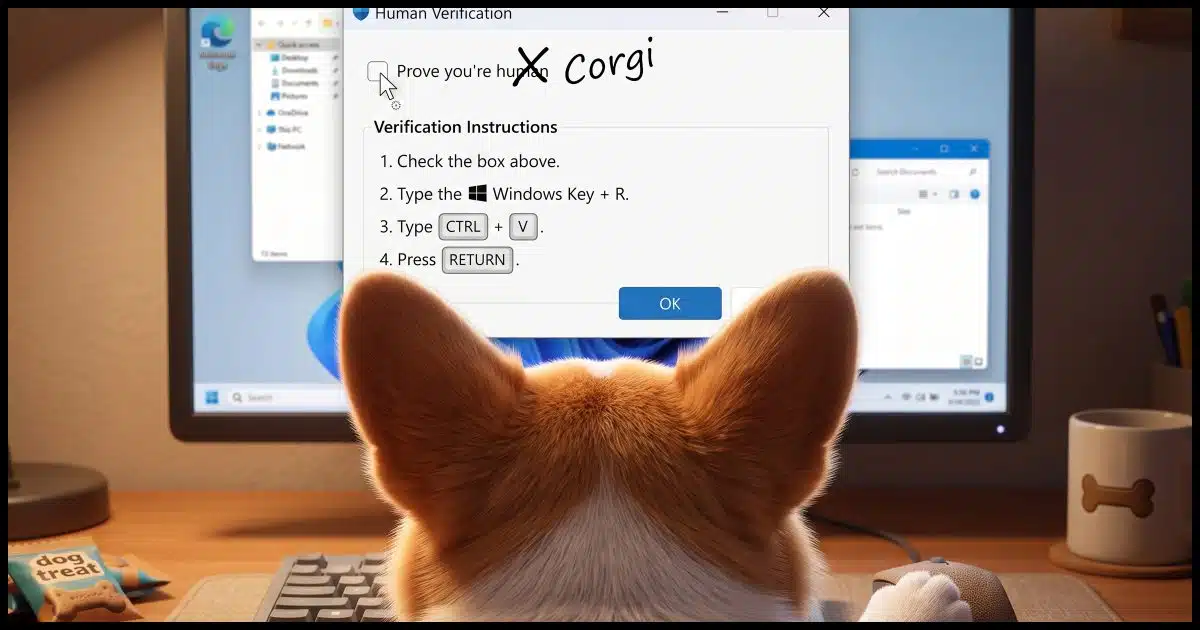
You’re surfing along on the internet, and you get another one of those “prove you’re human” pop-up messages. Instead of being an obscure “click every square that has a bicycle” CAPTCHA (yay?), this has instructions that are easy to follow: click here, type that, and prove your humanity.
You also installed malware on your device.
This one is sneaky.

Avoiding ClickFix
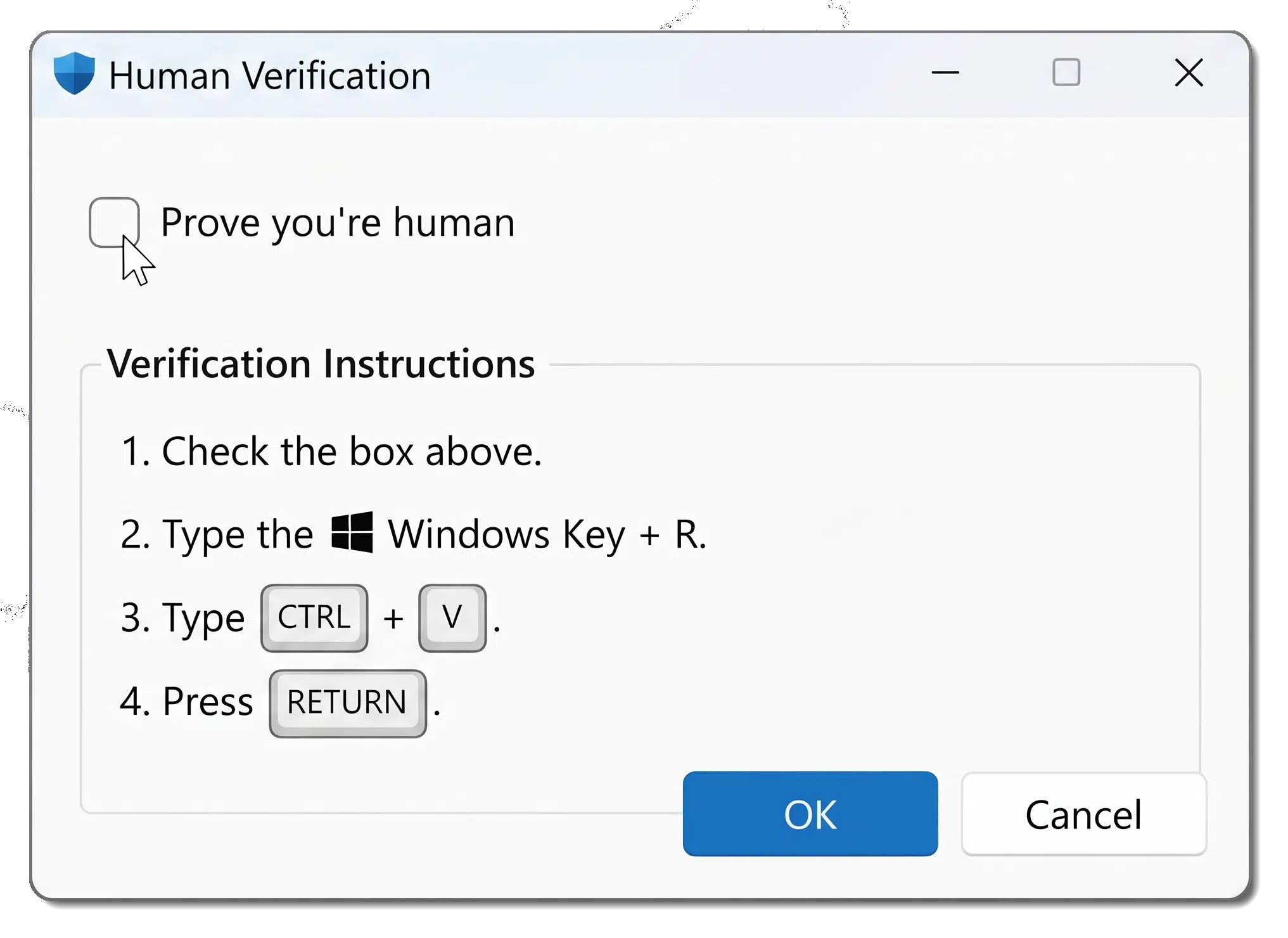
ClickFix is a hacker’s trick that gets you to copy hidden code and paste it on your computer. That’s how it sneaks in malware. Remember: no real site ever needs you to paste anything. If you see that, stop.
ClickFix
ClickFix works like this.
- It presents a message that requires you to take some action, followed by some keystrokes or other actions.
- The first action — clicking the box in the example above — silently copies malicious instructions, or a payload, onto your clipboard.
- The subsequent actions cause those malicious instructions to be run. In the example above:
 + R opens the Windows “Run” dialog box.
- CTRL+V pastes the clipboard contents — malicious instructions — into the Run dialog.
- Enter causes those malicious instructions to be run.
 + R opens the Windows “Run”
 You didn’t download anything shaky; you didn’t open an unknown attachment; you just followed instructions.
It works because it bypasses your antivirus and browser warnings — you’re the one running the payload. This example also exploits our familiarity and frustration with complex CAPTCHAs because it’s easier to follow.
Help keep it going by becoming a Patron.
ClickFix is the delivery; the payload is the goal
ClickFix itself is just a delivery mechanism. Its goal is to get you to run something malicious. That something is typically a download of some larger malware package.
What can that package do?
Depends on how it was written.
The symptoms of having fallen for a ClickFix delivery vary dramatically based on what your specific interaction downloaded and installed. It could be a silent password stealer, a spam bot, a cryptocurrency miner, or something more obviously destructive like ransomware.
ClickFix is just the bus it rode in on. Once delivered, it’s free to do what it wants.
Related

Don’t Fall for It: Social Engineering and How Scammers Hack Your Brain
Think you're too smart to fall for a scam? Think again. Scammers aren't targeting your intelligence; they're targeting your humanity. I'll share the sneaky mind tricks they use every day and help you spot the red flags before it's too late.#190031
Where you’ll find ClickFix
Legitimate sites that have been compromised are the most common places you’ll encounter ClickFix. But ClickFix can be found in all the normal scam/phishing sources:
- Phishing emails
- Fake Zoom/Teams install, update, or “fix” prompts
- GitHub issue/comment lures
- Fake browser-crash recovery screens
- Fake software update or driver-fix pages
You get the idea. The answer to “Where can it be found?” is really “Anywhere”.
The big red flag
Fortunately, once you know how it works, there’s a huge red flag that tells you to stop.
Any instructions telling you to open Run, PowerShell, Command Prompt, or Terminal and paste something into it are malicious. Legitimate verification never requires this.
In fact, you can boil that down to a single, less complicated red flag: legitimate verification never asks you to paste. As soon as you see paste or CTRL+V or SHIFT+Insert1, stop. You’re done. Go no further.
If it’s already happened to you
If you’ve already run whatever ClickFix offered you, then you must assume that your computer has been compromised and you have malware.
Take steps to remove malware. I can’t be any more specific than that, because we don’t know what malware was downloaded and installed.
And, of course, learn from the experience.
Do this
Remember: no legitimate site or app ever needs you to open a system command prompt and paste anything to prove you’re human. As soon as you see instructions to paste anything anywhere, run away.
Subscribe to Confident Computing! Less frustration and more confidence, solutions, answers, and tips in your inbox every week!
Podcast audio

Footnotes & References
1: Also another common, old-school keystroke for paste.
Think before you Click(Fix): Analyzing the ClickFix social engineering technique – Microsoft

Hello, I routinely work on my friends’ computers to get them running again after problems you describe. One problem that seems to be missing from your excellent video is a situation where a “clickfix” comes up and does not allow the user to exit the program unless its instructions are followed. Because I, personally, know how to exit from such situations I find that most of my friends become stuck. They know clickfix is bad but cannot get past it. Do you have a video on that? It would be quite helpful! -KTP
There is an embeded video in this article.
I am not sure what link I am looking for. Would you like to post it here rather than my guessing which link I should use? Thank you for your help. -KTP
It’s under the heading “Related Video”
Thank you! I’ll leave it here, but I am referring to “It’s OK to hang up”. My work is usually about how to exit from a potential scam that has frozen the user’s screen where the user tries to back out of it. I thought other interested persons might want to know.
Lately I’ve had notifications pop up in my web browser while going to my bank’s login page requesting permission to access my clipboard and more recently to access other apps on my computer. I decline every time becausethe bank has never expkained why they need this permission. I get this is different than what Leo described but it also highlights that you have to keep an eye on what is going on when you’re on the web.
As long as the banking website works without that access, it’s fine to block that access.
The moment I loaded this item from today’s newsletter, and saw the image of the Corgi looking at the display, a quick read of the dialog being displayed told me everything I needed to know, because I can think of no scenario where I should be required to paste anything to prove I’m human. My initial reaction was that before I open the run dialog … after clicking the checkbox, I should open notepad and paste the contents of my clipboard there to see what I’m being asked to run.
After some consideration, I’ve decided that in the same situation, before clicking any checkbox, I’d be best served to simply close my browser window, then go on about my business.
Failing that:
Press and hold my laptop’s power button to force a cold shutdown
Wait ten or fifteen seconds
Restart and run a full malware scan using both Microsoft Defender and Malwarebytes
Open a terminal window
Run ‘DISM.exe /Online /Cleanup-image /Restorehealth’ to update the backup system file store
Run ‘sfc /scannow’ to check the system files for corruption and make any needed repairs
In so doing, I greatly decrease the chances that any malware has found a foothold on my computer, but also insured that my system files weren’t corrupted by the forced shutdown.
I hope reading this helps anyone who encounters such a situation,
Ernie
Any ‘Prove that you’re a human’ seem like a red flag to me. Causes me to stop and consider if I really want to continue. Even if they are not a common trick to infect your computer, I find them often worthless — I reconsider what I am supposed to ‘get’ from this website, and weather it’s not worth the effort these ‘proofs’ take. Because they are often so ambiguous (is enough of that bicycle/traffic light in that box to count?) or the mangled letters are unclear, especially with older eyes. Usually I just close the website entirely when encountering one.
Unfortunately, CAPTCHAS have become a necessary evil. Websites are under constant attacks from AI bots. The same AI technologies that make bots smarter also make CAPTCHAs harder for humans.
Today, looking for a User Manual of something, I got a “Prove you’re human” prompt and ticked the box. Nothing else. I very shortly gat a series of pop-ups, purporting to be from Firefox, warning of a Trojan and telling me to get rid of it via McAfee. I could choose to take action or ignore. I was suspicious so exited Firefox and closed down the PC, but after restarting and opening Firefox the same pop-ups populated my screen. Eventally I was able to remove them through Firefox’s Notification settings, but scanning with Defender found one malware, then Malwarebytes found another. All I did was tick a box!
That wasn’t Firefox McAfee, and wasn’t caused by ticking a CAPTCHA box. It was browser‑based scareware triggered by a malicious website. The malware detections afterward were likely unrelated leftovers or PUPs (potentially unwanted programs) that Defender/Malwarebytes finally caught during the scan.
The pop‑ups came from the browser, not the system. The “Trojan warning” was fake.
Thank you Leo, one of the very few online tech commentator’s we really TRUST!
Great info, but are the type of pop ups that ask us to verify we are not a bot (or that we are human) by holding down a button” apply as well? There aren’t any instructions telling me to open Run, PowerShell, Command Prompt, or Terminal and paste something into it. It was on a site I was signed into and frequent.
This article is specifically about attempts to fool you into copy/pasting things into Start Run (or Command). All other CAPTCHA techniques are currently fine.
Question: is there any way–a software program that could be written–that a person receiving such malware can reverse the connection and place something equally destructive on the scammer’s computer? Seems to me that doing to the scammer what they intended to do to you would be the best way to eliminate such behavior.
That would be illegal.
And unethical, as well as likely immoral.
I don’t necessarily see hacking a scammer as immoral or unethical, but it’s definitely illegal and can get you in trouble.
When I am not signed into my google account, I have started getting the verify you are human when I do a google search. Is this something new? I do have McAfee and they never warn me about it. It has never asked me to copy anything, just to verify the objects. This started happening two or three months ago.
More and more websites are implementing CAPTCHAs because AI bots are increasingly attacking. Not clearing cookies can stop some sites from asking again. Unfortunately, some cookies expire and the CAPTCHA is required again.
From a blog by group-ib.com on this scam to underline the advantage to always use private browsing:
“Information stealers are the most common ClickFix payload. They collect saved passwords, browser cookies, cryptocurrency wallet files, and password manager contents. Everything reaches an attacker-controlled server within minutes of execution.
Stolen session cookies matter more than stolen passwords. A valid cookie represents an already-authenticated session hijacking, so an attacker can reuse it without ever facing a login page or a second factor.”
Private browsing doesn’t protect you from tracking by the sites you visit. It only deletes your history, cookies, and cache when you close the browser. It doesn’t stop websites from seeing your IP address, browser fingerprint, or anything else they normally collect.
As for stolen session cookies, yes — they can be reused if malware steals them. But at that point the attacker already has full access to your machine. They can read your files, capture your keystrokes, take screenshots, and steal anything they want. The stolen cookies are just one more item in a long list of things malware can grab. The real issue isn’t the cookies — it’s the malware infection.