It’s generally a sign that something’s broken, but what?
Your computer’s IP address wasn’t “changed” so much as it was broken.
If your computer ends up with an IP address beginning with 169.254, something is definitely wrong.

Dynamic IP addresses are assigned by your router or equivalent when your computer asks for one. IP addresses beginning with 169.254. indicate your computer never got a response. That can happen for several reasons, so your computer, the path from your computer to its router, and the router itself should be investigated.
Where IP addresses come from
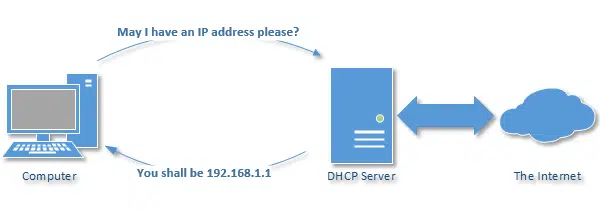
Typically, the IP address of your computer is assigned when you boot your machine. Using DHCP, your computer requests an IP address.
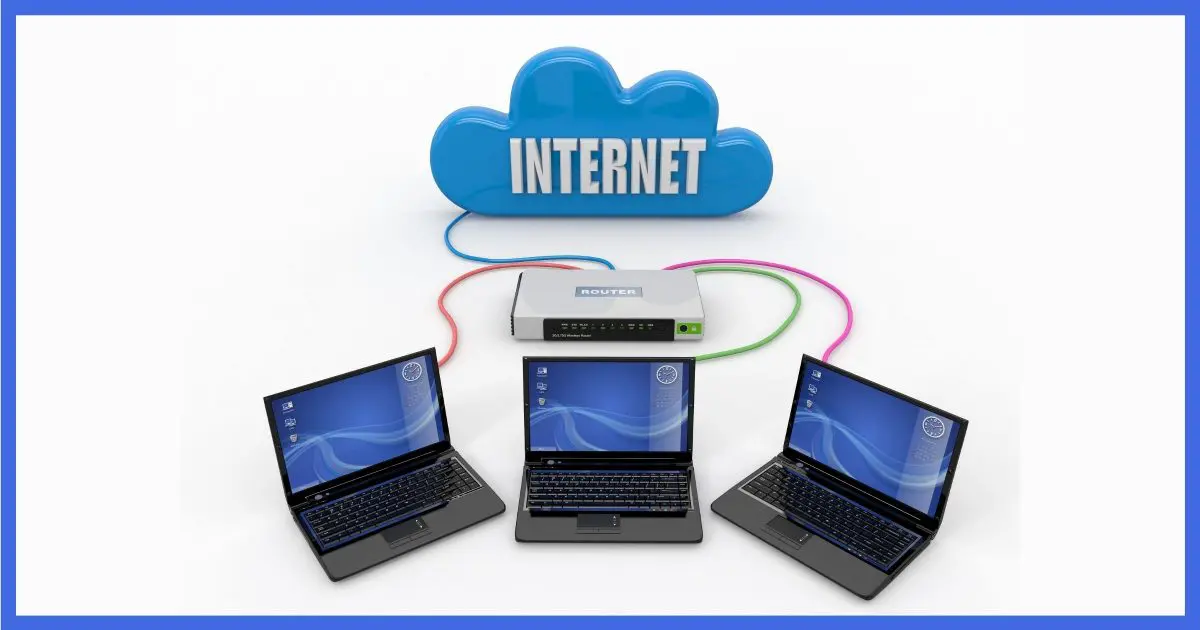
If you are connected to a NAT router, it acts as a DHCP server and hands out IP addresses. You’ll most commonly get an address in the 192.168.x.x range.1
If you’re directly connected to the internet, your IP address could be almost anything, but it’ll be assigned by a DHCP server run by your ISP.
IP addresses beginning with 169.254, however, are special.
When there’s no answer
The difficulty arises when your computer asks for an IP address and no one responds.
Whether due to a network problem — maybe not being on a network at all — or perhaps a lack of DHCP server to hand out IP addresses, the result is the same: the request for an IP address assignment goes unanswered.
Your machine waits for a while and then gives up.
But when it gives up, it invokes what’s called Automatic Private IP Addressing, or APIPA, and makes up its own IP address. And those “made up” IP addresses all begin with 169.254.
Limited connectivity
Situations resulting in a 169.254.x.x IP address are flagged as “limited connectivity” in Windows.
If you see that status associated with your network connectivity, then you’re facing the problem discussed here. Your machine almost certainly has a 169.254.x.x IP address.
Almost as good as no IP at all
The problem is, while making up an IP address solves a few obscure problems, they’re all problems you and I don’t care about. A 169.254.x.x IP address is pretty close to useless.
The reason IP addresses are assigned in the first place is so the networking equipment knows where to send packets that are destined to reach your machine. When things work, the networking equipment knows your machine has this address.
If your machine makes up its own address, no one else knows. As a result, there’s no way to get data to your machine.
It’s like having an unlisted phone number that’s so unlisted, even the phone company doesn’t know it. No one can call you.
Help keep it going by becoming a Patron.
Something’s broken
Getting a 169.254.x.x address simply tells you the machine cannot reach the DHCP server over the network.
Something isn’t working, but exactly what is difficult to say.
- Your computer may not be connected to the network. This could be for any number of reasons, ranging from bad or unconnected cables, to a bad network interface, switch, router, or other network device.
- If you’re connected via a NAT router, the router may not be responding to the DHCP request.
- If you’re connected to the internet directly, there may be a problem with that connection or your ISP’s equipment.
I suggest triple-checking all cabling involved in your network. Perhaps reboot the modem, router, and wireless access point. Sometimes disabling and re-enabling Wi-Fi can help, if you use it.
You can check your networking settings within Windows, but unless something’s changed recently, this isn’t a common source of this error.
Particularly for a direct internet connection, if all else fails, call your ISP — it may actually be their DHCP server or some other item they control that’s at fault.
The bottom line is simple, if generic: if you’re getting a 169.254 IP address, something about your network setup isn’t working. You’ll need to investigate what and why.
Do this
Subscribe to Confident Computing! Less frustration and more confidence, solutions, answers, and tips in your inbox every week.
I'll see you there!
Podcast audio

Footnotes & References
1: Another common range is 10.x.x.x

Wherever I lay my Red-Hat, that’s my home!
this is all makes sense, i have a spanner thrown into my works. i’m running a wireless network in my home. for some reason a few days ago my Desktop stopped connecting to the internet. phone my isp and we ran through a number of things. the computer wouldn’t run either through ethernet or usb to the modem. there appears to be nothing wrong with the computer tried going bac to a restore point when everything was working and this didn’t work there is nothing wrong with the router or the modem as i am still able to connect wirelessly from my laptop, actually what i’m usiing now to write this. but my desktop won’t connect to the router or the modem either through ethernet direct cable, usb or wirelessly i am stuck and don’t know where to turn now. have unistalled firwall and virus (after doing checks!) cann’t see any reason why adawre or spyware would actually try to stop me connecting. does anyone have any ideas?
I Read the article with interest on the IP addreses and learned something new. Good explanation, have never been caught up in this sitiuation but now I know about and IP address that just will not work.
The evening after I read this article, two of the computers in my home network started displaying this. I was so grateful I’d read the article because I knew (sort of at least) what was going on. Thanks for all the great information.
Tobie, try new port on router? new cable? diffrent computer, connected to the router hardwired? Reset your router? manually configure your ip on that comptuer? Run->CMD->ipconfig /release (Enter) ipconfig /renew (Enter)? 30 sec power cycle? Finally Baseball bat, bet u could hit a home run!!!!
The one an only home i have is “::1”
—–BEGIN PGP SIGNED MESSAGE—–
Hash: SHA1
Ex, you’re ahead of your time. To bad your home isn’t widely available yet.
Someday.
Leo
—–BEGIN PGP SIGNATURE—–
Version: GnuPG v1.4.7 (MingW32)
iD8DBQFGzKDGCMEe9B/8oqERAkPBAJ9XgWdx1IT9GCf6tFs9UWtEkw9gBgCggOSw
PhS+NrTmugnCMTyYhctjMn4=
=uU2Z
—–END PGP SIGNATURE—–
hi, i wanted to know why i am receiveing a message like this (the server name or address could not be resolved) . this happens when i try and conncet with just 1 website , ultimate baseball online, everything else works , it doesnt make any sence to me. please help me . thannk you
I had the same problem with this wrong 169.254 ip address. Please check if you have set up WEP. If yes, check the authentication type; it must be “Open Authentication” on your wireless PC, otherwise the router can’t send the right ip address acording to the DHCP range, and the PC assumes the 169.254 managed by APIPA. It’s possible also to set up static IP address, but is not a good solution, and the conection is also very unstable.good look
I seem to have found a solution to ip address 169.254.x.x following guidelines by leo.
I simply went to services in administrative tools,right clicked on DHCP client stopped,waited for 5 secs and restarted DHCP client,unplugged ethernet cable from pc,restarted pc and router.
Turned on the router first and plugged in the ethernet cable back in as pc started again.
Checked ip address and pc picked up the right ip address letting me reconfigure the router.
who said WEP? DON’T USE IT!!!!! Use WPA (WiFi Protected Access). it’s MUCH more secure.
I RUN A INTERNET CAFE SOME TIMES MY COMPUTERS THEY GET APIPA.MOST OF THE TIME IT IS RESOLVED BY DISABLING & ENABLING THE NIC>A RELEASE RENEW>WINSOCK RESET>SWAPPING OF LAN CABLE> HARD RESET OF ROUTER.ALSO I DO CHECK THE LAN ADAPTOR BY PINGGING 127.0.0.1 . AM I FOLLOWING THE CORRECT TROUBLESHOOTING STEPS?IF NOT THEN WHAT ARE THE STEPS I SHOULD PERFORM?PLEASE REPLY.MY EMAIL ADDRESSS IS [email address removed]
using router and switch connect with 6 pc with wired,3pc have ip:169.254.x.x why,
I did power cycle, winsock, ipconfig/release/renew, …etc. still don’t fix.
Please help me out.
Indy – I got 169.254 on Dec 1 2008 on my 3rd day down – Im connected wired from the cable modem to the computer – when I remove the coax to the modem I get the IP for the modem – when I connect the coax back in the modem I get 169.254 again – using Charter internet – Thanks
I have now experienced this problem with two clients and its the same problem with both wireless and wired pc and laptops. Something strange is going on here. I have tried every possible solution on google. I got so pissed I finally just reload XP on the computer and all was good. But I still haven’t come up with a solution. But I’m on the job and I will post the solution here on this site.
Well I guess I was wrong. To get my client back on the net. I looked up his Ip address via his router then I regedit the registry and I searched for 169.254.16.119, his current stuck address and replaced it with and ip address in the real range of addresses and default gateway of 255.255.255.0 and ran winsockfix. I found on google and I am writing this fix on right know on his computer and he is very happy. It worked! I will do more research on this cause I want to know why this is happening.
I am trying to recocnise a Vivotex PT 7137 PTZ camera usung supplier install software.
All is fine, with an IP Address of 10.0.0.8 from a router DHCP server, in ipconfig until I run the discover program, then I end up with the following ipconfig
Windows IP Configuration
Ethernet adapter Local Area Connection:
Connection-specific DNS Suffix . :
IP Address. . . . . . . . . . . . : 169.254.19.220
Subnet Mask . . . . . . . . . . . : 255.255.0.0
IP Address. . . . . . . . . . . . : 10.0.0.8
Subnet Mask . . . . . . . . . . . : 255.255.0.0
Default Gateway . . . . . . . . . : 10.0.0.2
Is this a standard problem for the discover programs?
Thanks
Rod
I solved the problem pretty easily (I have vista though). The only thing I did is clicked ”diagnostic and repair” on the connection menu and chose ”get an ip address for the connection”. I actually tried it a couple of time yesterday night and it didn’t work. I just waited until this morning and it worked the first time I tried. It’s probably because I left my laptop closed for several hours. Good luck to all!
The best way I have found this issue to be resolved if all wlse fails like
netsh winsock reset catalog (vista)
or netsh winsock reset (XP)
try resetting the TCP/IP Stack in cmd prompt which is netsh int ip reset resetlog.txt
see if that works. Sometimes as i have learnt Winsock does not always repair the issue even though it’s a last resort cmd. but resetting the tcp/ip stack can sometimes resolve this issue.
Thank You, Thank You, Thank YOU to “Mark H”!!!
I’ve just spend 8 hours in hell (can I say that word?), trying to revive my system from restore points and backups from (fortunately only) a week ago, but keeping track of everything … well long story short, my problem was this “dead network” connectivity with the 169.254.x.x IP address.
Well, Mark H’s comments to the rescue, the command: “netsh winsock reset” for my XP did the trick! I’ll also look at the other command, “netsh int ip reset resetlog.txt” as I’m curious about that one.
Also, does anyone have more info on “WINSOCKFIX” program, is it anything more than just these two commands above? I’m leery of a downloaded program from the web (e.g. the DLL fixers) as you hear such war stories about them.
Best Regards to all, and again THANK YOU for having a site with such valuable posting, and to Mark H for the “winning” post!
Microsoft offers a utility that will “hard reset” an IP address that has ‘defaulted’ to a bad ip address.
Generally you can get the system to reconfigure itself… the issue is caused from a timing issue and static charge.. When you tell the system to reset the IP address it may not work.. do it several times.. then before trying to connect online power cycle your machine.. turn the machine completely off and even unplug it/remove battery. It may take several cycles of this.
The windows utility and directions for a manual stack dump can be found here:
http://support.microsoft.com/kb/299357
I have two other laptops connecting fine. Except this one with default ip address of 169.254.145.125.. I tried the above “netsh winsock reset” and “netsh int ip reset resetlog.txt” rebooted and still not able to connect to Wireless Network for 192.168.2.1…using WinXP Svc 1.
169.254.x.x IP denotes a faulty network cable.
Ta daaaa nice short answer 🙂
17-Nov-2010
I have Telus High Speed ADSL coming into my Cisco modem, which is then connected to my in-home router, which in turn connects to an assortment of WinXP, WinVista, Win7, and Mac OSX 10.6.x PCs (not all at once).
About once a week, sometimes more often, the ADSL modem link to Telus appears to lock up, so my network loses Internet service. When this happens, my in-home network is still functioning, so I suspect the problem is either my router or the ADSL modem.
I’ve recently replaced the old LinkSys router with an Apple Airport Extreme, but the problem continues, except *maybe* not as frequently.
When I inspect the Airport router TCPIP setup, it shows an address of 169.254.x.x, and I notice that the last logged connections were an attempt to get a network time update (may be coincidence).
This interruption process is REALLY annoying, requiring a power cycle of the Airport router, and sometimes of the ADSL modem. Any suggestions? Thanks for any help you can provide!
04-Dec-2010
Hello, I am getting 169.254.112.94 However, I can connect using other ISP’s and not my new charter service. They have sent 3 techs over and all get it to work for maybe 1-2 minutes tops. Then all of a sudden, crap again. I need help.
I’ve been trying to fix a problem with my wireless printer. It took a while, but I finally was able to get the Netgear router to see it, and configure. But when I changed a router setting, the printer went away. Now having a hard time again.
Reason I mention all that is that my printer’s IP address is 169.254.55.43. Which is probably appropriate for a printer … but I thought I’d mention it.
Cheers!
14-Apr-2011
Thanks, Leo. That said, do I need to change the IP address on the printer to get it to work? Is it possible to do that? If so, not sure I know how.
14-Apr-2011
ipv4 connectivity limited
ipv6 connectivity limited
media state enabled
my freind has broadband and lets me use it on my pc and i live next door iv allways being able to connect because he gave me his password but now it saying what iv typed at the top of this commentin what can i do to get the internet connection thanks leo
Getting an ip of 169.254.x.x on one computer out of the 4 PC, on iMac, 2 iphones and an ipad… it was working earlier this week and noticed today via TeamViewer that this one computer was offline… After resetting the modem, router (even though all else worked fine) and rebooting the failing pc – still no luck. Any idea why just one computer would not resolve to the 192.168.0.x that it should have…
Thanks,
Chet
02-Apr-2012
I am having the same problem as Chet. My Acer computer didn’t go online when I started it last week. After checking ipconfig /all it had the 169.254.x.x address. It’s the first time this has happened and my other computers (these are all wireless# can access the Netgear router and get on the Internet. I tried puting in a static IP #192.168.1.x) but that didn’t work either.
Its an error code, you have no internet network access, try restarting your router or switches.
I have a cisco access point(wap200 wireless-G) and sometimes laptops and phones get ip but others don’t.I made some tests with an ipad nad it gets the ip 169.254.215.133 which as I understood from the aricle means that the ipad doesn’t get ip. On the other hand my network is OK because at the same time my phone is connected on internet.What should I do to solve this???thanks
If your computer thinks there should be a cable connection and no cable is connected or it is a faulty cable then you can get the 169.254 IP (even if you want to be wireless).
If wireless, you might get 169.254 if you didn’t enter your wifi security code properly, but more likely it will just keep asking you for it.
I have a user who is getting a 169.254 IP and gets different errors, one of which is “IP address conflict”/ “another device is already using that IP address”. What is interesting is he (says he) can get out on the internet (amazon.com). I haven’t figured that one out yet.
Other things to consider are your router isn’t set up to provide an IP address (you want to control who can use your network / DHCP is disabled in the router). You may have assigned MACs to each IP address and no available IPs are left (you have to assign an IP in the router’s configuration table). Your router is not broadcasting its presence (you may have to enter the network name and password). Another device (computer) is responsible for assigning IPs and that device isn’t seen. The ISP limits the number of computers or assigns only specific MAC addresses to the connection (you have to tell the ISP which MACs are present).
Hi!
When i got home yesterday my Iphone wouldn’t connect to the wifi. I tried every option on the apple support site, but nothing worked. But then i came across this article, and i have the same problem as many here, the ip-adress starts with 169.254.xx.xx. I have tried everything; restart my iphone, restart the internet, deleted the network… The wifi works fine on my mac.. Right now i feel kind of helpless..
I hope someone answers me, altho this post is old..
(and sorry for my bad english, i come from Norway)
If you haven’t already done so, turn off you phone’s internet and start it up again. That fixes a myriad of problems.
https://askleo.com/why_do_so_many_tech_support_solutions_start_with_reboot_or_turn_it_off/
My Domain controller (also handling DHCP&DNS) received 169.254.172.97 after a reboot. (thinking some other device grabbed the static IP???) However, I can get onto another server on the domain using a local account (Domain users not authenticating as DC is 169.254.172.97…..) but cannot seem to connect using RDP and the 169 address, is this normal behavior because they are not in the same subnet?
My question is:
How do a connect to my server remotely (using a PC that is on same network as the server) so I can make it re-try its static IP?
Hoping this makes sense… cannot believe this is so frigging difficult…
One scenario of this I helped someone fix was caused by drivers. A lot of troubleshooting steps I tried were not working, and device manager showed that it was working correctly. Weirdest of all, the icon displayed”limited connectivity” when I unplugged it, and the slot was lit up like it was still plugged in. As a last resort, I went to device manager and uninstalled this Intel Ethernet card. After a reboot, it was replaced with a Realtek Ethernet card and the internet worked fine.
To this day, I still don’t know what caused the problem in the first place; Windows Update didn’t show any driver updates, and I don’t think anyone that used the machine knew how to do anything with drivers.
The most common IP issue I run into is people who are connected wirelessly (WPA usually) who close their laptop instead of turning it off. When they open and “Resume”, the NIC assumes it will have the same IP address as before. If powered off then booted up, the system re-establishes connection via DHCP. Many times a slumbering laptop’s IP address is re-assigned to another device while it’s asleep. Sort of like waking in a different bed….
You are a treasure at explaining technical things.
Here’s one I really like:
“It’s like having an unlisted phone number that’s so unlisted, even the phone company doesn’t know it. No one can call you.
But unfortunately, the autodialers and spambots can somehow come up with your phone number and email addresses 🙁
Try resetting the hosts file, Using this utility
http://www.majorgeeks.com/files/details/hostsxpert.html
Oh and run a malwarebytes scan, too.
I had the same problem! Tried all of the fixes above to no avail, but then I stumbled upon a fix that worked well. The problem was that my built in NIC had lost it MAC/physical address. Manually assigning a MAC address solved the problem immediately and hopefully, permanently. When doing an ipconfig, and the result show “……ethernet adapter…..” with a physical address of 00.00.00.00.00.00, there is a real good chance that your hardware has lost its MAC address. Hope this helps.
I had this problem and spent a total of 2 1/2 hours between the ISP and computer manufacturer trying to fix it. It the end, the only thing that worked was to “System Restore” my computer.
How is it possible to connect to internet with a private address?? Either u require nat device to translate private ip addresses or have a dhcp server
Your statement: “Getting a 169.254 address simply tells you that the machine cannot reach the DHCP server over the network.” may be true. But, what about a 169.254.. Ipv4 when I use Chrome to search google.com to search something that is _not_ in the cache and it gives me good results? Stay on google sites and I am fine. Off Google and DNS server not found.
All cables are working have to be working. Googles DNS server is working. Why isn’t the default server working? All ipconfig commands have been tried, etc, Restarting the modem may (or may not) give this computer work. Other computers on the local net may (or may not) work. The net offers a mulitude of ipconfig commands to fix this. They may work for some. I have not found a solution for my net.
Your article basically states: If you get an ipconfig with 169.254.. then something is broke. Not very helpful.
Xbox one saying same number IP address 169.254 and when I try to connect to internet on my hot spot tells me I am already plugged in I have reset it and gives me an option to change my IP but I do not know what to put
I have an I Phone 5 IPod touch and Xbox 360. All three were connecting fine until last night. And I am the only one in the house having a problem with it. All other devices never lost connection. I am able to connect to the wireless network but something is blocking the internet after that point. I have reset the router, reinstalled network configurations, tried setting dns server to 8.8.8.8 and 8.8.8.4. Nothing gets me past the router. I am able to connect on other wireless networks and there are no new devices or equipment on my home network. Only my devices are affected. Any suggestions as to what it could be or what else to try? Any suggestions would be greatly appreciated.
Have you rebooted all equipment, including the router? That’d be my first step.
I keep getting an error message saying there is another computer with the same address on my network. when I ran ipconfig /release…then ipconfig /renew, i also ran ipconfig /all and saw this address as well 169.254.90.149. My modem keeps rebooting now. My ISP says the line outdoors needs to be upgraded and then buried immediately. Any thoughts?
What if you have set up a static IP, while connected to a correctly configured Cisco switch, and the ipconfig still shows a 169.254 (preferred) AND the static ip (duplicate). Pings return general failure, but port responds to pings from other machines on the subnet. Replaced mobo, but apparently not hardware issue.
Hi, my computer had a similar problem. an error message said “Wifi does not have a valid IP address.” I looked and saw my default gateway was missing and the IP address was 169.254.xx. I tried system restore but that didn’t fix the problem. What actually worked for me was uninstalling and reinstalling my antivirus software.
I do have a real-practical use of the APIPA: when I must contact a door access controller that has been factory defaulted, I can use the device virtual port 169.254.242.121. I guess that many IP devices may have a virtual port like this to be used for first time configuration.
I was having this problem today seemingly out of nowhere. but only on my laptop wireless (when I used an ethernet cable DHCP would give it an address without a problem). I wasn’t able to fix the DHCP issue but got around it by using a static address. I checked the windows event viewer and it revealed that the DHCP service was refusing to give out the requested address to the wireless adapter, even though it was within the allowed DHCP range and not leased to any other devices. I tried a hard reset on the router and put in all of the settings again. The wireless adapter in my laptop obviously isn’t ‘broken’ because it works fine on the network with a static address.
Needless to say this is a really strange issue.
This is genius! I have been having problems with my HP Printer for months and I have tried all sorts of things to get it to work.
IP address was 169.254…. I stopped trying to fix the problem on the computer, disconnected the printer from the wireless network, reconnected and problem solved!
Interesting it didn’t get repaired when I powered on and off the printer and router – I had to actually disconnect from the network and reconnect.
Thanks for this!
Is there a reason devices default to 169.254.x.x, specifically? Can they default on some other made up IP address, if they decided to?
I suppose they could, but if they have to default to any address things just aren’t going to work. I’m not aware of any device or driver that lets you change the default, though.
The address range 169.254.0.0 – 169.254.255.255 is specifically allocated by the governing body to cover this issue. This is known as the ‘Link Local’ address range and the addresses are not to be used for anything other than local network addressing. [Look up “Link Local Address” in wikipedia to get a full[er] expanation …
I once had a situation where none of the things in this article worked. Restarting the computer fixed it. So if all else fails, restart your computer. This applies to many kinds of problems,
Why Do So Many Tech Support Solutions Start with “Reboot” or “Turn It Off”?
There are two different links to this article in your email. One doesn’t work because the . was left out of askleo.com giving askleocom so fix itplease.
Once email has been sent it’s out of my control — I can’t fix it. Sorry for the inconvenience.
If you wrote this article recently, why do you have people commenting since 2007? Much of that is so old that it is no longer relevant. Can’t you just keep the comments current?
My (only) internet-connected computer is connected via ethernet to my router/cable modem. When I can’t connect to the internet, and I’ve exhausted the easy, no-cost solutions (cable connections, restarting computer and router, etc), I replace the ethernet cable with a new one. This has worked twice in a short time recently. Ethernet cables seem to be the least reliable part of my installation. (Because they’re made in China? But even my HP computer and printer are made in China.) If the new cable doesn’t solve the problem, I at least have a spare for when the cable fails.
Working with bands, I’ve found that having extra cables is the way to go but I’ve never had a problem with an Ethernet cable in the more than 20 years of use. Although I have has the plastic clip break of and fixed it with Scotch tape. Are you plugging and unplugging the cable or moving your computer around?
Hi,
Thank you very much for your helpful and clear explanation. I have Raspberry Pis and want to connect them to a network which allows connecting machines if their MAC addresses registered to the network by IT service, but I am not sure that previous student registered them or not. I have a problem of not connecting to the network, and I receive IP address of 169.254.x.x
If I can connect them to another network can I be sure that the problem is that their MAC addresses are not registered in the network? or it is possible that something went wrong in my side?
Thank you very much for your advice