It’s a blurry line.

I’ve seen this happen. I’ve also seen it come and go.
It can be a side effect of how ads work on websites, how browsers try to protect your privacy, and how blurry the line between the two can be.

Ads blocked by tracking prevention
To some websites, your browser’s tracking prevention can look like an ad blocker. In Edge, click the padlock next to the web address, turn off tracking prevention for that site, and refresh. If the site works, you’ve found the cause. Then decide whether to allow the ads or go elsewhere.
Tracking prevention is sometimes also ad-blocking
Browsers use techniques called tracking prevention to stop websites and advertisers from knowing what you do online.
In Edge, click on the padlock or other icon immediately in front of the web address in the address bar. There you’ll see a setting called “Tracking prevention for this site”, which is likely identified as “Balanced” and turned on.
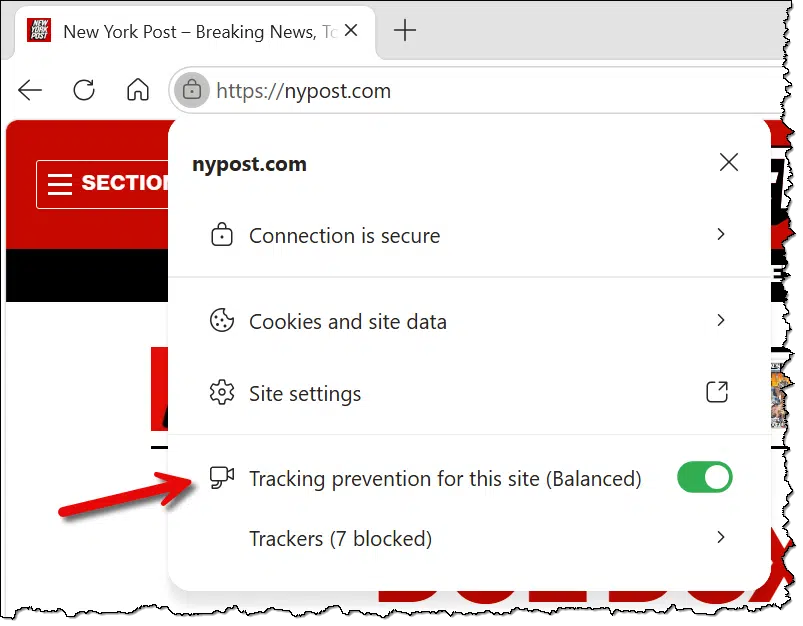
Turn it off and refresh the page (F5). If that makes the website happy, you’re done.
In Edge, this allows you to control tracking prevention per site. Other browsers may have similar settings accessed in much the same way.
Help keep it going by becoming a Patron.
Why tracking and ads get confused
Websites and advertisers use many techniques to track your online activity. Tracking prevention tries to block those techniques. That might include:
- Preventing certain known tracking scripts from being loaded.
- Preventing certain known tracking cookies from being placed or retrieved.
- Preventing suspected tracking cookies and scripts from operating.
- Identifying other tracking-like behaviors and preventing them from operating.
It’s an imperfect system. It’s likely that systems aggressively trying to gather tracking information are also trying to hide from tracking-prevention techniques. I suspect it’s a game of whack-a-mole: as changes are made, tracking works for a while, and then those changes are noted and blocked.
There are two catches.
- Ads themselves are often tracking you, so tracking prevention correctly kicks in.
- Techniques used to place ads on a page can be similar to tracking techniques, so tracking prevention might kick in when technically it shouldn’t.
In other words, tracking prevention can look like ad blocking, even if you’re not using an ad blocker.
What if I want tracking prevention?
Like it or not, websites are within their rights to insist you turn off ad blockers. Ads are, after all, part of the price we pay to view content without paying money for the site.
There are three ways to solve this confusion between ad blocking and tracking prevention.
- Turn off tracking prevention for that site, and live with the ads.
- Live without the site in question. Don’t visit it anymore.
- If it’s an option, pay for an ad-free experience.
For many kinds of websites — say news sites — finding alternatives isn’t hard. On the other hand, if a specific site is important to you, you’ll need to prioritize between privacy and ads.
It’s also constantly changing
This is an area of website design that’s almost always in flux.
The ads or tracking technology used today might change tomorrow.1 A site you’ve always visited without a problem might start asking you to turn off your nonexistent ad blocker, or the site that was giving you problems yesterday might start working today.
I guess that implies a fourth option: wait a while and see if things change.
Do this
If you run into this problem, turn off tracking prevention to see if it’s at fault. If it isn’t, you can turn it back on. If it is the cause of your inability to view a site, decide between keeping your activity private or seeing ads.
Subscribe to Confident Computing! Less frustration and more confidence: solutions, answers, and tips in your inbox every week.
Podcast audio

Footnotes & References
1: As it turns out, it changed between the time I answered this person’s question directly and when I got around to writing this article. The site in question no longer incorrectly accuses me of having an ad blocker.

I’ve always assumed that web sites intentionally gave that warning because they wanted to be able to track you for advertising purposes.