It only took five years.
When Windows 11 came out, one of the biggest complaints was the new taskbar. From the inside, it appeared to have been completely redesigned and reimplemented. From the outside, it added annoying features and took away popular ones… like being able to put the taskbar at the top or sides of the screen.
Five years later, that feature is back.
It’s implemented slightly differently than before, so I’ll show you how to make it happen.

Move the taskbar
Windows 11 finally lets you move the taskbar to the top or sides of your screen again. Open Taskbar settings, find Taskbar behaviors, and pick the position you want. If you don’t see the setting, install the 26H2 update first. Other old favorites, like resizing the taskbar, still aren’t available.
It’s a setting now
Right-click on the taskbar and click on Taskbar settings. In the resulting Settings window, scroll down to the “Taskbar behaviors” section.
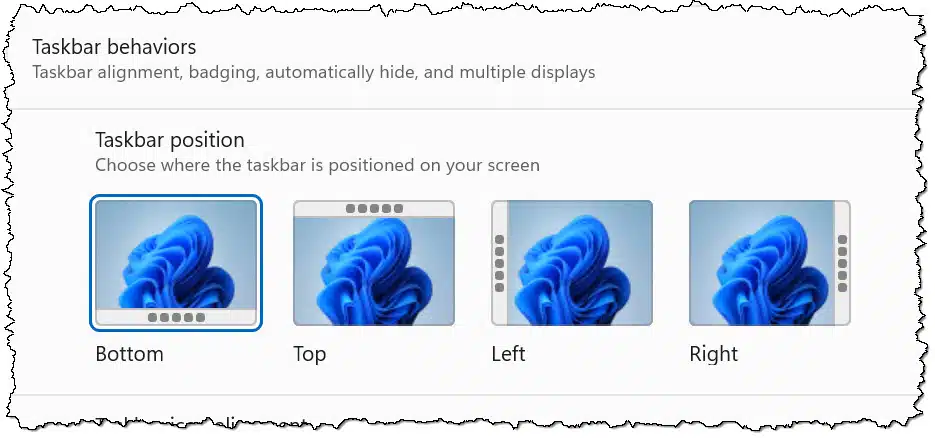
Click the position you want the taskbar to occupy, and you’re done.
It’s as simple as that.
Help keep it going by becoming a Patron.
If you don’t have the setting
This setting was added in a recent Windows 11 update, so make sure you’re up to date.
Specifically, the 26H2 update, which is basically a rollup of previous updates, should cause the setting to appear. Visit Windows Update in the Settings app.
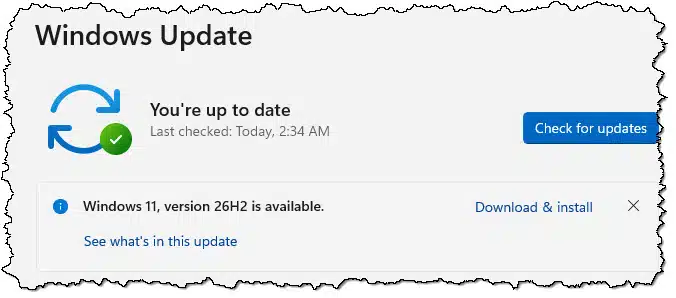
You should see that 26H2 is available. Click Download & install to get it.
If you’re not sure whether you have it, type  +R to open the Run dialog, enter “winver”, and click OK.
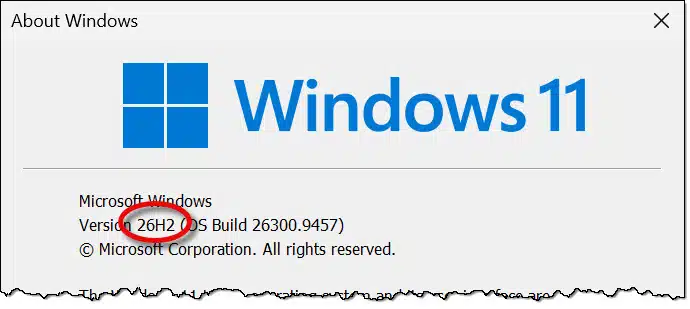

The version you’re running will be listed.
What’s not been fixed
Sadly, other common complaints about the taskbar have not been addressed.
- You can’t resize the taskbar to make it thicker.
- You don’t appear to be able to add a menu to the taskbar.
I used both of those constantly. You may have other annoyances that haven’t yet been addressed.
Maybe someday.
Do this
Move the taskbar to your heart’s content! Yay!
(I just did. It’s now on the side of my 3840 × 1600 display instead of taking up space along the entire bottom of the screen.)
Subscribe to Confident Computing! Less frustration and more confidence, solutions, answers, and tips in your inbox every week.


I would guess that all Windows users that really wanted thid feature have helped in the past years already with StartAllBack or Open-Shell. So I like many others now do not care anymore what Microsoft does.