Apparently not, though they’re pushing it hard.

It’s no secret that major companies have been pushing AI hard. Whether or not users want the functionality, they’ve been shoveling it into products and websites.
Google recently added something called “AI Mode” to their search bar. They also announced some changes to AI search that made many wonder if AI mode will become the default and preferred search mechanism.
It’s… complicated.

AI and search
Right now, Google is not making AI Mode the default. However, Google and other sites are pushing AI hard. It’s important to understand the difference between AI chat, AI answers, ads, and real search results.
AI was already here: a regular Google search
Google has already been under fire for including AI-generated summaries in its search results.
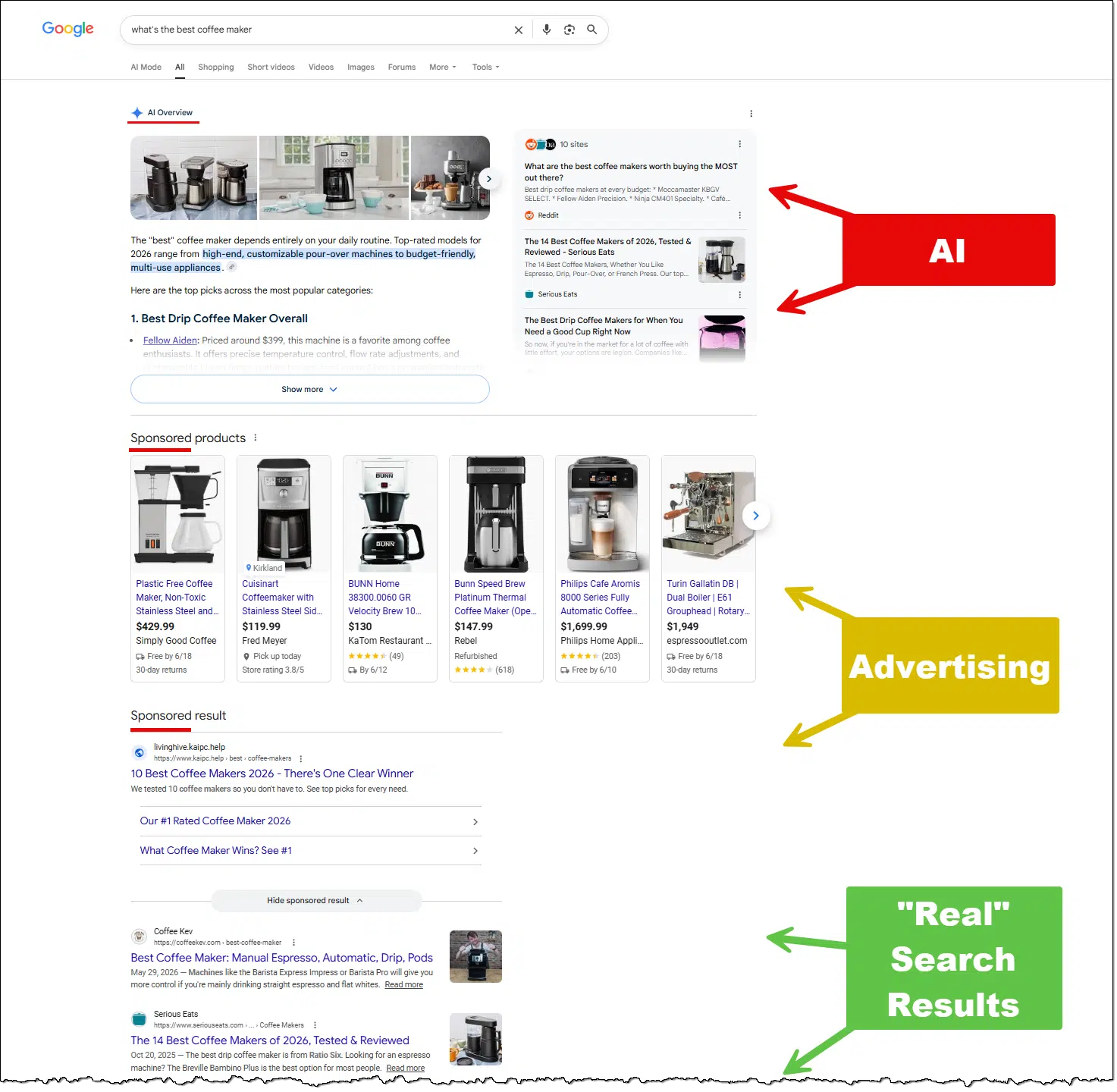
Most searches now contain three sections.
AI summary. As with most AI, it’s unclear what Google bases this summary on, but it attempts to provide the answer to the question being asked or search being performed. The idea is that reading this section alone will satisfy the person searching for information.
Advertising. This has little to do with the actual search; it represents items that companies have paid Google for placement. In our example, there’s nothing that says these are the “best” coffee makers at all. They’re just advertisements for coffee makers or websites, many of which might be complete garbage; they just paid enough to be shown whenever anyone includes “coffee maker” in a search.
“Real” search results. Scrolling down under AI’s response and ads, we find the traditional search results most of us are looking for.
There are multiple issues with this state of search results. Two of the most obvious:
- The addition of the AI summary pushes actual search results further down the page. I had to zoom out to even show them in the image above; by default, they were not visible without scrolling down (which many people don’t bother to do).
- AI summaries are still often incorrect.
Help keep it going by becoming a Patron.
AI mode
If we perform the same search in “AI mode”, we enter into a chat with Google’s AI1.
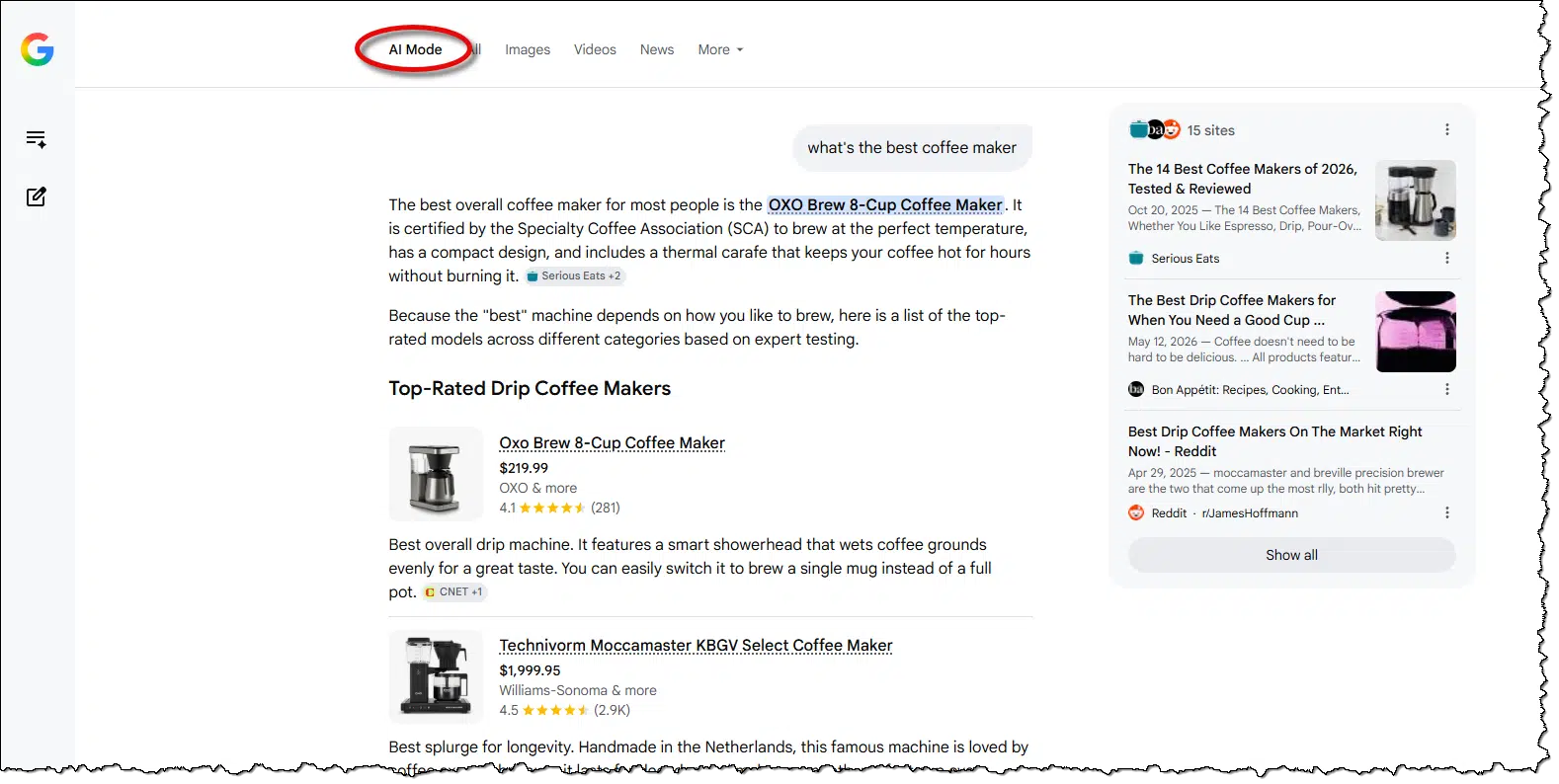
Once again, it’s unclear where the information comes from, but now the entire results page is AI-generated. There’s a summary and even a specific coffee-maker recommendation. This is followed by a list of top-rated coffee makers and concludes with a table comparing the listed models (not shown here). Google then asks a follow-up question to continue the chat: “To help narrow this down, how do you usually make your coffee—do you prefer a quick single cup from a pod, a full pot of drip coffee, or espresso drinks like lattes?”
Depending on your faith in AI, it’s not a bad experience. It’s worth noting, though, that Google displays the common disclaimer: “AI can make mistakes, so double-check responses”.
AI mode is not currently the default. It’s unclear if it ever will be, but we can’t rule it out. Why? Because of competition.
ChatGPT has entered the… chat
Many people now use ChatGPT and other AIs instead of search engines at all.
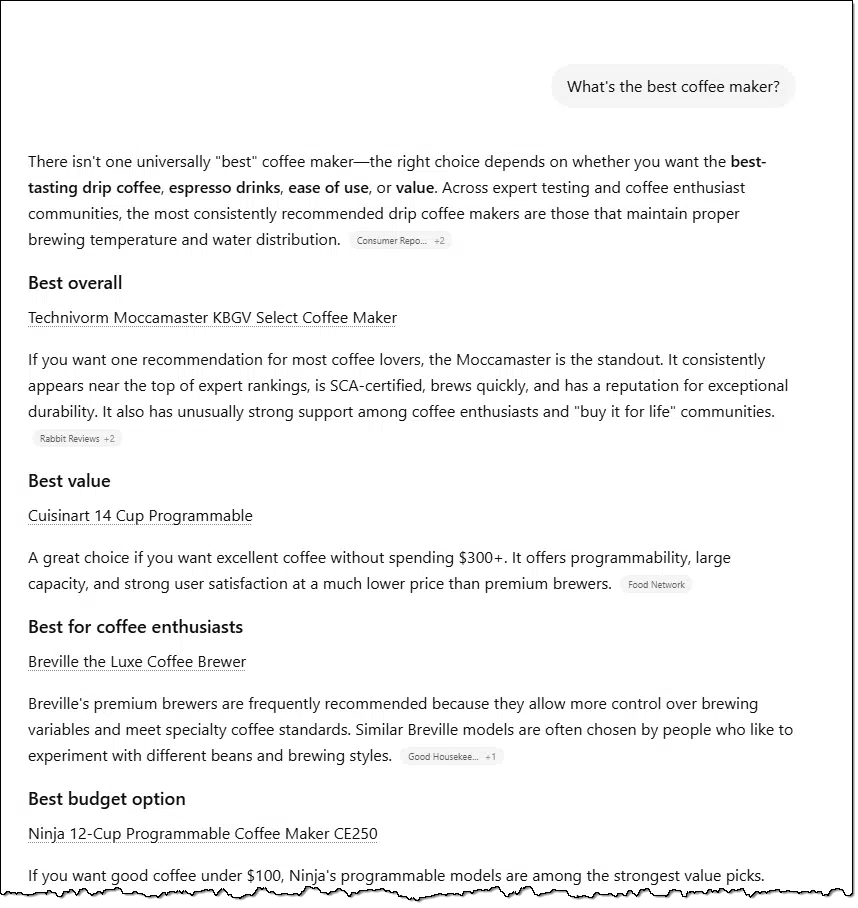
Much like Google’s AI mode, it’s not a bad experience, and it gives confident-sounding answers. Whether they’re accurate or not is unclear, though ChatGPT did not include the disclaimer about accuracy. It did, however, include links to the sources used, though once again at the end of the response, off the bottom of the screen.
Given that so many people are using alternative AI chatbots instead of search, it’s no surprise that Google would feature their own more prominently. After all, it’s the search interface most of us have used for years.
DuckDuckGo somewhere else
According to reports, use of the DuckDuckGo search engine saw a significant uptick after Google’s announcements relating to AI mode. In the face of Google’s apparent push to include more AI, people turned to alternatives that presumably wouldn’t do so otherwise.
I get it, as DuckDuckGo promotes itself as privacy-focused and giving the user greater control. And yet, I was disappointed by the results.
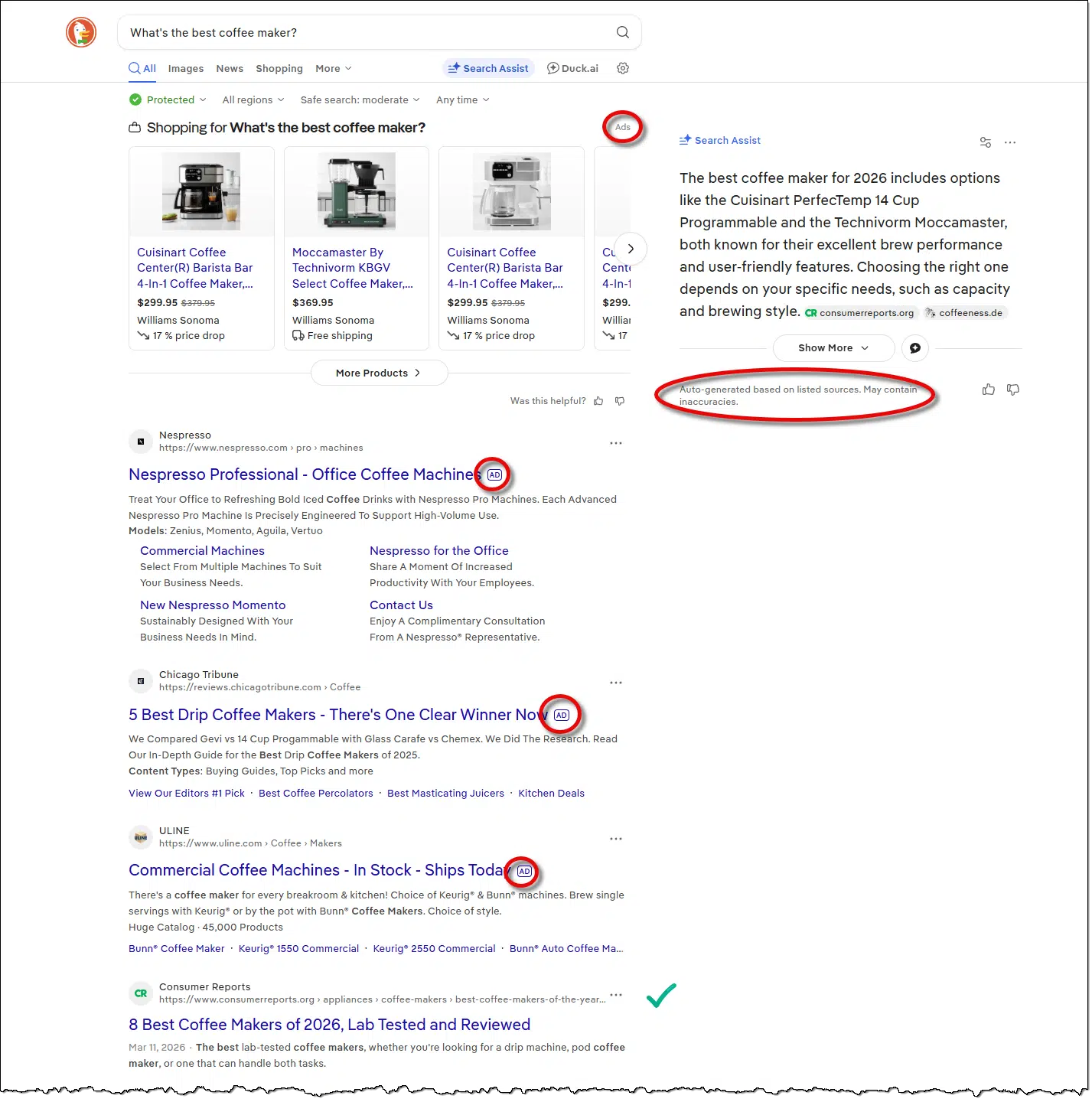
It included both an AI-generated summary and enough ads to push the “real” search results off the bottom of most people’s visible page.
Et tu, Kagi?
I pay for2 and use Kagi as my primary search engine. So I ran the query through it for comparison.
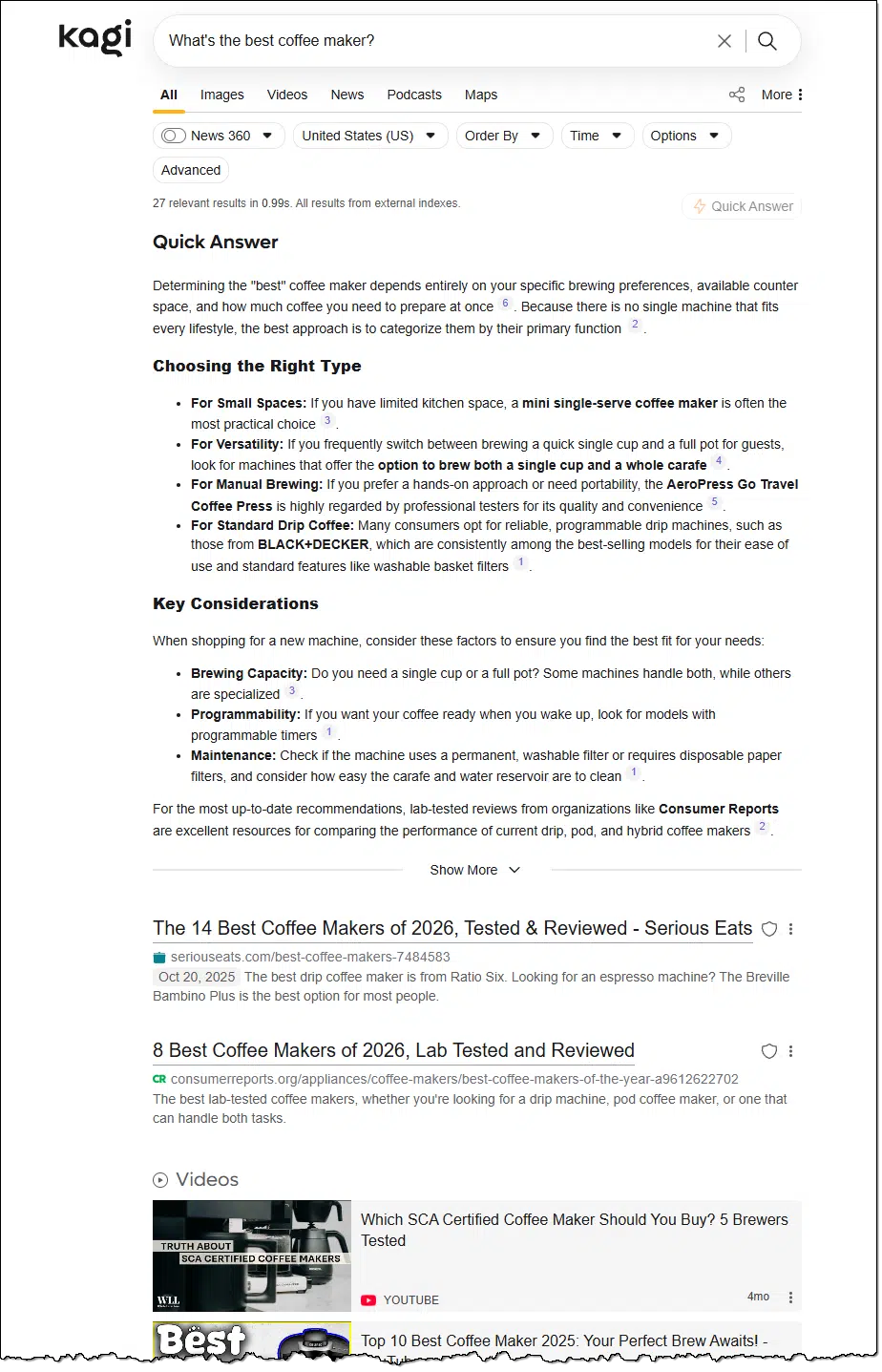
I was surprised to see a sizable AI-generated “Quick answer” at the top of the results. I was not expecting that.
But in Kagi’s setting, I found this:

It is interesting that my use of a question mark triggered AI mode. I tried without the question mark, and indeed, I got search results and nothing more. Exactly what I want most of the time.
Kagi redeemed itself.
Related

Why I’ve Stopped Using Google Search
Google search used to be the winner by far, but recent decreases in its trustworthiness and the improved offerings of other search engines make switching a pragmatic choice.#170290
A word about my examples
In my previous article and video about leaving Google Search, I got a lot of feedback that boiled down to “Well, you searched for coffee makers, why are you surprised that you got results about coffee makers?”
My concerns today are twofold.
AI results are interesting and perhaps helpful, but you still can’t blindly trust them. Unfortunately, most people see the AI-generated summary or answer and take it as a true, accurate answer without doing anything to confirm it. This is true for coffee makers and anything else you search for.
Advertisements are often misleading in two ways. First, they’re often disguised as or mistaken for traditional search results; many people don’t realize they’re ads. Second, they rarely relate directly to the question. In my examples above, I’m looking for the ‘best’ coffee maker. But the advertisements shown aren’t there because they’re best; they’re there because someone paid to display them. The coffee makers or linked pages referenced in the ads could be legit or could be complete garbage.
The future of Google search
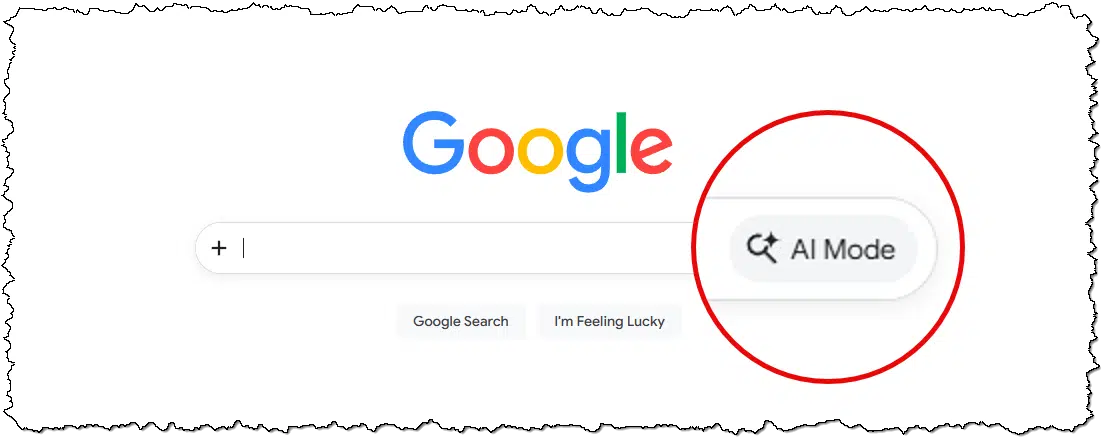
So, is Google going to make AI mode the default?
Today, the answer is no. It’s an option you can select as you enter your search query or on a search results page.
Tomorrow? Who knows? It’s certainly possible, as competition in both the search and AI space forces Google to make competitive decisions.
All I can say is that this is a rapidly changing space.
Do this
The single most important thing is to understand the difference between:
- AI chats
- AI-generated results or summaries
- Ads
- Normal/traditional search results
Use them as you see fit, but understand the strengths and weaknesses of each.
Subscribe to Confident Computing! Less frustration and more confidence, solutions, answers, and tips in your inbox every week.


I just did a Google search for something. On top were ads, followed by the AI summary which was helpful in this case (it sometimes can be helpful).
“Sponsored products” title was prominent on the top of the page. Next came the ads. After the ads, came the AI summary but the search results were literally 4 screens down.
Duck Duck Go
On top were the well-labeled ads, next came the real search results which appear 3/4 the way down on the the first screen.
The AI called “Search assist” was in a small window to the right.
So far, I’ll stick with DDG which has been my main search engine for decades. I like it because it gives me what I ask for, not what they think I want.
Google started out as a search engine but has evolved into an advertising company. Google’s famous old motto “Don’t be evil.” has been replaced with suck as much money out as we can.
They’re not alone in that attitude. Sadly, it seems that our free enterprise system has lost it’s aspect of profit with integrity …
I liked this video, I really would have been interested to hear you thoughts on Startpage as a default search engine in terms of the quality of results returned. I’ve been using it for some time and find it just gets to the point.
Always appreciate other viewpoint!
StartPage is a privacy focused proxy for Google search. It uses Google to search, but it strips away all identifying information and gives you non-personalized results. It’s privacy focused as is Duck Duck Go, but you get the Google results without personalization or AI summaries. It’s based in the Netherlands, so you get the benefit of privacy protections the GDPR (General Data Protection Regulation) provides. GDPR might be a PITA sometimes (the idiotic cookie warnings), but it legally binds the company to strict data privacy standards that go beyond what US-based competitors like Google or even DuckDuckGo are required to follow.
I’m trying it out. It reminds me of Google’s results page 25 years ago.
It’s a fork from the old Scroogled. It’s likely that it will be eventually killed off the same way Scroogled was.
Google isn’t forcing us to use AI, but they are definitely trying to trick us into using it. This seems to be the general trend with search engines. Duck Duck Go does it too, but it doesn’t hide the results under 4 screens like Google and others do.
See this article on Dark Patterns
“Google isn’t forcing us to use AI….” Lately I’ve become a fan of OpenAI, so much so that if Google started charging for it I might, depending on the cost, happily pay for the service.
Recently my Win 10 PC would wake up seconds after being put into sleep mode. OpenAI’s troubleshooting advice was beyond my expectations. Like having Leo or another tech wizard at my side.
I recently did a search for the Flat Rock Playhouse to learn of the upcoming productions. Google promptly presented a list of sites.
First among them was flatrock.net. Looking like a bonafide site offering tickets, I bit. What, much to my embarrassment, turned up was Go Tickets. Looking like a processor for the playhouse. Ticket prices exceeded $100 ea.
After my purchase and further research I found flatrockplayhouse.org, where ticket prices began at $50. Now attempting to cancel the order and get a refund I get the message that they can’t do either.
Lesson learned. I now will alert others and the state attorney’s office to un-ethical business practices. Expensive lesson. I just hope the expensive lesson at least produces an enjoyable evening.
The search produced, what may have been a fee based priority order of presentations. Beware. AI assisted? Rules no doubt set by Google.
One think I haven’t yet seen you mention about ads in Google. I think it used to be they appeared at the top of the first page, but further down and on subsequent pages, you’d be in legitimate search results. Now, they show at the top of EVERY page. So obnoxious.
I have two questions regarding the AI summaries:
1) How does the AI choose which sites it uses to source its information? Is it working with a list of top sites in the genre based on traffic numbers? Or are websites maybe covertly paying for priority?
2) How can Google search (and other search engines) get away with presenting information sourced from websites without adequate attribution? They are ripping ad revenue from websites without any sort of compensation, surely there must be cause for a class action law suit?
1) We don’t know.
2) Because they can? There will be legal challenges, of course, but I’m skeptical of the outcome.
AI does not make mistakes, it gets sabotaged. AI finds what is on the internet. But AI cannot tell what is true information, what is an error, what is malicious, and what is propaganda that is posted to the internet. If it is on the internet, it is a source.
Could search AI be restricted to ‘official’ sites? I suppose it could, but it would miss so much data.
I understand what you are saying about AI. I want to see if you can guide me to a live human being within LinkedIn who can do something about changing my city, state it presently shows of Champaign, Illinois, below my photo to the correct city and state I changed it on March 31, Albuquerque, New Mexico.
I keep going inside where I changed it each week and it does say Albuquerque, New Mexico. LinkedIn replied back to me on April 1 and said they received my message and will look into it ASAP. They still have not.
In the last couple of months, I also have contacted 5 employees, who work for LinkedIn, who wrote Tech and some AI stories praising AI and telling them the same story I am telling you. No one will respond to me to direct me to a solution finder. Even on Facebook and a couple of other sites I changed my new destination in less than a minute.
Can you please provide the name of someone I can contact? It seems like LinkedIn is getting just like Google, Facebook and so many other big tech honchos who have no live human beings to help customers. Just stupid AI who CAN’T understand what most of us humans are saying or asking them. Thank you.
Sorry, I know of no human contacts there.
I use Firefox as my default web browser, and initially AI concerned me because of what I considered to be potential privacy issues. Over time since, I’ve read several items from various newsletters on the topic espousing the author’s take, so now after reading the terms of use for (in my case) Gemini, I’m less averse to using it, but not in the form of installing an LLM + agent combo like Llama et-al. Instead, I’ve chosen to enable the AI sidebar in Firefox, choosing Gemini as my agent of choice (mostly because I use Google search, and I prefer to keep those eggs in one basket), and I’m happy with my experience so far. My first project was to create a Python script to put a small window on the screen with a title and message I provide on the command-line because I wanted to create a reminder system and nothing available as an app suits me. It took a few iterations to get lust what I want, but the process was much faster than it would been if I wrote it myself with no assistance other than my research, an the result may not have been as satisfying either. I use Windows Task Scheduler to schedule my reminders. My Python script sounds a beep then displays my window with the message and title I provided in the scheduler, and most importantly, it remains on the screen until I press a ‘Dismiss’ button to close it. The persistent window display is what I wanted in my reminders system, and what no existing app does, so my Python script’s the perfect solution for me. Today, using either the address bar or the AI side bar, I ask questions about how to do things I’m unfamiliar with. Since I always get a list of source information with the AI overviews, I double check any information using the listed sources, and there have been times when there was a better solution in one of the source information items. For me, having Gemini handy is almost like having a tech guru at hand whenever I need one. Additionally I seldom request the best of any specific item unless I want the correct name for it so I can search for the available options myself.
Ernie
I use the Brave browser and therefore Brave search. It produces an AI summary at the top of the results that I find is usually pretty good.
Other than Google Maps, I avoid Google anything unless I am forced into it. Unfortunately there are a couple of organizations I belong to, such as ITDRC ,that are very Google-centric and I have an Android phone, so I can’t completely avoid it. I’m using Yahoo mail. I’m thinking I need to switch to something more private such as Proton but it would be a huge hassle to switch completely.
Pete, I use Brave, too, and don’t understand why it’s not used by a lot more of us. Opening Google search in Brave, the first result comes from OpenAI, not ads, and I’ve come to respect OpenAI’s feedback.
I also use Brave. I haven’t turned off the AI results and sometimes use them. I do appreciate that three AI summaries include links to the sources.
Even though I have used Gmail for many years (can’t avoid it with Android) a couple of years ago subscribed to paid Proton and have been pretty happy. I use it instead of Gmail more and more. I also use their calendar, password locker (not as a primary) and recently their AI assistant Lumo.
I use Brave as well and have generally found it to be pretty good. That being said I have usually already researched a topic on my own and had to correct the AI response; I have no idea if the corrections I make (and Brave acknowledges) “stick” and improve someone else’s results on the same topic.
Thanks very much for this information on AI search results. I’ve been really disappointed in Duck Duck Go for a while now because they continually produce ads and Amazon as search results. Today I’m trying Kagi and so far am very pleased.
” I have an Android phone, so I can’t completely avoid it”.
If you are using an Android phone, you are fully immersed in Google. I use it myself, but just be aware, it’s Google and fully integrated with Google services. As the old dish soap commercial goes, “You’re soaking in it.” It’s actually the world’s most widely used OS.
I use AI to check many of my answers on Ask Leo! If I were to use all the answers they gave me, I’d be fired on the spot. AI is so often wrong, all I trust it for is grammar and language clarity. It feels like they are right about 90% of the time, but that 10% wrong answers make it dangerous.
If you wat to find out which coffee makers are the best check Which? reports
That’s kinda beside the point of this article.
The search engine coded in Java.