You can’t, but you can manage it.
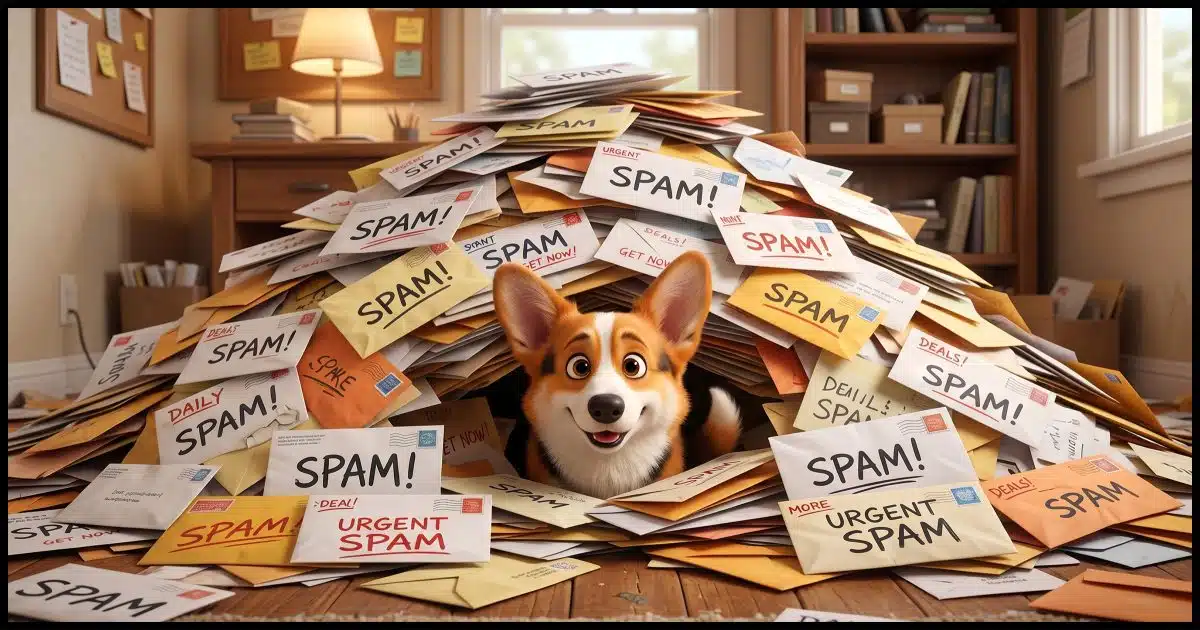
Assuming that you mean you get 300 spam emails a day, I agree that’s a fair amount. Between all my various email accounts, I suspect that I probably get around that many.
The question is not how to stop spam. There’s no way for you or me to stop spam. The better question is how to deal with it so it’s a minor annoyance rather than an overwhelming chore. And of course, how to avoid or at least minimize it in the first place.
Sadly, as I update this article 12 years after its initial publication, very little has changed.

Mark as spam and move on
You can’t stop spam, but you can tame it. Don’t try to block or unsubscribe, because that backfires. Instead, let your spam filter do the work. Mark spam as spam, and over time, your inbox will get cleaner.
You can’t stop spam1
The bottom line is that anyone who has your email address can send you email. Period. That’s how email is designed to work.
That’s good in that anyone who knows you and your email address can communicate with you via email.
It’s also bad, because anyone who knows your email address can send you junk trying to sell you stuff, get you to download malicious attachments, or fool you into handing over your private information when you shouldn’t.
Help keep it going by becoming a Patron.
Related
Why Doesn’t Blocking Email Senders Work?
Most email programs can block email from a specific address. Unfortunately, that's completely ineffective when it comes to spam.#4731
Blocking doesn’t work
On the surface, email blocking (or banning) seems like the perfect solution, but if you look deeper, spammers work around it instantly.
Blocking simply tells your email provider or email program to discard any email you get from a specific email address.
Unfortunately, spammers send email from fake addresses. They typically use a different fake email address on every message. I’d guess that your 300 spams a day are from 300 different email addresses. And those are 300 different email addresses from the 300 spams you got yesterday, and the day before, and the day before that.
The fake “From:” addresses are often designed to look like they come from your friends and acquaintances. If you block one of those because you got spam from it, then you’ve blocked your friend, who had nothing to do with the spam in the first place.
Blocking just isn’t a viable approach.
(And for the record, deleting history does nothing to spam.)
Unsubscribing does the opposite
Related
How Do I Unsubscribe from All These Unwanted Emails?
There are emails from which you should certainly unsubscribe if you no longer want them. However, there are emails that you absolutely should never unsubscribe from. I'll review the difference.#14941
I often hear from people who click on the unsubscribe link sometimes included in spam emails.
Don’t. Clicking on an unsubscribe link in spam will get you more spam, not less.
Spammers do not honor unsubscribe requests. In fact, many use unsubscribe requests as a way to identify which of the millions of email addresses they’re using belong to real people. Those email addresses are more valuable, and as a result, they will get more spam.
Now, there’s an important distinction to be made here.
- Do use unsubscribe links from reputable providers, such as people you know and mailing lists you signed up to join.
- Do not use the unsubscribe links in emails that you don’t recognize or are obviously spam.
Good spam filters make life bearable
What does work are good spam filters.
Spam filters work by looking not just at where email comes from, but the nitty-gritty technical details of the email: what it’s about, what it says, how it says it, and how many other people are getting that same email message. If it looks like spam, the email is placed in your spam or junk mail folder instead of your inbox, and you never have to see it.
Of the hundreds of spam emails I get every day, I’d say fewer than five — perhaps even fewer than one or two — show up in my inbox.
If you have 300 spam emails arriving in your inbox every day, I’d guess that you’re not protected by a spam filter at all.
If you have 300 spam emails arriving in your spam folder every day, that’s the system working as it should.
Your spam filter
If you’re using webmail, like Yahoo!, you have a pretty good spam filter available to you already.
Most modern email programs, like Outlook or Thunderbird, also come equipped with a spam filter. Most enable it by default, and most allow you to tweak how aggressive it is in the program’s settings. Exactly how this works depends on your specific program.
However, just because you have a spam filter doesn’t mean you’re done.
Training the filter
The default spam filter offered by most email services or most programs is typically relatively good.2
But you can and should make it better.
You make it better by telling the service or program every time you find spam in your inbox. When you see spam in your inbox, right-click the message and click “Mark as spam” or its equivalent.
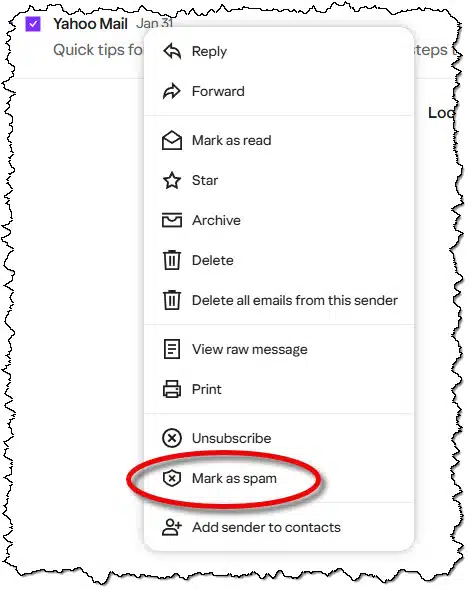
The message will be moved to your spam folder.
Doing this tells Yahoo! that messages like this are spam. It takes that information and uses it to refine its spam filter to get better at automatically detecting spam in the future. This could be either globally, if enough other people say the same things about emails like that, or perhaps just for you if the system’s spam filter supports that level of personalization.
Keep doing that, and the amount of spam you find in your inbox should decrease over time.
If you’re using a system other than Yahoo!, such as Gmail, Hotmail, or any other service, or if you’re using an email program such as Outlook, Thunderbird, or Windows Mail, take the time to learn its spam-filtering features. Most now have this type of “learning” spam filter that relies on you marking spam in your box when you find it.
False positives
People sometimes worry that they may lose email that is incorrectly filtered as spam.
It’s a valid concern. You should check your spam folder every so often to look for email that has been mistakenly filtered as spam.
But — and this is important — instead of just moving that email back to your inbox, mark it as Not spam instead.
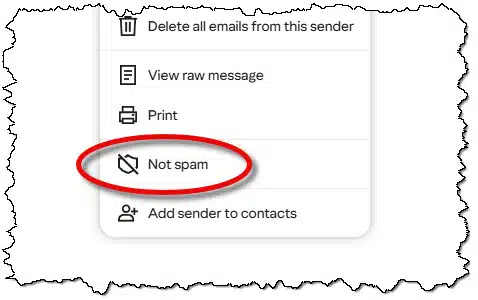
This does the opposite of what the Mark as spam option does. It tells your email service or program that the selected message is not spam. The spam filter is then adjusted accordingly. As with spam, it may take correcting a few false positives before the filter starts getting it right consistently.
Related
Why I (Still) Don’t Like Challenge/Response Spam Blockers
An error caused my newsletter to come "From" the wrong address. Flooded with challenge/response mails, I wonder: what other messages are you missing?#4714
A note on challenge/response blockers
Preventing spam in the first place
As I said, there’s no way to stop spam, but there are ways to deal with it in a way that makes it less of an issue.
Similarly, there’s no way to prevent it from starting. Eventually, all email addresses get spam.
What you can do is avoid asking for spam. Asking? Yes, asking.
We “ask for it” in several ways.
Related
How Does Blocking Pictures in an Email Protect My Privacy?
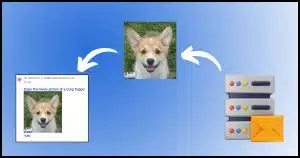
Email programs commonly block remote images. I'll look at why, and how spammers and others use remote images for good and evil.#3275
- Posting an email address publicly. If your email address is visible on a webpage somewhere that anyone can visit, then “anyone” includes spammers. They harvest email addresses from webpages on the assumption that they are more likely to be real, active email addresses than simply guessing randomly (which they also do).
- Responding to or acting on spam. Replying to any form of spam signals the spammers that they have a real, live person at this email address, and that they should send you more spam; lots more spam, even if you ask them to unsubscribe you. Similarly, acting on spam (such as clicking on a spammer’s link or — horrors! — purchasing a product through spam) also tells spammers, “We’ve got a live one!”
- Enabling pictures in spam. The reason pictures are disabled by default on most spam-filtered email services is that the mere act of accessing an image so that it can be displayed can tell a spammer they have a real email address. Expect more spam.
- Giving your email address to the wrong person, company, or agency. This is one reason many people have more than one email address or create one-time or “throw-away” email addresses. Many companies share their email lists with others or even sell their customers’ email addresses. Reputable companies do not, so keep shopping at Amazon and the like, but be careful when dealing with a company you’ve never dealt with before. Consider creating and using a different email address for this purpose.
The list goes on. What’s worse is that it includes items that are not in your control.
- When you send a joke, photo, urban legend, rant, or what-have-you to a friend, and they then forward it on without removing your email address from the forward, your email address is now in the wild. Worse, when a friend sends you an email like that and does so by putting you and 200 other people on the To: or Cc: line, they’ve just advertised your email address to everyone else who got that email. And when they forward it without trimming your email address, your address goes out to potentially hundreds or thousands of people you don’t know. And some are spammers. There’s nothing you can do except perhaps teach your friends not to do that — but by then, it’s too late.
That’s why I say that sooner or later, every email address will get spam.
Do this
Mark spam as spam, and get on with your day.
You can’t stop spam, but you can manage it so that it becomes less of an annoyance. If that spam is landing in your spam or junk folder, then things are working as they should.
Subscribe to Confident Computing! Less frustration and more confidence, solutions, answers, and tips in your inbox every week.


Can I delete the messages in my spam/junk folder? Do then messages need to be there in perpetuity for the filter to work? Do the messages in the folder take up room on my computer?
Thanks
Yes. You can delete spam as soon as it appears in the Spam or Junk folder or as soon as you mark it as spam. Your spam filter stores what it’s “learned”.
Of course, messages take up space, but unless the emails contain attachments, the space they occupy is negligible .
You can delete them if you like. Most systems will auto-delete them after a certain amount of time.
is it not possible to block the URL instead of the email address?
Yes, it’s possible, but it’s useless, as useless as blocking email addresses. Spammers constantly change their email addresses and IP addresses.
Most spam is sent through botnets. Botnets are networks of computers infected with malware, which they use to send large volumes of spam emails. Botnets send out approximately 85% of the over 100 billion spam messages sent daily. These botnets make it easier for attackers to distribute spam, phishing emails, and malware on a massive scale- It’s impossible to trace the source, because the computers that send them are of unsuspecting users whose computers are infected.
Depends on your email system or program, but generally, no. (Besides, the URLs keep changing just as fast, or faster, than the email addresses spam is sent from. It would be pointless.)
Can I delete the msg in my spam junk folder? Do messages need to be left there in perpetuity for the filter to work?
Yes. You can delete spam as soon as it appears in the Spam or Junk folder or as soon as you mark it as spam. Your spam filter stores what it’s “learned”.
I really miss Eudora (!) – an old email client. So I switched to Outlook (client), which I am NOT fond of. The “Rules” are, by their admission, broken – only sometimes work. And the “spam” filter setting only has three options (including OFF). I have had to set up my own VBA rules, which makes it livable.
My problem, however, is that the option to mark something as NOT JUNK and NEVER BLOCK do not work on some of my very important mail. It goes into the junk folder regardless of how many times I tell Outlook to let it through. Most of the time this email shows up with the word [SPAM] added to the subject. I am unable to prevent it, can’t find who is doing it, and it is NOT as simple as the word (although that is what I see visibly). Ideas???
Eudora was great. It was my first or second email client. Later I switched to Outlook Express which was simple and did everything I needed. When OE was removed, I tried to Outlook from MS Office because I had it already. Too bloated. I switched to Thunderbird 20 years ago and haven’t stopped.
I still run Outlook Classic and New, every once in a while, only when I have to answer a question on them.
I’ve never used Eudora, but when Microsoft released their Outlook web app, I switched to Thunderbird and I like it, but recently I’ve encountered issues I’d rather not deal with so I gave BetterBird a try, and I like it a lot. It’s a more privacy focused fork of Thunderbird, so it’s still familiar.
Ernie
Switch to a different client? Thunderbird, emClient, and many others are out there.
I read AND FOLLOWED UP WITH USING, Leo’s suggestions here about NOT blocking or unsubscribing spam probably 2 years ago. His advice on this is GOLD!
Since taking his advice and simply marking unwanted email as spam, I now get very few spam messages. Maybe 3 or 4 a week and often less. I look forward to seeing what he comes up with about the AI stuff and intend to follow that advice too.
Why not block the domain? That’s everything to the right of the @.
Because it’s futile.
https://askleo.com/why_doesnt_blocking_email_senders_work/
Could you do a similar writeup on test messages? My methodology entails separating texts from unknown sources into a special directory which I delete all at least daily and mark as spam. It is an inconvenience (minor) but does it do anything to stop the barrage? Is there a better way?
My approach is to view any email message from unknown senders as spam, because I didn’t request it. I don’t want to get advertising messages because a lot of spam is disguised as advertising, so I simply mark anything I get from unknown sources as spam. When it comes to messages I receive from friends/family, if I wasn’t expecting it, I contact them to confirm they sent ti before opening and in cases where they didn’t send it, I delete it, not marking it as spam so my friend’s/family’s messages don’t get marked as spam too.
Ernie
I don’t understand why it is allowable for spammers to send emails with pornographic titles. They all go to spam, as I’ve directed them to for a long time, but then the titles are still there. I tried reporting it to AT&T but this entails opening the email and forwarding it to AT&T which I suspect made the problem worse. How is it legal for spammers to send this kind of content?
Freedom of speech considerations prevent some pornographic email message titles from being illegal, but based on the content, much of those messages are illegal, but finding and prosecuting senders is the hard part. If it’s spam, as Leo says, most of it’s sent using bot nets, so the owners of the sender’s IP addresses may not know they’re now part of such a network.
My solution is the same as for any spam. I mark it as spam in my BetterBird email client, and move on. I use BetterBird to access several email accounts from a single app, and each has it’s own spam/junk folder. The advantage for me is that I open one app and have access to all my email accounts at once. When I mark any message as spam, it’s moved to the account’s spam folder so i no longer see it. I can ALT-Click the spam folder in the left column and delete spam in bulk so I never have to see any of it again.
Ernie
If it’s landing in spam then the system is working as it should. There’s no global concept of “allowed” when it comes to email.
I thought the article was about stopping spam from getting into your spam folder. I have a few e-mail addresses and a few thousand go into the spam folders every day, which I have to check everyone because some e-mails are valid.
As you continue to mark non-spam messages as such in your spam folders, the situation should improve over time. I did that for a few years, and now, the only email that ever gets diverted to the spam folder that’s not spam are the ones that are new to me, depending on the sender’s reputation (often senders for apps I’m trying out), so I mark them as not spam and move on, just as I do for spam.
Ernie
I’m constantly receiving non-spam email in my spam folder and I always mark them as such. Yet there are at least 3 or 4 legitimate email addresses that are still going into my spam folder after having been marked as non-spam for at least 2 years! I use RCN/Astound email and I’ve contacted them several times about this problem but nothing ever changes. It’s unbelievable how many obvious spam messages go straight to my inbox! Their spam filter does next to nothing as far as I’m concerned.
Have you tried adding those addresses to your address book? That works for many email programs and webmail sites.
This is sadly true for many email providers. Spam filters, while necessary, are often seen as a checkbox (“yes, we have one”) rather than a feature (“yes, we have a REALLY GOOD one”). Google, and from my recent experience, Proton and FastMail all seem to have good ones.
BlueMail for mobile, the client I use on my phone, considers block sender and mark as spam as interchangeable, one button serves both i.e. block sender/mark as spam. Makes following Leo’s advice a bit tricky (no reflection on Leo intended), seems to work though.
Blocking senders can be risky. Spam which comes from a friend or contact’s spoofed address will block any legitimate email from them.
Hi, Leo,
There’s a grammar issue in the section about challenge/response spam blockers that causes confusion.
“Those are systems where the first time YOU send someone a message, THEY get an automated response that includes a hoop THEY need to jump through to prove that they’re human and not a spammer.”
As written, that doesn’t make sense. (The RECIPIENT needs to prove they aren’t a spammer?) I think what you meant to say is “Those are systems where the first time someone sends YOU a message, they get an automated response…” You wrote it backwards, switching the sender and recipient.
I can see where marking EMAILS as spam will work but I believe someone was asking about TEXT messages. That locks up my telephone. Political texts begging for money, fill out surveys, on and on – I get over 200 a day on my cellphone in the “Messages” app. Sending to Trash does nothing. They return the next day with more. I have tried everything my cell provider has suggested but within a week my Trash is full. I have a Samsung android. What do we do to stop them from locking up the phone?
My SMS app allows me to block and report spam. Don’t all phones have that? It only blocks numbers. That’s not much better than marking an email as spam, though.