Where else but OneDrive?

This one ain’t great.
Microsoft is changing the deal they offer for Microsoft 365 Family edition, and reducing the amount of storage available if you share your subscription with others.
If you’re using a lot of OneDrive storage, you’ll want to pay attention.

Microsoft 365 storage changes
Microsoft 365 Family is changing. Instead of 1 TB for each person, everyone on your plan will share just 2 TB. If your group uses more than that, uploads stop at your next renewal. Check who you share with and how much space everyone uses. Not sharing? You gain space.
The change
Here’s the relevant section from the email Microsoft 365 users are getting:
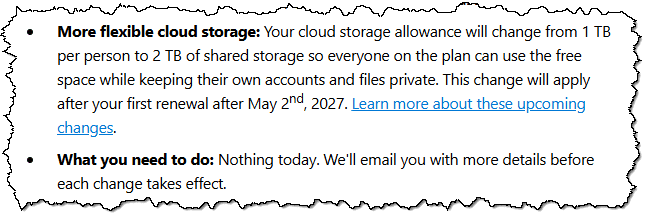
The most important section is “change from 1TB per person to 2TB of shared storage”. “More flexible” is in the eye of the beholder.
This is from Microsoft’s storage quota page, which discusses OneDrive storage allocations for Microsoft 365 plans.
Before:
- Family plans1 included 1 TB per person, and you could share your subscription with up to five other people. That means in total you and your five friends could use up to 6 TB, 1 TB each.
After:
- Family plans include 2 TB shared storage. You can share your subscription with up to five other people, but you share a single 2 TB allocation of space. (You don’t see each other’s files; you simply share the space allocation.)
Plans purchased on or after October 6, 2026, apparently get the “after” deal.
The kicker?
Previous purchases will be converted to the “after” deal at their next renewal. If you and the people you share with are heavy OneDrive users, you could all run out of space the day the change takes effect.
Help keep it going by becoming a Patron.
An example
Let’s make up an example.
Let’s say I have the Microsoft 365 Family plan, and I share it with four of my closest friends: John, Paul, George, and Ringo. We’re all heavy users of OneDrive.
Based on the plan purchased before these changes, we’d have something like this.
| User | OneDrive space available | OneDrive Space Used |
| Leo | 1 TB individual | 750 GB |
| John | 1 TB individual | 500 GB |
| Paul | 1 TB individual | 500 GB |
| George | 1 TB individual | 800 GB |
| Ringo | 1 TB individual | 100 GB |
| Total | 5 TB | 2,650 GB ~= 2.65 TB |
We’re using a total of 2.65 TB, and each person uses less than the 1 TB of storage allocated to our individual account.
As soon as the change takes effect, the picture changes to something like this.
| User | OneDrive space available | OneDrive Space Used |
| Leo | 750 MB | |
| John | 500 MB | |
| Paul | 500 MB | |
| George | 800 MB | |
| Ringo | 100 MB | |
| Total | 2 TB shared | 2,650 MB ~= 2.65 TB |
No one has changed the amount of space we use, but that 2.65 TB now exceeds the 2 TB of storage we share. OneDrive will stop accepting uploads from any of us.
Microsoft reduced the total amount of storage available to us.
The solutions
There are several solutions, but none of them are particularly pleasant.
- Purchase more OneDrive storage. I’m certain this is Microsoft’s preferred solution, and I expect the eventual error and promotional messages we’ll see will make this as easy as possible. And, to be fair, it is the easiest solution. Just add money, and you’re done.
- Delete files from OneDrive storage. You and the others with whom you’ve shared Microsoft 365 will need to coordinate to delete enough from OneDrive to get under the new shared quota. In our example above, that means I’ll need to coordinate with John, Paul, George, and Ringo to delete at least 650 GB across our accounts to get under the 2 TB total quota. We’ll probably need to delete more to have room to upload future files. (Be sure to back up or move anything you want to keep before deleting.)
- Unshare with one or more people. Again, in the example above, unsharing with George would immediately remove 800 GB and get us under quota. George would have to find a new solution, such as his own Microsoft 365 subscription.
- Use something other than OneDrive. Either in addition to or as a replacement for OneDrive, start moving files to a different online storage provider. There are many.
Are you really affected?
This change affects you only if both of these are true:
- You’ve explicitly shared your Microsoft 365 subscription with others. (Gifting someone their own subscription isn’t affected, though they could have shared their subscription with others.)
- The amount of OneDrive storage used by you and the people you’ve shared with exceeds 2 TB.
I suspect not many people fall into this category. I also suspect that Microsoft is counting on that.
If you haven’t shared your Microsoft 365 subscription, your storage actually grows from 1 TB to 2 TB, since no one’s sharing it with you.
Do this
Two simple things for you to do.
- Check to see if you’ve shared your Microsoft 365 subscription with anyone. While you’d probably remember doing so, you can visit account.microsoft.com/services/microsoft365/details and scroll down to “Share subscription”, which lists who you are sharing with.
- If you are sharing, find out how much each person has stored in OneDrive. If your total usage exceeds 2 TB, take action before your next account renewal.
If you’re not sharing? Enjoy the additional terabyte of storage.
Subscribe to Confident Computing! Less frustration and more confidence, solutions, answers, and tips in your inbox every week.
Podcast audio

Footnotes & References
1: There are similar changes to the Pro and Premium plans, though Pro has a 5 TB quota shared across all users.

“If you haven’t shared your Microsoft 365 subscription, your storage actually grows from 1 TB to 2 TB, since no one’s sharing it with you.”
I suspect that not many people would pay for a Family subscription and not share it with at least one other person unless they were using the unshared accounts to get more storage. A single subscription costs $69 for 1 TB and wouldn’t benefit from a Family subscription.
The reason for the change, as I’ve heard it, is that AI datacenters are gobbling up the available storage, which means the providers like Google, Microsoft, et al. have to scale back on what they let you store. It seems totally unfair that AI datacenters are costing the average consumer more money, whether we want to use AI or not. I’m not anti-AI. I just think we don’t need as much AI as is being pushed on us. It’s good to see some jurisdictions are making AI datacenters pick up the bill. For example, some places make the datacenter pay for the upgrades to the electrical or water infrastructure.
What would be nice is if Microsoft provided a summary of the amount of storage that each person is using. I don’t need to see the files that my wife and kids are saving in OneDrive, but as the subscriber, it would be nice to see the total amount that they are each using. It would make it easier to plan.