All the places email can fail.
In your case, the message was probably delivered to the other three recipients.
However, things get complicated because you are not guaranteed to get a bounce message if something goes wrong.

Did it get there?
Email takes a specific path on its way to your recipient’s inbox. Each step along the way can have its own type of error. Fortunately, bounce messages generally tell you what the error was and where it happened. The details, if they exist, are revealed by paying close attention to those bounce messages.
Defining a bounce
A bounce is nothing more than an email message that is returned to the sender because of a problem delivering that message.
You send a message. It has a problem being delivered. You get an email that tells you about that problem. The email you sent is referred to as having bounced back (whether or not the error email you get includes your original message).
Help keep it going by becoming a Patron.
The path email takes
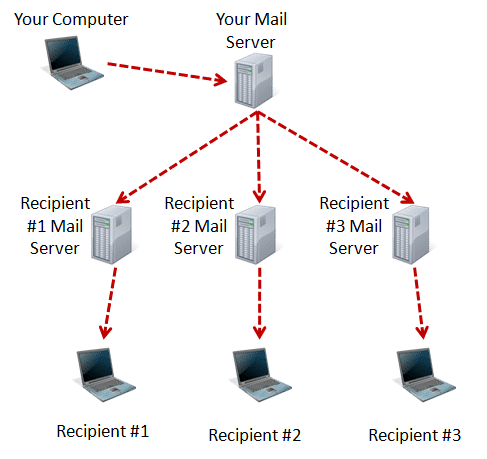
Email makes several stops along its path from you to your recipients. Errors can happen at any point: before the email leaves your computer, before it gets to your email server, or en route to your recipient.
What an error message means depends on at least two things:
- Where in the path it happened
- The specific error
The key in every case is to carefully read the error message for clues as to what broke and where.
Let’s look at a few examples.
Related

Why Does Email Bounce?
Email can bounce for many reasons. I'll look at several of the most common email bounce messages and try to interpret what they really mean.#11192
Failures before email leaves
Some errors are generated by your email program when you press the Send button. These types of errors include anything that can be detected before sending, including a malformed email address, improper account configuration, or misbehaving mail server.
In these cases, the email never leaves your machine and won’t make it to any recipients.
Some email programs create their own bounce messages in this scenario. Rather than popping up an error message immediately, they manufacture a faux-bounce in the form of an email message placed in your inbox.
Failure getting to your mail server
By “your mail server”, I mean the mail server your email program contacts when sending mail. Typically, that’s the SMTP server setting, and the configuration information was provided to you by your email service or ISP.
The three most common causes of failure when sending email at this stage are:
- Bad account information, such as an incorrect username or password
- Bad account configuration, such as an incorrect mail server name, port, or security requirements
- Something about the message itself, such as some kind of early spam detection or size limits of some sort
Regardless of whether it comes to you as an immediate popup or a bounce, the error message should tell you exactly what’s wrong. Read it carefully.
Failures at this stage prevent all copies of the email from being sent; the message still hasn’t left your computer.
Related

Why Am I Getting Bounces for Email I Didn’t Send?
Spammers want to send email that looks like it’s coming from someone who can be trusted. They want it to look like it’s coming from you -- and you may end up getting the bounce notifications.#3606
Failures en route
Your mail server is responsible for taking your single message and sending it one at a time to each recipient. At this point, errors fall into two general buckets.
- Your email server can’t contact the recipient’s email server.
- The recipient’s email server refuses to take delivery of the message.
In the first case, you usually get a bounce from your email server telling you it was unable to contact the remote server. The bounce message comes from your mail server. Depending on the error, you may get the response immediately, or it can take several days for the mail server to give up.
In the second case, the bounce message may come from your mail server or the recipient’s mail server. In either case, the reason will be included in the message. Common problems include:
- The recipient’s mail server thinks your email is spam.
- The recipient’s mailbox is full (or over quota) and cannot accept more mail until it’s cleaned out.
- The recipient’s email account has been closed and no longer accepts mail.
- You’ve typed the recipient’s email address incorrectly.
Regardless of the reason, if the email has reached this point, each failure is per recipient, meaning some of the emails will make it, and others — the ones that result in an error message back to you — will not. The error message should specifically reference one of the email addresses you attempted to send to. It’s that address that has the problem.
Confusing bounce messages
Bounce messages can be confusing. There’s a lot of technical gobbledygook making the message difficult to understand.
Please take the time to read it anyway. Generally, the error will be buried within that mess: brush the mess aside, and the reason for the failure becomes clear.
Unfortunately, sometimes bounce messages say the equivalent of “It didn’t work” without additional information as to why. When that happens, the best you can do is to use the information in the “From:” line of that message to see which server along the sending path generated the error. Use the information above to make an educated guess as to what might have gone wrong and whether it’s something you can fix.
Do this
Of course, it’s possible that your email was not delivered and you didn’t get a bounce message at all.
The problem is spam. Since so much spam is sent to invalid or blocked email addresses, sending bounce messages for every piece of spam is overwhelming. As a result, many email services elect not to send them at all.
There’s little you can do about this. If you suspect your email hasn’t made it through, about all you can do is ask your recipient about it using a different email address or a different communication tool.
Subscribe to Confident Computing! Less frustration and more confidence, solutions, answers, and tips in your inbox every week.
