Dates, location, history.
Ever encounter a website you’ve never heard of before? Perhaps a domain name that kinda-sorta makes sense but seems like something new?
Websites come and go all the time. The problem? Many of those websites are less than reputable, and many are outright scams and phishing attempts.
There are a couple of pieces of information you can gather quickly to help you decide if you want to click on or take action on that website.

Three website clues
Before you trust a website you don’t know, do three quick checks.
- Look up its whois dates (new + short-term can be risky).
- See where its server is located (odd countries are a warning).
- Check archive.org history (stable over the years feels safer).
Remember, no test is perfect; this is just quick data to factor into your decision.
There are no absolutes
I need to be clear, here: there are no absolutes. The information we’re about to gather will not tell you that a site is legitimate, and it will not tell you that a site is bogus. It’s just additional information that may help you draw more informed conclusions.
It might make you feel a little more secure.
It might make you decide to avoid the website entirely.
Help keep it going by becoming a Patron.
Dates
Let’s say you’ve received a solicitation via email with a link to reallybigbookstore.com. Sounds like an interesting site, but you’ve never heard of it before, and just aren’t sure.
We’ll start with “whois” information. Visit whois.domaintools.com and type in the website you’re investigating. The whois service returns quite a bit of information. We’re going to focus on the “dates” section.
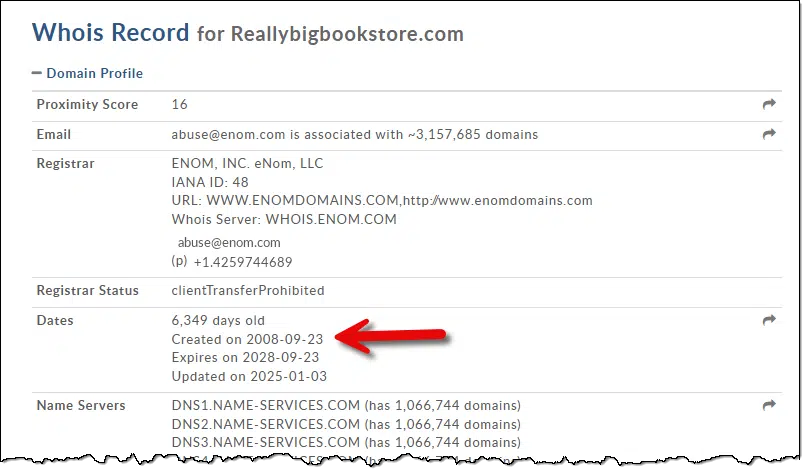
- Created on: tells us when the domain was first registered, or when it was re-registered after having expired. It tells us nothing about the current owner or how recently domain ownership may have changed hands.
- Expires on: tell us how long the current owner has registered the domain. If that date is several years from now (I believe 10 years is the maximum), this implies some amount of commitment. If the expiration date is soon, that doesn’t really tell us much. It could be a domain registered for a shorter period, but it could also be a lengthier registration just naturally approaching its renewal date.
If it’s a recently created domain with a short expiration date, then caution is definitely warranted. It could be legit — we all have to start somewhere, after all — but it’s also a common setup for less-than-reputable sites.
Location
Included in the whois information is the IP address of the server currently hosting that domain.
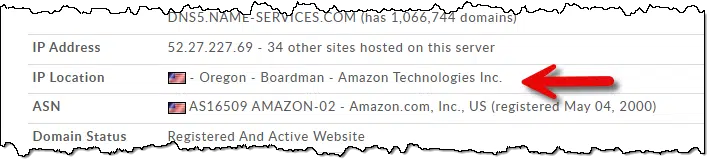
This example tells us two things:
- The server is located in the United States.
- The server is managed by Amazon’s AWS.
Neither of those is particularly good or bad — I think of them as neutral. Many malicious servers exist in the US, even on AWS servers.
This information is more interesting if the country is not what you expect, or especially if the country isn’t congruent with the expectations set by whatever the website is saying. A website that purports to be a local provider of merchandise in rural USA should probably raise eyebrows if its server happens to be hosted in China.
History
We saw above that we can’t really determine how long the current domain owner has owned the domain. The next best thing is to examine the historical website contents.
Head to archive.org, and enter the website domain — reallybigbookstore.com, in our example — into The Wayback Machine.
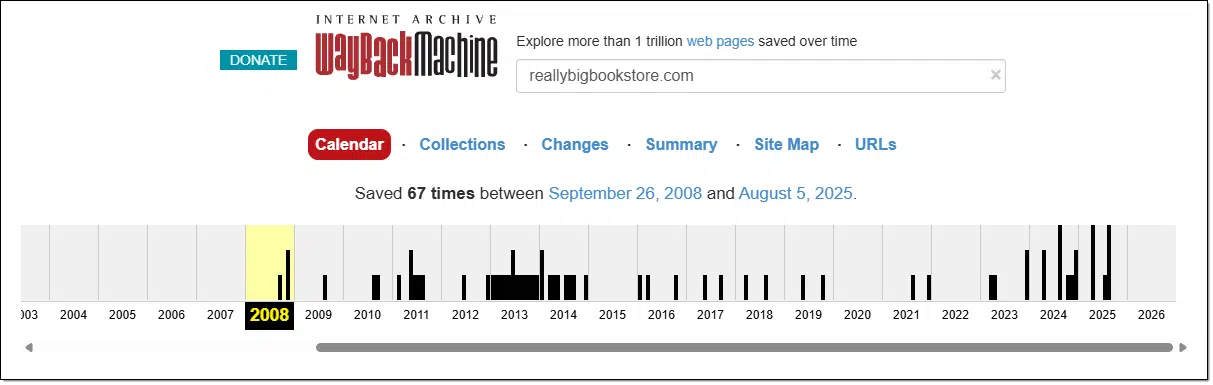
The first thing to look at is the pattern of snapshots. If it seems consistent, that’s a good thing. On the other hand, if there are gaps (e.g., 2020 is missing in the record above), then that may warrant investigation. Especially if the only snapshots are recent, that implies that the site may not be very old or established.
Pick a snapshot, perhaps within the last year, and examine what the site looked like at that time.
- If it’s the same site, or at worst, the same site with a different design (since those do change from time to time), that gives you some confidence that the site is established.
- If it’s a different site, or a “coming soon” parking page, that tells you that the site has been developed relatively recently.
In the case of reallybigbookstore.com, all the snapshots back to 2008 show pretty much the same thing — it’s been a very stable “bookstore”.1 
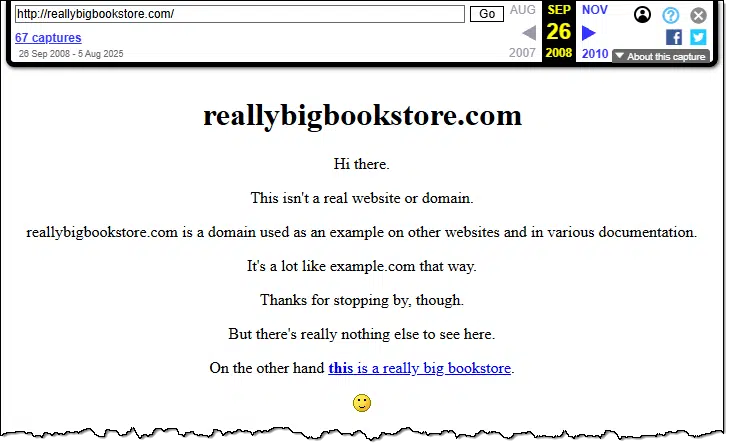
Just because a site is new doesn’t mean it’s malicious — again, we all have to start somewhere. However, there’s a certain level of trust that a long-established site might warrant that you cannot apply to something recent.
Putting it all together
- A younger site warrants more caution than a well-established site. This is primarily determined by how it’s changed, or not, over time via archive.org’s WayBack machine.
- A site that isn’t hosted where you might expect — say, an unexpected foreign country — warrants much more caution than a site hosted in your country or in a country consistent with how it presents itself.
- A site whose registration expires soon warrants a little more caution than a site whose registration doesn’t expire for several years.
While none of these are absolute determinants of legitimacy, they’re additional bits of data you can use to make an informed decision about whether to engage with the site or not.
Subscribe to Confident Computing! Less frustration and more confidence, solutions, answers, and tips in your inbox every week.
Podcast audio

Footnotes & References
1: OK, it’s me. The current owner is me.

i use this to check on a sketchy site,
https://www.scam-detector.com/validator/
Hmmm. “…and type in the website you’re investigating.”. Sounds logical, but one has to be cautious about what someone sees and what someone types. The fonts you see on your screen could be deceiving. What you think is the lowercase letter of the twelfth letter of the alphabet could be the digit one. The letter “O” could be the digit “0”. I’ve seen bogus websites that include an extra letter (usually “ll”) and reversed letters of common websites. Leo – Would copy and paste be better than typing the URL?
I already have the Domain Tools Who Is site, but I’ve never seen or heard of the Website validator, I’ve saved it’s link, and I’ll check it out soon.
@Leo, have you ever heard of Website Validator, part of the Scan Detector site?
Ernie