Infected before you know there’s a risk.

The very nature of zero-day exploits is that your malware scanner would show that you were clean both before and after being infected. It’s not until your security software provider updates their databases and you take that update that your malware scanner knows what to look for.
Yes, that means you may still be infected.
Let’s go through the timeline that got you here.

What's a Zero-Day Attack?
A zero-day attack is malware discovered “in the wild” that leverages a known but as yet unfixed vulnerability in software. Typically, anti-malware tools are unaware of the malware and/or the vulnerability. The term comes from having zero days to fix it before damage can occur.
Vulnerabilities exist
A security vulnerability is a bug in software that could be hacked to compromise the system. There are undiscovered security vulnerabilities in Windows (and in all operating systems). That’s just a fact of software development, particularly for systems as large and complex as operating systems.
If no one knows about them, they’re not an immediate threat. Malware creators can’t exploit vulnerabilities they’re unaware of.
Now, who discovers the vulnerability first — that’s important.
Help keep it going by becoming a Patron.
Related

Why Did My Security Software Not Detect a Virus on My PC?
Malware can slip past even a good antivirus program. Using my silliest metaphor yet, I'll explain vulnerabilities, exploits, and what actually keeps you safe. Learn how infections happen and what you can do about it.#6276
First discovery by the good guys
When a good guy discovers a vulnerability, they often keep it a secret so malware authors can’t exploit it.
Instead, they contact Microsoft (or the creator of the software that has the vulnerability) privately, informing them of the issue so a fix can be distributed before the vulnerability becomes general knowledge.
Sometimes, they indicate that details will be made public after a certain amount of time. This is intended as an incentive for Microsoft to resolve the issue. For example, they might give Microsoft 90 days to release a fix. After that, the nature and details of the vulnerability may be published publicly.
First discovery by the bad guys
If a malware author (a hacker) discovers the vulnerability first, they also try to keep it secret so Microsoft doesn’t learn about and fix it. Instead, they release malware exploiting the vulnerability so they can infect systems before anyone knows about the issue.
A zero-day vulnerability means it was discovered “in the wild” before a fix was available. Microsoft has zero days to fix the problem because it’s already out there.
When this happens, security software vendors scramble to make sure their scanners recognize and block the malware exploiting the vulnerability, and (hopefully) Microsoft scrambles to fix the problem.
The vulnerability timeline
Let’s look at the timeline a little more closely.
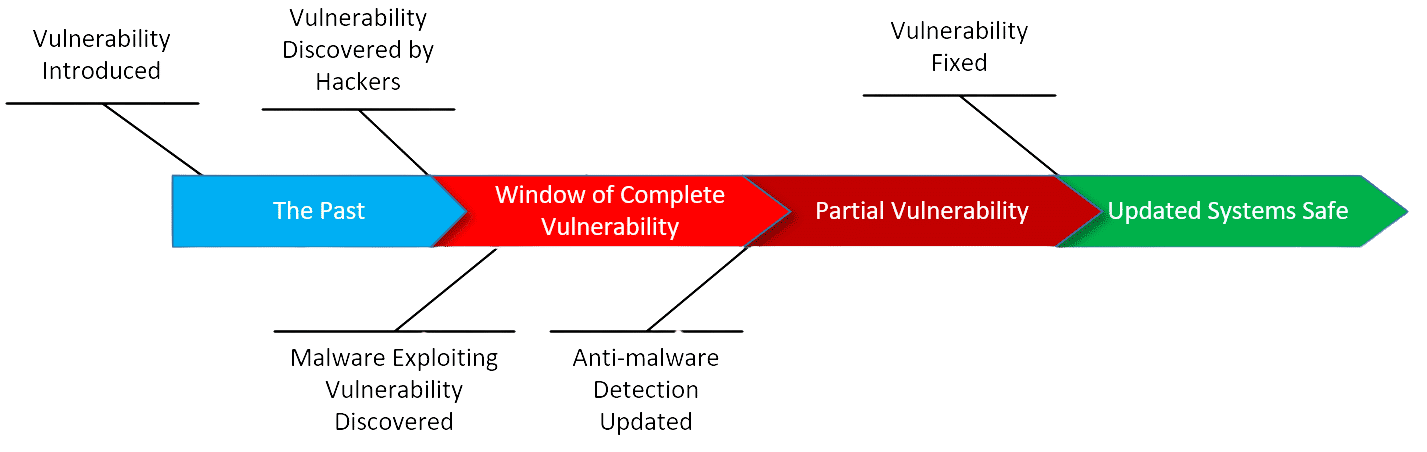
Vulnerability Introduced. Almost all vulnerabilities are born of a simple programming error or oversight. Amazingly, it’s often something that could have happened years ago. If no one knows about it, no one knows to exploit it, and no one knows it needs to be fixed, so it remains completely benign.
Vulnerability Discovered by Hackers. Once discovered, the race is on. Hackers try to keep it to themselves for as long as possible so as to delay any fix.
This begins what I call the Window of Complete Vulnerability: there’s a vulnerability, there is malware exploiting it that security software cannot yet detect, and there is no fix. Other than making sure to practice safe computing, there’s little you can do.
Malware Exploiting Vulnerability Discovered. At some point, the existence of the problem becomes public knowledge — usually when someone finds and reverse-engineers the malware exploiting the vulnerability.
Anti-malware Detection Updated. As new malware is discovered, anti-malware tool vendors add information to their databases so the program can detect it. This is why it’s so critical to keep your anti-malware databases as up to date as possible. Without the latest updates, your scanners will not know how to detect the latest threats.
This begins what I call the period of Partial Vulnerability. The malware can now be detected and blocked by anti-malware tools. This is only partial safety, though, because the vulnerability in the operating system has not yet been fixed. New malware will be written making use of the same vulnerability as they attempt to stay one step ahead of anti-malware vendors.
Vulnerability Fixed. At some point, Microsoft releases a patch fixing the underlying problem and removing the vulnerability. Systems that take the update are now safe from that particular vulnerability. Malware attempting to exploit the vulnerability on those systems will fail. This is why it’s important to make sure your operating system is updated regularly.
It’s a race. In the best-case scenario, Microsoft has time to release a patch to prevent a vulnerability from being exploited. In zero-day attacks, unfortunately, the vulnerability is already being maliciously exploited.
Do this
If you find your machine infected with malware that your security software doesn’t yet detect (exploiting a vulnerability that has not yet been fixed), the best approach is:
- Restore your computer to a backup image taken before the infection.
- If you don’t have a backup, try a system restore to a point prior to the infection. This isn’t guaranteed, but depending on the specific malware involved, it could help.
- Check with your anti-malware tool vendor immediately. Update the tool’s database and perform a full scan. Keep updating regularly; I recommend daily (which, fortunately, most security software does by defaults).
- If you can, figure out what you did to allow the malware onto your machine. If possible, don’t do that again.
- Take system updates regularly in the hopes that the vulnerability will be resolved quickly.
It’s all about the race between anti-malware tools, hackers, and software vendors.
Occasionally, it’s the users who lose.
Subscribe to Confident Computing! Less frustration and more confidence, solutions, answers, and tips in your inbox every week.


The Drive-by Attack, probably a Zero-Day one (as my computer was fully updated and patched) that I experienced, attempted a download of malware which I successfully aborted before its completion by switching my computer off manually. In such a case would there be a possiblity of malware infection?
—–BEGIN PGP SIGNED MESSAGE—–
Hash: SHA1
It seems unlikely that you’d be infected, but there’s really no way to know
*for certain* that you’re not. Did you turn it off in time? How would you know?
Leo
—–BEGIN PGP SIGNATURE—–
Version: GnuPG v1.4.7 (MingW32)
iD8DBQFHL8YOCMEe9B/8oqERAtI6AJ9+bx1aqZ+9ndWyBC2S/2CjLMOlhwCeJv/K
U9wiJESKNrv8cq3WGDtzEXQ=
=2Req
—–END PGP SIGNATURE—–
several of us in the household and friends that come over have Yahoo email accounts, we’ll use the email and then it’ll start to ask if we want to “link” our accounts. NO NO NO we do not, is there some way to stop this?
Leo didn’t address one part of the question, the “drive-by attack” part. Like for the word virus, drive-by attack may mean different things for different people. I define “drive-by” as malware that does not require any abnormal or confirmation action by the user in order to infect the computer. Like for zero-days, true drive-by attacks are relatively rare but get much higher attention because of their potential virulence. The Wanna Cry worm was a example of drive-by attack, the user literally only had to have their computer on a LAN to be infected. (Conversely, Wanna Cry was *not* a zero-day virus, the exploited Windows vulnerability had been both known and patched.)
As noted, there is very little an end user can do in the face of a zero-day drive-by attack other than the standard advice: keep your operating system *and* applications updated. It’s not just Windows that can get infected, it’s Adobe Reader and Flash, it’s Java and MS Office, and it’s your third-party browser and unsecured Wifi connection. And certainly don’t make it even easier by opening unknown attachments or files, clicking on links to unknown web pages, or believing everything you read on the Internet.
Very good article, and I’ll add another category of good guys, who can also occasionally wreak havoc : intelligence agencies. As we have seen recently, they hoard vulnerabilities in order to attack bad guys (which is, I hasten to add, a good thing) ; however, in so doing they run the risk of being hacked themselves, and the vulnerabilities being used by bad guys against good guys — us. Which is what happened in the last few weeks.
If the “good guys” are hoarding the vulnerabilities they discover, they can probably defend themselves against those exploits. The bad thing is that they don’t want those patched on our machines.
Years ago when I was running Windows 98 a program called “Go Back” existed. With that program, deleted files could be recovered and/or the entire system could revert to a point of time in the past–much better than System Restore–eliminating malware as if it never happened. It worked flawlessly. Whatever became of that program?
Not sure about GoBack, but it sounds like a good backup regimen would achieve the same results. Also: System Restore was never intended to restore files. It’s basically a glorified registry backup.
What are your thoughts on using “white list” virus/malware protection rather than the traditional black list approach. In this approach, only programs that are listed as good in the virus protection software are allowed to run, so no bad new apps can run to infect your computer. I’ve been using PC Pitstop’s PC Matic Supershield for years and have not had any virus/malware issues since I started using it.
Well, I’ve been using only Windows built in security for years and I’ve never had a virus/malware issue since using it either. 🙂 Those kinds of one-off personal experiences, while nice, aren’t really a way to evaluate a particular tool’s usefulness for others.
I’ve been leery of the whitelist approach, since it requires approval for anything that’s not on the list. Think UAC, but for any application you run and/or install for the first time that isn’t on some master list. In a way I’d be concerned that people get trained to click “yeah, yeah, ok” the same way they’ve been trained to basically ignore UAC and click OK when it comes up. It gets treated as an annoyance rather than the true security measure that it is.
Given how much random stuff I run, for example, I’d not choose a white-list tool for myself.
All that being said, though, there are a couple of scenarios where I think a whitelist tool makes a TON of sense:
But I’d be concerned that for most users it might be too intrusive. But if it works for you, great. The approach is a very solid one.
I hear what you are saying and that is the usual “bad press” that “whitelist” anti-virus programs seem to get. However, in all the years I’ve been using the program I have never encountered a program that would not run and while I would not suppose that I run anywhere near the number or variety of programs that you run in your line of work, I consider myself way more than an average user. So I believe that the “whitelist” anti-virus software has a very extensive list of software programs that are already whitelisted for the everyday user. Additionally, for that rare occurrence where an app might not run that I need, I would rather wait 24 hours to get it approved and on the list, than to be down or have problems for multiple days because I encountered a “Zero Day” attack while waiting for an app to be identified and added to a “blacklist” anti-virus program (though I do back-up and image regularly so I should be back up quickly if something happens). Anyway, I appreciate your thoughts and all the work that you do to keep us all advised on how to “compute” safely. Thanks for all your hard work!!!
Windows 10 now uses whitelisting by default. Whenever I wanted to download a program which isn’t in the Windows Store, I used to get a warning that it isn’t in the Store and may be dangerous. I don’t install a lot and I know my sources so I turned that feature off. I supposed for many users, this can be a useful safety feature and for others, it’s another reason to hate MS for being overprotective.
I believe that’s different. True “whitelisting” is at the application level. This version of photoshop is allowed to run, that one isn’t until it’s been added to the whitelist, for example.
What I believe Windows is doing is based on trusted signing. So applications from Adobe (again, for example) are allowed without question, while applications from Joe’s Discount Software Factory are not. Naturally applications in the Microsoft store would have to be signed by a trusted source to even get in.
Like Leo, I have only been using Windows built in security for many years and have not had any virus/malware issues/problems. I too have been wary of white lists.
My first PC had MS-DOS v3.1, and I’ve used either MS-DOS or some version of Windows ever since. And I discovered Mandrake Linux shortly after the advent of Windows 95. I’ve been using a combination of some version of Windows dual-booted with some GNU/Linux distribution ever since.
Back in my MS-DOS days, I contracted a virus from an application I downloaded from a now defunct BBS I used to dial into with my than 96baud Phone Modem. I got a copy of Norton Antivirus (before it was purchased by Symantec) and eradicated the virus, so no notable damage done, especially because back then all that computer was used for was me and my boys playing games, or my wife doing her homework for her Business Machines courses.
I learned my lesson from that experience, and ever since then, I updated my computer whenever an update was available, either for the OS (usually version updates) or for any software we had installed. And from the day I dealt with that virus, to present I’ve kept an antivirus/malware suite installed, and I’ve always scanned any downloads using the antivirus/malware before using it, regardless whether it was an executable or not. As a result, well combined with an ever evolving set of safe computing practices, it was the only virus or malware I’ve ever had to deal with so far, and knock-on-wood, it’ll be the only one too, but we all know that no matter how careful we may be, there’s always a chance that any one of us may become another victim.
Ernie