I’ve noticed sometimes when I get an email from someone who used a distribution list, that everyone’s actual name along with their email address is displayed in the “To” field. I’ve noticed this from friends who use MSN and AT&T though I’m not sure about Yahoo and Gmail and so forth. Seeing all the recipients’ actual names along with their email addresses tells me who they actually are when I might not be able to tell from some other cryptic email addresses. Now I know I can set up my mail so that my name appears as the “send” instead of my email address, but how can I have all my note recipients’ actual names, along with their email addresses, always be displayed in the “To” field? All my contacts have their first and last names in the appropriate fields in my Contacts list. But is there another field in AOL that will allow me to do that?
I’m not exactly sure whether you’re asking about the “To” line in email that you receive, or in email that you send. The answer is actually quite different depending on which it is – and I’ll touch on that, and email addressing in general.
Though I will throw out the caveat that I’m not very strong on AOL. So if things don’t work the way I describe with your AOL email client, you may need to actually ask AOL for some help.
Addresses and names
The low-level email protocol that all mail servers use to send email back and forth supports two different pieces of information for each recipient:
- A descriptive name or display name, which is actually optional and is in fact ignored by the protocol.
- The actual email address of the recipient; the email address to which to send that email.
If you’ve ever seen a name followed by an email address in angle brackets, that’s what you’re seeing:
John Q. Public <example@randomisp.com>
An email address alone? It’s just an email address. An email address in angle brackets is what the mailer actually pays attention to if there’s a descriptive name in front of it. Like I said, the descriptive name is otherwise ignored.
You set your own when you configure an email account. Most email programs or services will actually ask you for two pieces of information: your name and your email address. Then, when it sends email, it sends it as being “from” your name as the display name followed by your email address in angle brackets:
From: Ask Leo! Reader <awesome@randomisp.com>
Now, this isn’t something you can type in when you compose a message; it’s actually something that the email service or program constructs for you using the name and email address you configured when you set up the account in your email program or service.
As I said, the name’s completely ignored so you can set pretty much whatever you want. That’s why so often you’ll get spam where the name is one thing, and the email address is something that’s clearly completely unrelated to the name.
Display this, or that?
If there’s both a display name and an email address, email programs can choose what they want to display on the email you receive. They can display only the display name (hence the term), which is very common; they can display the display name followed by the email address in angle brackets, which is what it sounds like you’re seeing on the email you receive, or they can ignore the display name and show only the email address. Typically, they only do the latter if there is no display name to display.
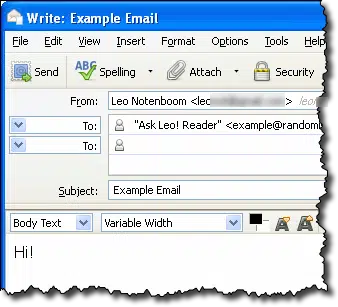 When you compose email, the “To” line gets kind of interesting.
In most programs, if the email address you type in is in your address book, the program will automatically fetch the display name if there is one. And in most programs, if you start typing someone’s name that matches a display name, the program will show you one or more potential email addresses from your contacts, or perhaps email addresses you’ve recently sent mail to, and allow you to select one.
But in most cases, if you have both a display name and an email address, regardless of how you type it in, the email program should use both in the “To” line. Unfortunately, if that’s not what you’re seeing with AOL mail, I can’t quite explain it.
Changing what’s displayed on received mail
If you’re asking if you can change what you see when you receive email, the answer is simple. You can’t.
What’s shown when you display the email you receive is completely determined by the sender. Your email program isn’t really supposed to play around with that at all.
And of course, I have to point out that it’s bad form to send email to a distribution list in such a way that everyone’s email address is visible to the other recipients. You, or the sender, should probably be using the BCC line for that. Among other things, that cuts down on spam.

Thunderbird will substitute the display name in your address book, if the email comes in with no display name in the To and From fields.
Received mails go directly to archive instead of inbox, how can i rectify this? Also when i send an email, the receiver received my email with the name of Yahoo! Warning instead of my name.
In order to get help with the archive problem, you’d have to specify which email program or webmail website you are using.That is usuall caused by a filter setting.
I’m using Yahoo.com
Click on the gear icon in upper right, click on Settings, then click Filters in the left column. Remove any filters which would send emails into the wrong folder(s)
I’d try this for the return address problem:
Click on the gear icon in upper right, click on Settings, then click Accounts in the left column. Click on your email account name and make sure your proper contact information is in there.
And just to be sure, I’d clear the browser’s cache. A corrupted cache can cause a number of problems. I don’t see that as related to that issue, but it’s something I often do — just in case.
https://askleo.com/whats_a_browser_cache_how_do_i_clear_it_and_why_ would_i_want_to/
Thanks Mark, Problem solved.
Mark, before I was able to see full email address when pointer was placed on name of sender ( inbox ).
Couple days ago such function disappear. Any suggestions? Alex
That sounds like something may have changed in the email program or website you use to manage your email. There may not be anything you can do.
Mark Jacobs: –
I’ve transferred my Contact List from Windows Live Mail on an old computer to Microsoft Office Outlook on a new Windows 11 Laptop … The problem I’m having is when I choose the recipients name to put in the ‘To’ line of an outgoing email, instead of the recipients name being displayed, that persons email address is displayed instead … I only want the persons name displayed … How do I achieve that … When I look at the Address Book there are three columns displayed: – The Recipients Name in the first column, then the other two show the email address duplicated in both columns … How do I get just the recipients name displayed at the senders and recipients end please?
Hi Leo, that’s a helpful explanation of how email clients handle the display of names and addresses. I hadn’t realized that it was ultimately up to the recipient’s mail client to decide how much information to show. Thanks for clarifying why sometimes I only see an email address, even when I expect to see a name associated with it.
Leo, thanks for clarifying this! I always wondered why sometimes I’d see “John Smith ” and other times just the email address. The explanation about how email programs handle this based on the sender’s address book makes perfect sense now.
This was a great explanation, Leo, and you’ve really highlighted the core issue. I appreciate you pointing out that **Thunderbird’s default behaviour isn’t necessarily a bug**, but rather a design choice that prioritizes the display name over the full address in the `To:` field. I’ve often wondered about this myself, and your clarification about it being a “global setting” and not something easily toggled per message is very helpful for understanding why it behaves as it does.
Thanks for tackling this common email conundrum, Leo! I particularly appreciated your explanation of how different email clients interpret and display the “To:” line, as that often causes confusion. It’s good to be reminded that the recipient’s view might not always match what we see on our end, especially with contact names versus raw addresses. This article really helps clarify why sometimes we see a name and other times a full address, depending on the client and whether they’re in the recipient’s address book.
This was a very insightful explanation of how email clients handle the “To:” field! I particularly appreciated the distinction between how our client displays information and what’s actually transmitted in the email header. It makes perfect sense that the sending client is the one parsing and formatting the display, not the receiving end, which clarifies why different clients might show things differently. Thanks for demystifying this common email nuance!
This was a really helpful explanation, Leo! I’ve definitely wondered why some emails show just a name in the “To:” field while others display the full address, and your breakdown of how it’s ultimately up to the recipient’s mail client clears up that mystery perfectly. It’s good to know I’m not missing some obscure setting on my end! The “from” field control, as you mention, is usually where our focus lies anyway.