When you think you’re the administrator, but you’re not.

I recently added an article that discusses this in some detail: Windows Administrator Explained. In a nutshell, a security feature in Windows means you’re not the administrator of your own computer.
Here’s how you can be.

Running as administrator
You’re the administrator, so why does Windows keep asking for permission to perform certain tasks? Here’s the short answer: for your own protection. When you need to run something as the administrator, you have several options. Just be careful to use it only when you need to.
Administrator… but not
By default, your login account doesn’t give the programs you run administrative privileges. If it did, any program you run could do anything to your machine. That means if you accidentally run malicious software, it could do anything, possibly without your knowledge.
Instead, when you run a program that needs administrative privileges to work, you’ll either be denied with an error message or be presented with the User Account Control (UAC) prompt, which allows you to decide whether or not to proceed.
These extra steps prevent malware from making administrative-level changes to your system without your knowledge.
It’s a good thing.
Help keep it going by becoming a Patron.
Limited versus administrator-capable accounts
Let’s say you want to do something requiring administrative access: install a program, for instance.
Most Windows accounts, and in particular the account you set up when you installed Windows, are what I call administrator-capable. If you try to run a program that requires administrative access, you may get the familiar UAC prompt, to which you need only respond Yes or No.
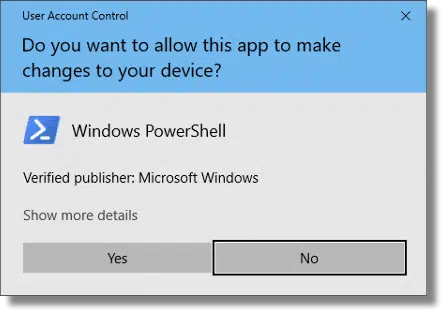
For most people at home or in small businesses, an administrator-capable account is the only account they use.
It’s also possible to set up so-called Limited User Accounts, or LUA, that can be used to sign in instead. When presented with a UAC prompt, users signed in with limited accounts must enter credentials for an account that is administrator-capable.
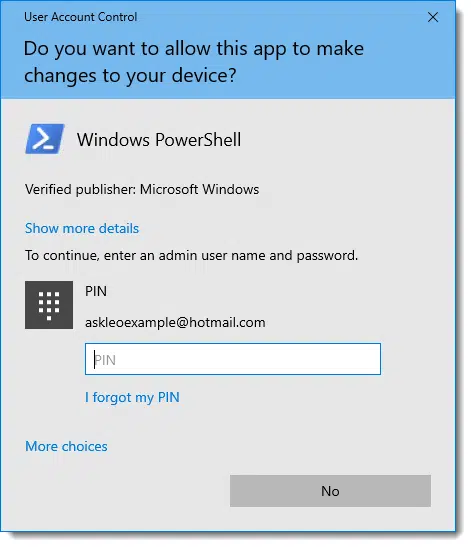
This proves the user is authorized to do something requiring administrative privileges. If they don’t know the password, they can’t run something as administrator. These accounts are good for kids or anyone else you don’t want making changes to your computer.
That’s really the only difference: whether or not you’re asked for a password when the UAC prompt appears. In most other respects, all accounts (other than the hidden account called Administrator1) are, in a sense, running as limited accounts.
Every now and then, you need to work (briefly) with administrator privileges. Let’s look at different ways to get there.
Administrator and the command line
Normally, when a program needs administrative access to perform some function, there are two things Windows can do: deny the request or ask for permission via UAC. Unfortunately, it’s not always possible to ask, which means the request is denied and the program fails the task it was attempting. Running the System File Checker might be one example: if you run it in a regular Command Prompt window, you’ll get an error message that you must be an administrator to run the program.
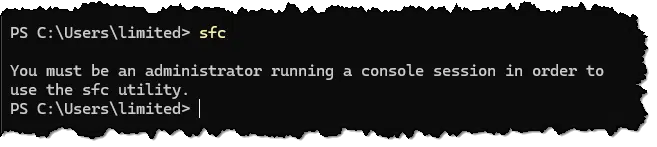
Another common, if vague, error message in this situation is “Requires elevation”, meaning your access needs to be “elevated” to administrator level.
The solution is to run the program “as administrator”. Because your account is administrator-capable, you can run programs with full administrative privileges. Many programs have this option; I’ll use Windows Command Prompt as an example.
The simplest way is to use the alternate Start menu (right-click on the Start button), and then click on Terminal (Admin)2.
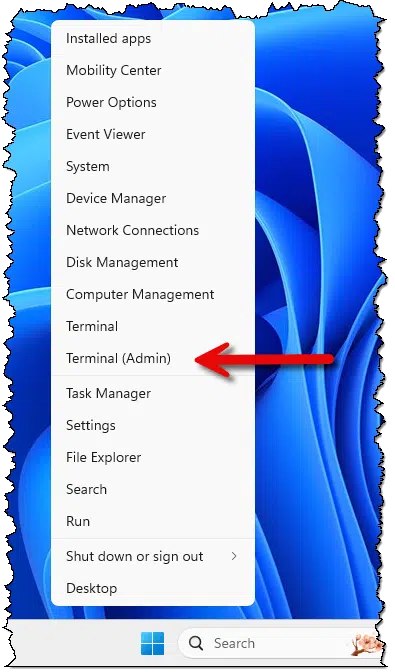
Click on that, and you’ll get the UAC prompt, confirming you want to run the program as administrator. If you are running an administrator-capable account, it should only require clicking on Yes. If you’re running a limited account, you’ll need to provide the password of an administrator-capable account.
You can then run the command requiring administrator-level access from within the administrative terminal.
Administrator and the Start menu
If the program you’re running is not a command-line program but rather a Windows program you might find on your normal Start menu, there’s another option.
Right-click on the program’s icon, and for many programs, you will see an option to “Run as administrator”.
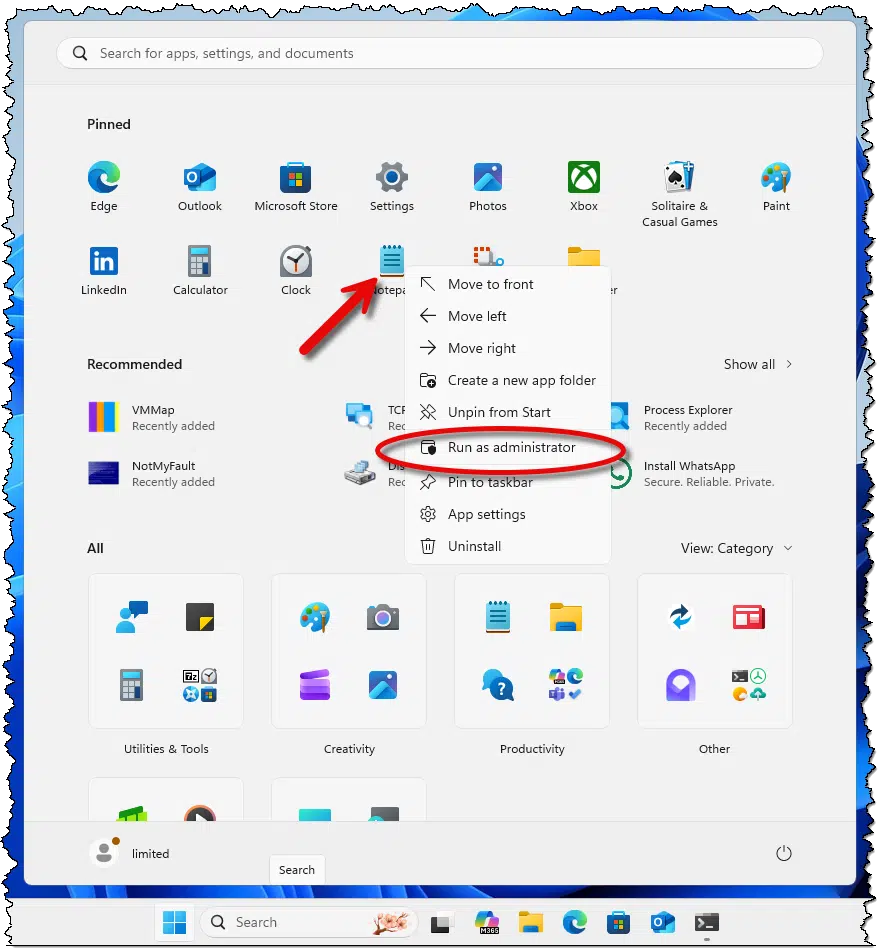
It doesn’t make sense for all programs to run as administrator, but when needed — say Notepad needs to write its file to a protected area of the disk — the option is there.
Administrator and search
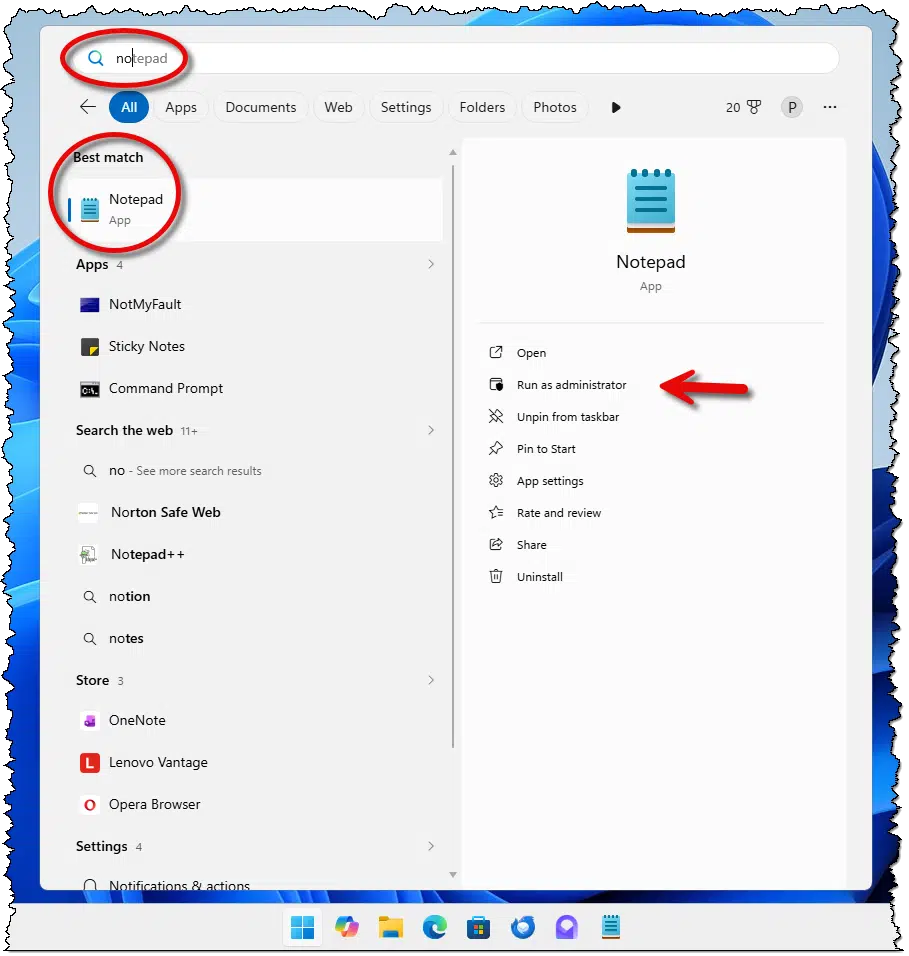
An even quicker way to run a program as an administrator is to search for the item you want to run on the Start menu. When it appears in the search results, a “Run as administrator” option may be present.
Administrator and the taskbar
Yet another shortcut can be found via items pinned to the taskbar.

Hold CTRL+SHIFT when clicking on the icon, and the program will run as administrator and present the UAC dialogue.

Administrator and Task Manager
Near the top of Task Manager is a button to Run new task. (In prior versions of Windows, look in Task Manager’s File menu.)

That will bring up a “Create new task” dialog, which includes a checkbox to “Create this task with administrative privileges,” or, in other words, run as administrator.
Administrator and the Run dialog
In the past, you could run a program as administrator using the Run dialog in either of two ways: a checkbox labeled “Create this task with administrative privileges”, or holding down CTRL+SHIFT+Enter to run the program. In current versions of Windows 11, these techniques no longer seem to work. The closest equivalent is the Task Manager approach above.
Use caution
Think twice before running programs as administrator. There should always be a clear reason to do so.
If you run your mail, browser, word processing program, or instant messaging client as administrator, those programs will be able to do anything. That means if you open an attachment in email, for example, whatever that attachment is will also run with full administrative privileges. If that attachment happens to be malware, you’ll have unintentionally worked around the security measures UAC puts into place.
In addition, Windows treats file ownership and security differently depending on each user’s permissions and whether you have full administrative privileges. For instance, files you create while running a program with full administrative privileges may not be accessible later, when you run without those privileges.
Do this
UAC security helps keep your machine safe from many forms of malware and exploits. Use “Run as administrator” with caution, and only when you’re sure you need it. Close the program as soon as you no longer need those extra capabilities.
Subscribe to Confident Computing! Less frustration and more confidence, solutions, answers, and tips in your inbox every week.
Podcast audio

Footnotes & References
1: It’s on all computers, and it’s hidden on purpose. The fact that your default account is administrator-capable gives it everything most people need. I’ve yet to come across a reason to unhide the account called Administrator. Windows Administrator Explained has more details.
2: On older versions, it may be listed as “Command Prompt (Admin)” or “PowerShell (Admin)”. Any of these will do here.

my pc don’t have administrator account.how could it be posible????
It all depends on how it was set up. There probably is a traditional administrator account. Try this: https://www.howtogeek.com/howto/windows-vista/enable-the-hidden-administrator-account-on-windows-vista/
Lro, you wrote: “your login account — even if it’s the “administrator” account you created when setting up the machine — doesn’t give the programs you run administrative privileges.”
That is the complete opposite of what I’ve been taught: that the “Administrator” account is the true administrator account, permitting you to do just about anything freely.
And this also fully accords with my own personal experience: while logged into the “Administrator” account, I find that activities that would, on any of our other accounts, normally toss a UAC prompt my way, are performed meekly without any objection at all.
Could you have misstated the matter?
UAC allows limited Administrator rights but processes requiring low level access are limited to programs run with Admin permissions.
The account you set up when you set up the machine is what most people consider “the administrator” account. That is separate from the account actually CALLED “administrator”, which is normally hidden. The later account is always administrator, you are correct. Yes, the terminology is confusing.
Leo –
Hi. I read an article where a PC user, I think after a reinstall of Windows, initially had only the default, non-hidden administrator user account to work with. The user then created a second administrative user account. Then he took the default, non-hidden administrative user account and downgraded it to a standard/limited user account.
1. If you’re the sole user of a PC, is there any benefit to having multiple administrative user accounts (and I’m not talking about the normally hidden administrative account here)?
2. Is there any difference between (a) the default, non-hidden administrative user account (the one that’s there to begin with and you just give it a user name) and (b) an administrative user account that is subsequently created by the user?
I’m trying to understand why the user in the article did what he did with the user accounts.
Thanks.
So to be clear, the only “special” account when it comes to administrator is the hidden one actually called “administrator”. Anything else is just a user account that has administrative ability, as outlined in the article. (OK, gross oversimplification, since nothing in Windows is simple, but you get the idea. )
)
To your questions:
1) Only thing I can think of is a backup account in case you lose access to your primary. Kinda makes sense with Microsoft accounts being machine login accounts now. If your Microsoft account gets hacked somewhere, and the password change, that puts your ability to login to your machine at risk. A backup account with administrative privileges would let you back in and take appropriate action for the machine.
2) Not that I’m aware of.
Thanks for really helpful article which i found saved in my favourites. ive had this problem off and on for years on my personal windows 7 computer. am scared at going into operating systems to override the hidden administrator but am at a loss because my computer is full and i cant afford a new one, it works fine but i need to delete what i can. i found command & c tiberian wars game using up 12gb space so though great my husband must have played it years ago (game install date 2 months after bought computer 2011!) i never played it. But it wont let me uninstall it. ive gone into properties taken full ownership etc that usually does the trick but not this time. Done this on both my husbands and my administrative accounts (gave him when he used my computer before he got his laptop). Appreciate any advice. if need to go into computer operating system (white words on black bits) my husband is computer savvy, having built them, i can trust him to follow your instructions to correct this. Thanks
A couple of things I would try. No guarantees, though.
The “Forced Uninstall” feature in Revo Uninstaller.
Boot your computer into Safe Mode and try uninstalling the program. Safe Mode disables unnecessary processes that might be interfering with the uninstallation.
Nice article. I have a program, however, that has defied all these methods (so far). Called RoboMirror, it is basically a shell that uses the Microsoft RoboCopy. Works great! Love it! But certain tasks that are supposed to run unattended require Admin privileges – most notably those that want shadow-copy usage. I have given RoboMirror every admin capability that I can find, both directly and via a program link, under properties, etc. and I still come in the next morning to find the message “You must have administer privileges to run this program” in a box on the screen. I have to then close the message. I right-click the program, select run as admin, hit YES when prompted, and it runs great – just not unattended.
Try scheduling the program with Windows Task Scheduler. When you create the task:
In the General tab select Run with highest privileges
Select Run whether user is logged on or not so it runs in the background (Session 0)
In the Conditions tab, check Wake the computer to run this task to ensure it runs if the PC is sleeping
In the Triggers tab, set the task to start at a specific time (e.g., 2:00 AM) or when the computer is idle.
See if these steps resolve your issue,
Ernie