Internal Server Error
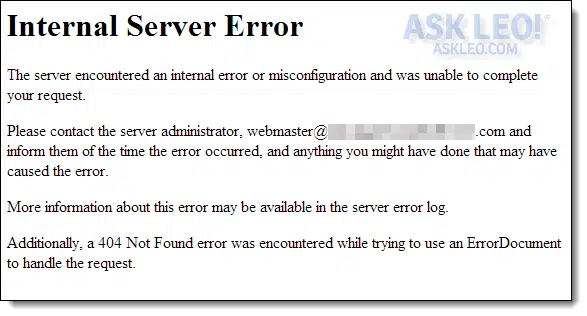
The server encountered an internal error or misconfiguration and was unable to complete your request. Please contact the server administrator webmaster@******.com and inform them of the time the error occurred and anything you might have done that may have caused the error. More information about this error may be available in the server error log.
Additionally, a 500 Internal Server Error error was encountered while trying to use an ErrorDocument to handle the request.
How is this resolved?
I’m very familiar with this error. I see it all the time when setting up or making changes to websites.
The good news? It’s not your fault.
The bad news? There’s probably nothing you can do.
Become a Patron of Ask Leo! and go ad-free!
Summary:
- It’s not really your problem, and likely there’s nothing you can do.
- Make sure the URL you’re going to is exactly correct.
- Treating it like a browser problem can help.
- If you’re the webmaster, there are probably some clues on your server.
It’s the server’s problem
An internal server error is an error on the web server you’re trying to access. That server is misconfigured in some way that prevents it from responding properly to what you’re asking it to do.
Think of it like the web’s version of a blue screen. 🙂 Something went so wrong on the server that it couldn’t even tell you what the problem was.
Aside from informing the site owner (who may or may not be at the webmaster email address included in the error message), there’s probably nothing you can do to resolve this problem. That’s because it’s not your problem.
The person who is responsible for the website needs to fix it.
It’s still the server’s fault, but…
Even though it’s the server’s fault for not handling something properly, there are scenarios where you might have inadvertently caused this. For example, errors in URLs can cause it.
One scenario: you saw a link in an email or webpage, and rather than clicking on it, you copied and pasted the link in a web browser. If you accidentally didn’t select the entire link and left off a few important characters, you might see this message.
Similarly, if you’re typing in a URL from a book or other source, and don’t type it in exactly, you might see this message.
To be clear, the server should be able to handle whatever you did cleanly and report errors in some useful way. If the server doesn’t, and you get an Internal Server Error message, that’s still the server’s fault.
There are some straws to grasp at
An internal server error happens when the server encounters a situation it just doesn’t know how to handle. Occasionally, your browser can be the source of these kinds of errors. You can try these steps to see if they’ll help:
- Clear the browser cache
- Clear cookies
- Refresh the page (F5)
- Try a different browser
While it’s more than likely these won’t work, there’s always a chance they might, and they are simple to try.
If you’re the webmaster…
So what if that’s you? What if you’re the webmaster?
Nine times out of 10, this error results from one of two very common errors:
- An error in a CGI script caused it to fail or output an error message before it started producing valid HTML. It happens to me all the time if I have a syntax error in one of my Perl CGI scripts.
- A permissions issue occurred when attempting to access a CGI script. Depending on how your web server is configured, it’s not enough for the script to have “execute” permission; it must also be owned by the correct user and belong to the correct group. I can’t tell you what that should be, because it varies widely from server to server (and even from site to site on the same server). My best recommendation is to look at the attributes of a script that’s working and copy that.
The format of the error described here is common for Apache web servers. That means we can also look for common error logs. Once again, the location of these logs varies a great deal based on the specific web server configuration.
- access_log is the log of successful accesses. On a shared or virtual hosting server, there may be many of these: one per website, often with site-specific names or in site-specific locations on the server.
- error_log is the log of errors. On some hosts, there is an error log per site. On others, each site has its own access_log, but there may only be a single error_log for the system.
- suexec_log is the log most people forget. It deals with the permissions used to execute CGI and other scripts. When a CGI fails to execute because its ownership is wrong, the generic internal server error shows in the error log, but a more specific error detailing the permissions involved appears in this log.
Additionally?
The message “Additionally, a 500 Internal Server Error error was encountered while trying to use an ErrorDocument…” indicates a second configuration error on the server.
When the web server encounters an error of any sort, the page it displays to report the error is just another .html file stored on the server. This error means that trying to display the error page for the first error (the internal server error) actually generated a second error (also an internal server error, in your case).
At that point, the server just gave up.
Was this article helpful?
Subscribe to my weekly newsletter and get more like it. Each week I tackle current tech problems, solutions, and issues to help you be safer and more confident. Sign up now and get a copy of The Ask Leo! Guide to Staying Safe on the Internet — FREE Edition with even more. Subscribe to The Ask Leo! Newsletter right away so you won't miss a thing!
Download (right-click, Save-As) (Duration: 6:16 — 3.0MB)
Subscribe: Apple Podcasts | Android | RSS


stacey
hi. im hosted by a friend and im getting this error too while tryingto upload files using http://ftp…my index.html wont load at all…
when i added a index.html file, if i type my site url in the browser, the ending is index.php? even though i dont have any php files added to it? it just automatically does it, and when i try to rename my html files as .php i get that error message…and i dont know how to edit the access file :S
Not True
NOT TRUE. Or ot is true about 10% this article.
It is the client’s FAULT! Just check your .htaccess file… argh!
19-Dec-2008
Isaac Lu
One question: I am useing mozilla firefox to view my yahoo email account and there’s been a new feature where you can “connect” to different people in your address list. But I chose to ignore that, so I clicked “inbox”. There’s a small light blue text box that says “loading…” below the tab (yahoo toolbar). I waited for many minutes and it seems that nothing is happening. If however, I decide to right click on “inbox” and choose to open in another tab, I would be able to go into that page, but the problem is that I can’t push send because I can’t “open” send in another tab. Who should I bring this issue to?
yohannes
yes, this problem happens to many times when i try to open my own site? can you tell me what ca I do to reconfigure again
01-Jan-2009
john
hi,
in most cases the problem is your .htaccess !!!
sry… i can’t tell u what you have to add to your htaccess or what to remove because i’m not on my computer right now… :S
but search google for this error and htaccess how to configure it.
best regards, john
john
hi,
it’s john again :>
it can be your .htaccess or if you set the premisson of a file or folder to 777 change it back to 755 or 644 or 666 and check if the error will diappear. 😉
john
Marion
Thank You very much. I was getting the same error message and took your advise. I had changed permissions in the file public_html/admin/configuration and public_html/admin/admin.php my in zen cart root folder as I was adding the google base feeder contribution. I was getting the above error message when I tried to access (My Admin configuration) for my store.
I changed the permissions back to 755 and it is now working. I am very grateful to John for the info. Thanks
Dan
I made a Sharepoint website for my office and everything was working fine until today. Now, the main page gives an Error 500 while every other page works fine. Because it was made using Sharepoint, the code is not accessible (I think) offline. Any suggestions?
Bill
I have a similar problem.. however.. the message I get is:
Forbidden
You don’t have permission to access /forum/memberlist.php on this server.
Additionally, a 500 Internal Server Error error was encountered while trying to use an ErrorDocument to handle the request.
——————————————————————————–
Apache/2.2.11 (Unix) mod_ssl/2.2.11 OpenSSL/0.9.8e-fips-rhel5 mod_auth_passthrough/2.1 mod_bwlimited/1.4 FrontPage/5.0.2.2635 mod_jk/1.2.25 mod_perl/2.0.4 Perl/v5.8.8 Server at fishcarverunderground.com Port 80
This comes from a forum I belong to. When a new post comes up it sends me a message allerting me of that new activity. Until recently, I could click on the link in the post and it would take me to the forum topic and the new post. Now I get this error message.. The owner of the site does not have the problem I experience.
Help???? Thanks, Bill
25-Jul-2009
noob
this happens to me when im trying to visit a site but after reading
this (my english is not so good)i think i get its the server
that somthing is wrong to not my computer ?
Irman
Hi, I have successfully installed PHP 5, MySQL 5.1, Apache 2.2 and phpMyAdmin. I’ve test the phpinfo(); and it works fine. Besides, i have tested the connection between MySQL and PHP and it connect well. I have 2 php file-1)Form.php & 2)Insert.php. The form will undergo the insert.php to insert the data into phpMyAdmin.
However, i upgraded from IE7 to IE8 and received the http 500 internal server error. I still could display my phpinfo(); and form.php. But when i submit the form after upgrading my IE, i received the internal server error. Anyway to resolve this? Thank you in advance!
Tariq
i am facining interal server error problem from last 5 days.how can i fix this problem. due to this error, i can not open & download connect2pk.com program
Mohammad.clergyman
when you encounter this error
What you need to do is to change the permission of www to 750 and your index file to 644
21-Dec-2009
valdi
This error is not always internet fault. It can also be user’s fault. Some malware can slow down the speed of internet and the effect is the same
linsey
I am a site owner and ive been told by 1 person that they cant access the site and it just says ‘Internal Server Error’ but i have asked quite a few different people to try and access it and theyve all come back to me saying theres no problem for them. and im not having any problems.. could it be something to do with the person trying to visit the site as its strange thet they are the only person to have the problem
mauricio
i saw error 500 on many browsers while accessing a certain page.. 2 firefox profiles did not show it. no infections, no errors in the error log(cpanel). it was gone after i cleaned my cache. servers fault?
Terri
for sometime now my computer has shut down when ever it wants to when I reboot first thing I see is internal in blue at right top. I have to shut down and reboot. I have check all wires, downloaded window’s xp again. I have regcure I use often. Yet it is still doing this shut down what can I do???? Please email me with any answers you may have. Thanks
Mohamed Hachem
Hello
to get the detailed error behind 500, no need to check the logs just do the following :
1) go to an IE page –> tools> Internet Options> Advanced –> uncheck show friendly http error messages
2) go to IIS, –> your site –> Features view –> ErrorPages –> select 500 error –> click Edit feature settings,
then click detailed errors and click ok
3) recycle the pool
4) try to generate the error
now you will have detailed error
That’s all 🙂
Roy Vincent
This error will also appear if you some of your command in htaccess is wrong… zzz
Geoff Stacey
Our website sometimes gets this error. I use a cgi script called Easy File Manager (EFM) to manage clients’ uploads and downloads. I asked the support at EFM and they said that if the script works once it should work all the time. This seems to make sense. What do you think?
13-Jul-2010
Terry Priestley
I have been using aMSN with Mac OS X version 10.6.4 for over a year with very little problems and today the 30 jul 10 it has come up with internal server error and wont work.
What can i do?
Any (layman term) help would be appreciated.
Terry
porckypine
I had a similar problem but found that things started working when I removed the .htaccess file. Played around with it for a bit and found that the following lines were causing the problem:
# Set some options.
Options -Indexes
Options +FollowSymLinks
# Set the default handler.
DirectoryIndex index.php
I just restored the original .htaccess, deleted those lines.
Puneet Verma
Might be your domain needs user and group as suexec. Let me know if problem solves by customizing httpd.conf
chris p.
Okay what if you’re the webmaster, but dont own the server, you pay for hosting? My error logs say: its a script called:.htaccess even after correcting it same error.
21-Jan-2011
Mark Jacobs (Team Leo)
Read the article you are commenting on. There’s nothing you can do other than contact the owner of the offending website.
Matt
This falls under the first common error but I’ve often had this error caused by an infinite loop within my code.. which causes the web page to just time out before it can return an error.
blt123
Not a good explanation of the error. The error can appear on one computer but not another when accessing the same site. I am having that problem now. My desktop gets the error, the laptop works fine.
Dougie
“error_log is the log of errors. One some hosts…..”
Thank you for this page! It had everything I needed all in one place.
Chris
Thanks, that helped me, especially by pointing me to check the logs which told me exactly what the problem was.
Troubleshooting 101: Always check the log file/s for clues or, in many cases, answers
jay
when i try to load the google homepage it comes up
with 500 internal server error it loads every other page bar the google page how do i fix this please anyone
21-Aug-2011
DAKz
You left out one very simple, very common, very easy to fix reason, .htaccess changes can cause this, this also links back to give you the additional 500 error.
So check your .htaccess file and see if its been changed, and that all new changes are spelled right. If there is doubt, simply undo the last change to the file and save see if that wont solve your problem. Cheers
natdrip
internal 500 error !!!
I fixed this by including
print “Content-Type: text/html; charset=iso-8859-1nn”;
under the perl include tag
I tested the web page from wamp and it got rig of the error
Maurice Kamau
I am typing in my user name and password to a career website but i keep getting the error.
The strange part is the website is accessible when browsing through the jobs offered but when i select a certain position and fill in my password details i get the error.
I have managed to change my password by on typing the new one I get the same error, I am using a corporate shared wifi system,could this be the reason i can access the other company servers to make applications?
worried.
Mark Jacobs
@Maurice
I’m not sure what’s causing that problem, but if I understand correctly, you’re accessing a career website using your company’s network? If that’s the case, you should be more worried about your company finding out that you are accessing a career website. Everything you do on a company’s website can be viewed by them. It is not recommended to access career websites using your company’s computers or wif-fi access.
Jesse Newby
I have a problem for 2yrs this computer system JWM3MC1 595B is protected by a password authentication system. you cannot access the data on this computer without the correct password
what can I do other than change the mobo
anthony hind
my Samsung galaxy tab 3, every time I use google to look for a web I 500 internal error message
Mark Jacobs (Team Leo)
It might be a problem with your browser’s cache. Sometimes the remnants of older pages in the cache can cause all sorts of browsing issues. I’m not familiar with how to do this in a Galaxy Tab, but I’d suggest you clear the browser cache.
Nancy
Many, many thanks, Leo!!! Kept receiving internal error message every time I tried to access ebates.com.
I had copied/pasted the webpage’s link to make a referral. I did a system restore, thinking the problem
originated with Google’s Chrome; however, that did not resolve the problem…neither did adding ebates.com
to my security’s unblocked websites. Then I googled the error in various ways and ended up at your site.
Thank heavens! First, I cleared my browsing history following your directions; this was unsuccessful. So, I
changed to Bing…bingo!!! So far, no problem!!! Once again thank you many times over; now I can go back
to saving money!!!
Jim Ryan
I commonly see this exact error message when I use a network stress tester on other peoples websites. I am referring to executing a DOS attack (Denial of Service) or DDoS (Distributed Denial of Service) using numerous computers of mine and or botnets. CMD run as Admin, i.e., ping 72.114.126.140 -t -l 65500.
Ping and reply directly with the server. Its a packet flood. Also the HOIC (High Orbit Ion Cannon with booster script). Once they are down I have removed them from cyberspace. The IP is masked with a good VPN. Did any of you ever consider that this may be happening to you or could happen to you at some time? you will surely see this error then.
Manoj
I am getting error code 406 for my website {link removed} when I browse frequently.
Leo
You’ll need to contact the site owner. That’s a server error response that you can Google – as you’ll see it has to do with the types of responses exchanged between the browser and server.
Nancy W.
I need help to fix the problem because any contact e-mail sent from my business website does not connect / link to my business e-mail address. That link is disconnected, and is causing us to loose business because any e-mail from our website cannot come through at all. But it was working very well when our business website was first built eight years ago by 2007.
So, please contact me back because I need to know if this is something you can help us fix it.
Thanks, and I will look forward soon for your response.
Sincerely,
Nancy
peter.r
how to remove the fatal error: Call-time pass-by-reference has been removed in /var/www/html/adservertest.smbdemand.com/application/controllers/common/gateways/paypal.php on line 23?
it is orbit open ad server.
Leo
That’s a server-side error unlikely to be in your control. I’d report it to the server owner.
Leo
No way to know without a lot more information. What version of Windows, where’s the file, WHY are you asking at all?
Mark Jacobs (Team Leo)
A 404 error happens if typed a URL to a page doesn’t exist. If you got there by clicking on a link, it means the error was in the link itself and there’s nothing you can do other than notify whoever posted the link. The 404 error you got was a customized message. That indicates that you went to a real website, but tried to go to a non-existent page on that site.
Here’s a sample of a 404 error on Ask Leo!
askleo.com/Leos404ErrorMessage
Lailyn Puad
I’ve been uploaded my Codeigniter Project to my server. But I used an addons domain. And I have a problem with my .htacces.
Internal Server Error
The server encountered an internal error or misconfiguration and was unable to complete your request.
Please contact the server administrator at webmaster@{removed}.com to inform them of the time this error occurred, and the actions you performed just before this error.
More information about this error may be available in the server error log.
Additionally, a 500 Internal Server Error error was encountered while trying to use an ErrorDocument to handle the request.
Apache/2.4.16 (Unix) OpenSSL/1.0.1e-fips mod_bwlimited/1.4 Server at exmud.my.id Port 80
Please help to resolve this problem.
Mark Jacobs (Team Leo)
I’d do what the error message said and contact the webmaster.
Leo
Could be just about anything from file permissions to syntax errors in the .htaccess file. Not nearly enough to go on.
Rosia Fuentes
I am trying to purchase a package in a game when I press the package I want all it says server error, it doesn’t even go to pay. How can I fix that
Thank you
Rosia
Connie (Team Leo)
If it’s a server error then that means there is a problem with the site. You’ll need to contact their support team and ask them to fix it.
malleswari
Access Denied! Your address is blacklisted. More information about this error may be available in the server error log. how can i get the information from that site
Leo
You would have to talk to the site owner.
Tabatha Kruse
Howdy! This iѕ ind of off topic bbut I need some guidance fom аn estabvlished blog.
Ιs it tough to sett up ypur own blog? Ӏ’m not very techincal Ƅut I can figure things oᥙt pretty
fast. I’m thinking аbout setting up mʏ own but I’m nott ѕure wheгe to start.
Ɗo you havе any рoints oг suggestions?
Thank you
Mark Jacobs (Team Leo)
Leo has a website dedicated to setting up and maintaining websites. That might be of help to you.
https://biz.askleo.com/
saleem
Hi sir am saleem fm pak going to request you that when I open the page my play win 4 .com today result shown but when I go to previous page result then internal server error block the previous result best regards
Mark Jacobs (Team Leo)
Read the article you are commenting on.
Ada
red the article, but no solution there…
Leo
Sure there is — contact the server owner. It’s a server problem.
BIJU
System Error
The server encountered an internal error and was unable to complete the request.
Please try after some time.
If the problem still persists, please clear browser data and try again. Thanks..!!
HOME
This error coming from gst.gov.in
i cleared browsing data but the problem still exist
Mark Jacobs (Team Leo)
Read the article you are commenting on, it answers your question.
KC NAGESH
I am also facing the same problem since the last seven days. I did whatever that was suggested but the problem still persists. I contacted the help desk, but they did not give any solution.
Sharon Sprinkleb
when i try to go to one certain friends page from facebook i get the 500 internal server error but i can go to other friends pages fine but that one it wont let me.
Mark Jacobs (Team Leo)
Please read the article you are commenting on. It answers your question. The error is on your friend’s website.
Megacon Perkasa
the most annoying error of all is maybe 500 internal server error, you never know when it hits you and frustrate the hell out of me to fix.
Mark Jacobs (Team Leo)
Why is it frustrating? It only means the website you are trying to access is having problems. Not much different from going to a shop and finding it’s closed due to illness or something. Just go to a different shop of come back later.
Jim Glass
Is the message: “Bad Gateway The proxy server received an invalid response from an upstream server.” a similar problem? If not, how does one fix it?
Leo
Typically it’s the same kind of thing, yes.
ahmad
Thanks