Keeping services separate is possible, though not obvious.
There’s a way to keep them separate, but it’ll have a side effect you may or may not care about.

Google versus YouTube accounts
A Google account includes access to many free Google services, of which Gmail and YouTube are only two. Every Google account has access to both. You can use multiple Google accounts, if you like, to keep your Gmail and YouTube usage separate, but each Google account will have both Gmail and YouTube components.
Google account
While we might think of our Gmail account as an email account, it’s really a Google account.
A Google account is the “one account to rule them all” when it comes to Google services. If you’re only using Gmail, of course, that’s your Google account.
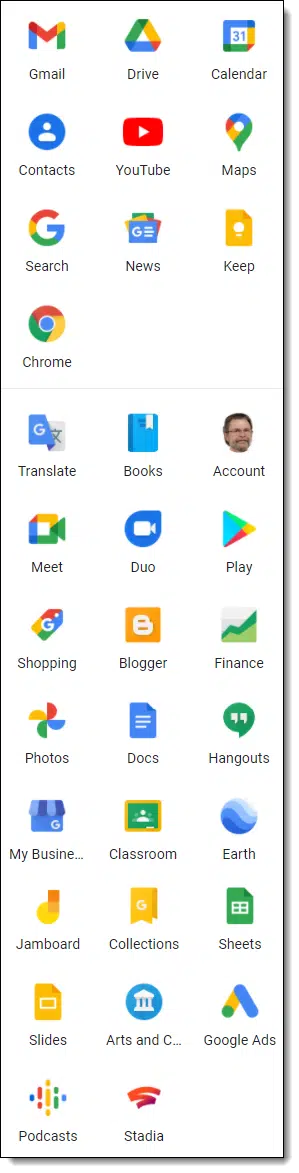
Regardless of whether you use them, however, every Google account has access to a wide variety of Google services besides email. That includes things like Google Drive, Google Docs, Google Photos, Google Voice, Google Keep, and a plethora of others. The icons for many popular Google services are pictured to the right.
Note that YouTube is one of them.
In other words, your Gmail account is also your YouTube account. They use the same ID (your email address) and the same password because in reality, it’s a single Google account.
There’s really no way to separate the two.1
But…
Separate accounts
You can certainly have multiple Google accounts.
I have at least three. 
You could have a Google account you use only for Gmail, ignoring YouTube, and another that you use for YouTube, ignoring Gmail.
Each account would have its own email address and password. They would be completely separate.
Since the account you use for YouTube would have its own email address, you can’t really ignore its Gmail completely — YouTube notifications would get sent to it, for example — but you can choose not to use that email address for anything else.2
Switching accounts
The Google web interface makes switching between accounts pretty easy.
After you’ve created that second account, click on your icon in the upper left.
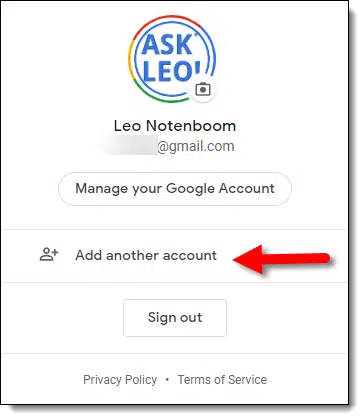
One of the items listed is “Add another account.” Click that, and a new browser tab opens on the other account. (“Add” kind of implies you’re creating a new account, but really you’re “adding” it to your set of accounts open in browser tabs.)
This technique works in most Google services. If you’re using account A to access YouTube, you can “Add another account” to switch to account B, which you use for email.
It’s a handy approach to managing multiple accounts and allows you to keep your Gmail and YouTube accounts separate. The only catch is that you’ll have two of each.
Do this
For most people, a single account with a single login for both Gmail and YouTube is plenty. If you have a reason for them to be separate, you can create two separate accounts.
Subscribe to Confident Computing! Less frustration and more confidence, solutions, answers, and tips in your inbox every week.
Podcast audio

Footnotes & References
1: Many years ago, they were two separate entities and had two separate accounts. This is no longer the case, and all former YouTube-only accounts have been migrated to Google accounts.
2: You could have your YouTube account automatically forward all its incoming Gmail emails to the account you use for your Gmail. I don’t recommend this, since if it breaks for any reason, you might miss out on important YouTube notifications.

Great article, however after much clicking around I am still unable to fine all of the “apps” google provides nor can I find documentation on how to “properly” use them. Any help appreciated
LRP
P.S. I know most don’t call them apps but since I have no idea what each is properly called I’ll just lump them together as apps.
TYVM
In the upper right corner of the Gmail page (or other Google app pages, including search if you are logged in), there is a round icon with 9 dots in it. Click on that, and you’ll get all of the available apps. I count 32 in that list, but there are actually more. As for how to use them, you can click on them, experiment, and see what they do. Most have help pages. Click on the ? icon.
Hi, always good to rattle our chains… one little thing i have been doing for a long while is opening my gmail account in a separate browser, sandboxed. so then i only do gmail in that browser and open a separate browser to do everything else. Let them spy on themselves…
WOW Leo,
I’m sure glad I stumbled on your site. At 83 I’m finding the computer more difficult to understand. The computer world is advancing faster than I. I’m keeping this post so It can be read over again.
Thanks for all the great explanations.
Thanks for the kind words! Glad you’re here Maureen.
Something a Google account holder should be aware to know: With one Google account, you can also have one YouTube service ON THE ACCOUNT; but you can create MORE THAN ONE CHANNEL on your YouTube service with this Google account.
I’ve seen “Add another account” in Google but I was interpreting it to mean add another account to my current account. There was a time when a gmail account could download email from multiple email accounts (maybe there still is). I have enough problems keeping my gmail accounts separate so I’ve never clicked on “Add another account”. Glad to hear I misinterpreted “Add another account”.