shortcuts
How to Select Text Faster: Six Tricks You May Not Know
Dragging a mouse across text works, but it’s slow and awkward. I’ll show you how to double-click, triple-click, or click in the margin to select words, paragraphs, and lines. Learn several easy selection tricks plus one small catch that can break a password.

AutoHotkey: Mouse and Keyboard Remapping, Macros, and Hotkeys
Typing the same email address dozens of times a day gets old fast. AutoHotkey is a free program that lets short key combos do your typing for you. I’ll show you how I use it every day to make a few keystrokes replace long blocks of text.

How Can I Pin “Restart” to My Taskbar?
I’ll show you how to put a one-click restart button right on your taskbar. The skills you’ll pick up along the way are useful far beyond restarting.
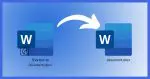
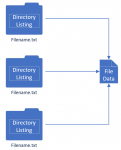
Why Is the Same File in Two or More Places on My Machine?
What appears to be multiple copies of the same file may be something else: one file simply appearing in more than one place.
